What should you consider when choosing one?
When managing your household finances in a café, the main considerations are secure access to your accounts, a clear overview, a suitable connection and whether you need accessories.
| Consideration |
What to check before buying |
Who is this important to? |
| Secure account access |
Check that your bank’s app and approval method work with the specific device version and can be kept up to date. The Federal Office for Information Security advises against mobile banking over public Wi-Fi networks. |
If I want to check recent transactions in a café, I need a suitable app and a connection I can trust. Around 33% of consumers put secure access to financial data first. |
| Spreadsheets and receipts |
Try a typical spreadsheet or PDF on the screen size you’re considering. Also check whether the stylus or keyboard you need is supported and included. |
If I want to compare income, expenses or several receipts, I need to be able to see the relevant details clearly on the display. Around 27% of consumers prioritise viewing and editing spreadsheets and receipts. |
| Portability and connectivity |
Compare the weight and dimensions of the specific version. Check whether it offers Wi-Fi, a smartphone hotspot or built-in mobile connectivity; you may also need a mobile data plan. |
If I often take my tablet with me or need my own connection when I’m out and about, the size and connectivity need to suit my routine. Around 20% of consumers prioritise portability or connectivity on the go. |
| Overall cost and usability |
Check that the selected version includes the charger and input accessories you need. Also make sure you’ll be able to keep the operating system and required apps up to date. |
When I’m managing household expenses, I only want to pay for features and accessories I actually need. Around 20% of consumers focus first on the overall cost and long-term usability. |
Joybuy products for spreadsheets and receipts
The Joybuy offers below list screen sizes between 10.1 and 11 inches. Several product names mention a keyboard or stylus for entering information in spreadsheets and summaries.
 No image available
Samsung Galaxy Tab A11+ X230, 11-inch, 6 GB RAM, 128 GB
The 11-inch size is a good fit if you prefer a larger display for managing your household finances.
Wi-Fi; 6 GB RAM; 128 GB storage; grey.
View at Joybuy
 No image available
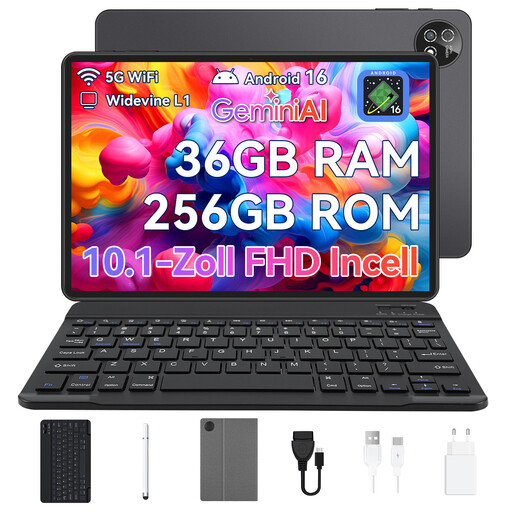
Android 16 tablet PC, 10.1-inch, with keyboard set
The keyboard set may be useful for entering information in household summaries if you prefer to use a keyboard.
Android 16; Unisoc T310; 36 GB RAM + 256 GB ROM; 1 TB TF; 6,000 mAh; Wi-Fi 6; GPS; keyboard set.
View at Joybuy
 No image available
10.1-inch tablet with keyboard and stylus
The keyboard and stylus listed in the product name may suit you if you want to do more than just read and also enter information.
Android 16; 36 GB RAM; 256 GB ROM; 1 TB TF; 6,000 mAh; 5G WiFi; Bluetooth 5.0; GPS.
View at Joybuy
 No image available
VANWIN tablet, 10.1-inch, with keyboard and protective case
The keyboard listed may be useful when editing household summaries if you prefer typing.
Android 16; 36 GB RAM (6+30); 256 GB storage; Unisoc T310; Wi-Fi; keyboard and protective case.
View at Joybuy
 No image available
10.1-inch touchscreen tablet with keyboard set and stylus
The listed accessories may suit you if you want to view and edit financial summaries on your tablet.
Android 16; 36 GB RAM (6+30); 256 GB storage; octa-core processor; keyboard set and stylus; black.
View at Joybuy
Frequently asked questions
Can I simply use public Wi-Fi for online banking in a café?
The Federal Office for Information Security advises against using public networks or Wi-Fi hotspots for mobile banking. The consumer advice centre also recommends avoiding public Wi-Fi for online banking unless you’re using a VPN tunnel. Your own mobile data connection or a smartphone hotspot with a suitable connection may be an alternative; device and app security are still important.
Do I need a banking app to manage my household finances?
No, you can also compare income and expenses in a household budget or spreadsheet. If you also want to check recent transactions, check your bank’s app, its approval method and the internet connection you’ll need.
What should I check before using a banking app for the first time?
First, check your bank’s requirements for its app and approval method. The Federal Office for Information Security recommends using an up-to-date operating system, a current banking app from a trusted source, and a device that hasn’t been rooted or jailbroken. This doesn’t confirm that every banking app will work with every tablet.
What are my rights when buying a tablet online in Germany?
For a distance purchase that is eligible for cancellation, consumers can normally withdraw from the contract within 14 days of delivery. According to consumer information from Your Europe, the European Union, faulty goods are covered by a legal guarantee of at least two years from receipt, which applies against the professional seller; exceptions and the specific seller should be taken into account. This is separate from any additional manufacturer’s warranty.
Do tablets have an EU energy label?
According to the European Commission, EU energy labelling and ecodesign requirements apply to covered slate tablets placed on the EU market from 20 June 2025. Certain “tablet computers” with desktop-like operating systems are excluded. So not every older or differently classified version will automatically carry the same label.


