Frequent typists on the train
If you rearrange longer interview passages, look for a keyboard that suits you and check that you can open documents offline before your journey.


If you edit longer interview passages on the train, check that the keyboard suits you and that the app you use allows offline access. For brief handwritten edits, pen support and what’s included in the box matter more. A Windows tablet may be a good fit if you need a specific Windows application, but adding a keyboard takes up space on your seat or tray table. Prepare your files in the relevant app before you travel: train Wi-Fi is no substitute for documents that are available offline.
If you rearrange longer interview passages, look for a keyboard that suits you and check that you can open documents offline before your journey.
If you mainly read existing notes and add brief comments, check pen compatibility and whether the right pen is included.
If your work depends on a specific Windows application, compare Windows tablets with a keyboard, taking their space requirements into account, against lighter tablet setups.
Start by checking the input method you use most often, then make sure your document will be available without a train connection. Accessories and the space you have to work in are part of a setup that’s ready for work.
| Requirement | What to check before buying | Who it matters most to |
|---|---|---|
| Editing longer texts in a confined space | Keyboard compatibility and German keyboard layout; space required by the assembled setup. | If I need to rearrange longer passages on the train, I need a keyboard that’s easy to use in the space available. Around 33% of consumers put typing longer texts first. |
| Making brief edits directly in a document | Supported pen model and app compatibility; included in the box or bought separately. | If I mainly read notes and add handwritten comments, a compatible pen matters more than input options for extensive typing. Around 27% of consumers prioritise editing with a pen. |
| Accessing files and keeping them confidential while travelling | Test the offline function in the app you’ll use; make files available in advance and follow security requirements. | If I need to access interview notes without a reliable connection, I want to test the offline process beforehand. Around 20% of consumers prioritise file access and confidentiality. |
| What’s included in a work-ready setup | What’s included with the specific version or bundle product number; the required keyboard and pen. | If I’m putting together a complete, usable setup, I want to know exactly which accessories are included. Around 20% of consumers focus first on what they need in their setup. |
Deutsche Bahn says that Wi-Fi is available on ICE trains and on an increasing number of IC trains. A connection doesn’t replace preparing your files: Microsoft recommends downloading and opening mobile Word documents before working offline.
Open the files you need in the app you’ll be using before you leave, and test how they’ll sync after your journey, too.
Unprepared files or syncing them later can take up extra time.
Apple lists compatible Apple Pencil models for the iPad Air, but that doesn’t mean a Pencil is included. Samsung lists an S Pen as included with the German Galaxy Tab S11 range.
Check compatibility and what’s actually included separately for the specific model.
Apple gives the weight of the 11-inch iPad Air Wi-Fi model as 464 g. Xiaomi lists the compatible Focus Keyboard on its own at 589 g ± 10 g. These figures relate to different components, so they aren’t comparable weights for complete setups.
If you’ll be carrying the setup around often, compare the tablet, keyboard and case separately, including their weight and dimensions.
The 11-inch iPad Air with M4 is worth considering for a compact iPad workflow, as long as you choose a suitable keyboard and pen.
The 11-inch Galaxy Tab S11 Wi-Fi, model number SM-X730NZAREUB, is an Android option for making edits with a pen.
Surface Pro is worth considering if your workflow depends on a Windows application.
The Idea Tab is an Android option if the specific bundle with pen and keyboard case suits your workflow.
The Pad 7 family is worth considering if you want to compare accessory compatibility and the weight of your setup in detail.
This selection includes Android tablets listed with a keyboard for writing on the go. It’s worth checking the specific version and exactly which accessories are included.
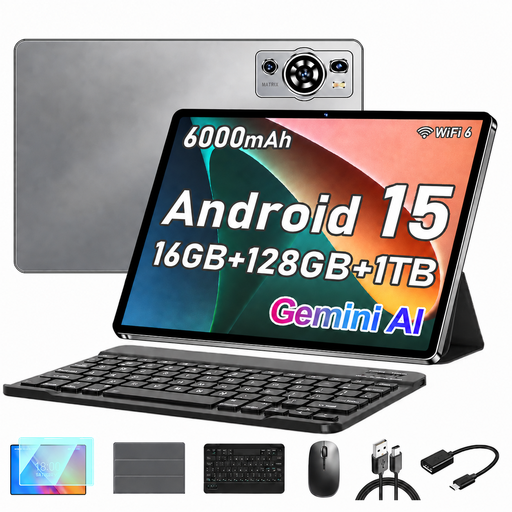 No image available
The keyboard mentioned in the product name is handy for longer typing sessions; a mouse and protective case are also listed.
10.1 inches; Android 15; 128 GB storage; expandable by up to 1 TB; 6,000 mAh battery.
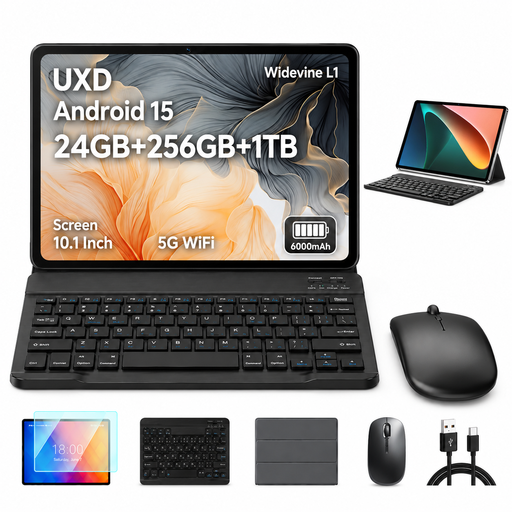 No image available
The keyboard listed is designed for longer typing sessions; a mouse and protective case are also included in the listing.
10.1 inches; Android 15; 256 GB storage; expandable by up to 1 TB; 6,000 mAh battery.
 No image available
The keyboard listed in the product name may come in handy for typing on the go; a book cover case is also mentioned.
256 GB storage; expandable by up to 1 TB with a TF card; 36 (6+30) GB LPDDR4 according to the product name.
 No image available
The keyboard listed is useful for typing longer passages on the go; a case is also included in the listing.
256 GB storage; expandable by up to 1 TB with a TF card; 32 GB RAM according to the product name.
 No image available
The keyboard listed is handy for typing longer passages; the larger screen sets this model apart from the 10.1-inch versions in this selection.
512 GB storage; expandable by up to 1 TB with a TF card; 8,000 mAh battery.
Yes, as long as you’ve prepared the relevant app and file. Microsoft recommends downloading and opening mobile Word documents before going offline; Google explains how to make Docs available offline on Android. Before travelling, test how the file syncs afterwards using a sample document.
No, not just for train journeys: Deutsche Bahn says Wi-Fi is available on all ICE trains, an increasing number of IC trains and selected regional trains. Speed and availability can vary, so preparing files for offline use is still important if you need to access them.
No, it depends on the model and bundle. Samsung lists an S Pen as included with the German Galaxy Tab S11 range; Microsoft says the keyboard and Slim Pen for the Surface Pro shown are sold separately. Check the specific version or bundle product number.
If your notes contain personal data, data protection obligations may apply depending on how the data is processed and who is responsible for it. The tablet model alone doesn’t give you legal clearance to store or share the data. The Federal Office for Information Security advises against transmitting confidential data without protection over public Wi-Fi, and suggests local encryption or a VPN as ways to protect it. This doesn’t mean everyone buying a tablet must get a VPN.
If a product is faulty, statutory consumer rights should be distinguished from a voluntary guarantee; the seller is generally responsible for statutory claims. Since 31 July 2026, Verbraucherzentrale has described additional repair rights that also apply to tablets, as well as an extension to the statutory rights period after a repair in certain circumstances. Whether a claim applies in a particular case depends on the purchase and the fault.