Frequent typists
If you rewrite longer passages from interviews, look for a keyboard that suits your tablet and check whether you can reliably export documents.


For longer rewrites, a tablet with a suitable keyboard is an obvious choice, provided the text app and export process suit your work. For margin notes, check stylus compatibility and what’s included: Samsung says the Galaxy Tab S10 FE comes with an S Pen, while Apple lists compatible Pencil models for the iPad (A16) but doesn’t include a Pencil with the tablet. If you want to read a transcript and draft side by side, options such as the 12.7-inch Lenovo Idea Tab Pro and the 13-inch version of the iPad Air M4 give you more screen space. Also check how your apps handle windows and how much room you have on the kitchen table.
If you rewrite longer passages from interviews, look for a keyboard that suits your tablet and check whether you can reliably export documents.
If you often have your original notes and draft open at the same time, usable screen space and how your apps display content matter more than having an especially compact device.
If you mark up quotes with a stylus or add notes in the margins, check the exact tablet model, stylus compatibility and what’s included.
First decide whether you’ll mainly be typing, marking up documents by hand or viewing several documents at once. Then check the app features, export options and accessories for the exact model you’re considering.
| Priority | What to check before buying | Who will find this most important? |
|---|---|---|
| Typing longer texts | Keyboard compatibility and layout; how it sits on your own table; and whether you can export a test document. | If I’m rewriting longer passages, I want to type comfortably and export the finished text in the format I need. Around 28% of consumers prioritise typing. |
| Comparing documents | The screen size of the exact model; how the apps you use display windows; and how much free space you have on the table. | If I often read notes and a draft side by side, I need enough room for both. Around 22% of consumers put document comparison first. |
| Handwritten edits | The supported stylus model and what’s actually included; and whether you can export an annotated test file. | If I mark up quotes directly in a document, I want to know whether my stylus works with the tablet and app. Around 22% of consumers prioritise handwritten edits. |
| Secure storage | Check your project’s requirements for device locks, storage, syncing, access and sharing. | If interview notes contain personal information, I want to choose a storage and syncing method that suits the project. Around 17% of consumers prioritise keeping notes secure. |
| A complete working setup | Check what’s included with the exact model; consider the keyboard, stylus and any software you need together. | If I need a setup that’s ready to use, I don’t want to assume a compatible stylus or keyboard is included. Around 11% of consumers prioritise a complete working setup. |
A compatible stylus doesn’t have to be included with the tablet. Apple lists compatible Pencil models for the iPad (A16), but doesn’t list a Pencil as part of the tablet package described; Samsung says the Galaxy Tab S10 FE comes with an S Pen.
Before buying, compare what’s included with the exact tablet model and check which stylus it supports.
The keyboard for the 12-inch Surface Pro is sold separately. Microsoft explicitly says that certain other Surface Pro keyboards aren’t compatible with this model.
Check the exact keyboard name against the full tablet model number.
A Joybuy product page for the Galaxy Tab S10 FE gives X520 in the title but SM-X210NDBAEUB in the specifications. This makes it difficult to identify the exact model with confidence.
Before choosing, ask the seller to confirm the full model code and what’s included with the version on offer.
The iPad (A16) is an 11-inch option; according to Apple, the iPad Air M4 is also available in a 13-inch version.
The Galaxy Tab S10 FE is an Android option for handwritten notes.
At 12.7 inches, the Idea Tab Pro is a larger Android option for viewing documents side by side.
The 12-inch Surface Pro is a Windows 2-in-1 option if your workflow requires a particular Windows application.
The Pad 7 is an 11.2-inch Android option; Xiaomi lists a Focus Keyboard for the Pad 7 range.
The Joybuy models below are selected for working with text at the kitchen table: from tablets that specifically list keyboard accessories to a Surface Pro model for a Windows workflow.
 No image available
For a workflow that requires Windows; check that your specific application works on the model you choose.
12-inch touchscreen; Windows 11 Home; 24 GB RAM; 1 TB SSD. The compatible keyboard is sold separately and must work with this model.
 No image available
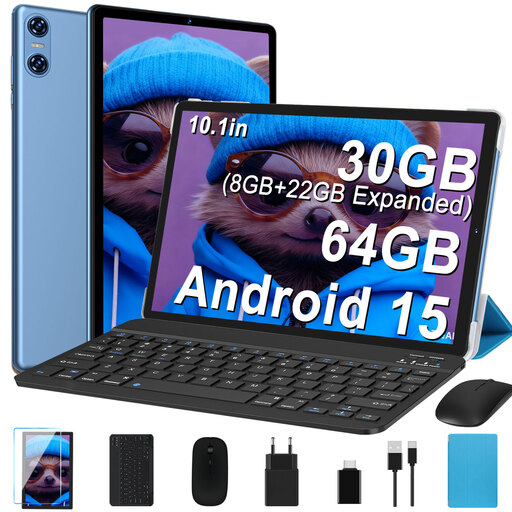
The bundle is listed in the title with a keyboard and mouse, making it an option for typing if you’re happy with a compact working area.
10.1-inch IPS display with 1280 × 800 pixels; Android 15; 64 GB ROM; keyboard, mouse and case listed in the title.
 No image available
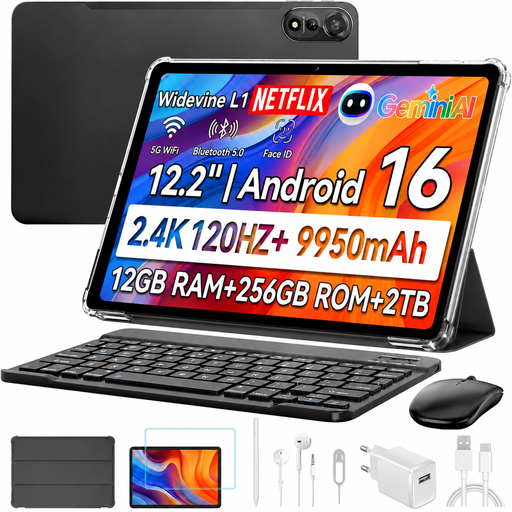
The bundle lists a keyboard and stylus, so it may suit a workflow where you type and also make handwritten notes.
12.2-inch display; 12 GB RAM; 256 GB ROM; keyboard, stylus and mouse listed in the title. The keyboard layout is English.
 No image available
The product title lists a keyboard, making this an option for mainly typing; check the layout of the specific bundle.
3.2K display with 144 Hz, according to the product title. Xiaomi specifies an 11.2-inch display for the Pad 7; accessory bundles may vary by region.
 No image available
The title lists a keyboard and stylus for a workflow that combines typing with handwritten notes in the margins.
12.7-inch display with 2K resolution; 256 GB storage; stylus, protective case and English Bluetooth keyboard listed in the title. The larger format takes up more table space.
No, not if you’ll mainly be rewriting sentences. Start by checking the keyboard and text app. A stylus is most useful for handwritten annotations: Samsung says the Galaxy Tab S10 FE comes with an S Pen, while Apple lists compatible Pencil models for the iPad (A16) but doesn’t include a Pencil in the tablet package described.
Start with a sample document and test opening it, editing it, adding handwritten comments and exporting it in the format you need. If you’re considering a 12-inch Surface Pro, also check that your chosen keyboard is specifically compatible with this model; Microsoft says that other Surface Pro keyboards listed aren’t compatible.
The seller is generally responsible for the statutory guarantee. According to the EU consumer information site Your Europe, the minimum period is two years from the date you receive the goods; this is separate from a voluntary manufacturer’s guarantee.
For a standard distance purchase from a business seller, you generally have 14 days from delivery to withdraw from the contract. Your Europe notes that exceptions and conditions apply; the right to withdraw is not the same as your rights if a product is faulty.
No. The purpose and the organisation responsible for processing the data are key. The Federal Commissioner for Data Protection and Freedom of Information notes that there are specific considerations for data protection in editorial work. If the GDPR applies to the processing of personal data in your particular case, you should consider appropriate technical and organisational safeguards; the intention to buy a tablet does not in itself mean that a particular tablet is required or that you are exempt from these requirements.