
Lieferung heute & morgen

Qualitätsgarantie

Willkommens-Angebote freischalten: KOSTENLOSE Lieferung | Bis zu 80 % RABATT | Kostenlose 30-Tage-JoyPlus-Testphase
App herunterladen
The search for a versatile device that bridges the gap between a smartphone and a laptop leads many users to a tablet with a keyboard. This combination promises on-the-go productivity, creative flexibility, and entertainment convenience—often in a single, streamlined package. However, the market is vast, and technical specifications can be overwhelming.
This article serves as your guide. We will introduce a selection of devices that, along with their accessories, form a cohesive package. Our goal is to provide you with an objective basis for your purchasing decision, based on the technical features and intended use cases of each model.
Before you decide on a model, several key features that significantly impact user experience and functionality should be considered.
The screen size, measured in inches, determines your workspace and the device's portability. Models between 10 and 12 inches offer a great balance for most use cases. A high resolution (e.g., 2K) ensures crisp text and image rendering. If you plan to draw or take handwritten notes, an Android tablet with a stylus and keyboard is a smart choice. Pay attention to the pen's specified pressure sensitivity, as this affects precision when drawing. An all-in-one bundle that already includes a keyboard, stylus, and protective case often provides better value for money.
A tablet's performance is crucial if it's intended to be a tablet as a laptop replacement for light office work or university studies. An octa-core processor is now standard and allows for smooth multitasking. For daily tasks like email, web browsing, and word processing, the RAM should be at least 4 GB. Many modern devices also use virtual RAM to boost performance when needed. The internal storage (ROM) determines how many apps and files you can save locally. 128 GB or 256 GB are good benchmarks here.
All tablets come with Wi-Fi. For maximum flexibility, especially for commuters or students working in various locations, a tablet with a SIM card can be advantageous. With a 4G LTE or even 5G-capable device, you aren't dependent on public Wi-Fi networks and can get online anytime. Also, look for current standards like 5G WiFi (Wi-Fi 6) for faster, more stable connections on your home network, as well as Bluetooth 5.0 or higher for a reliable connection to your keyboard, mouse, and headphones.
Here is a curated selection of tablets that come bundled with a keyboard and other accessories. These models cover a range of different needs and budgets.

Why it stands out: With its large 12.7-inch 2K display and pressure-sensitive T-Pen, the ArtPad Pro is aimed at creative professionals and users who value a large workspace. According to the manufacturer, the stylus supports 4096 levels of pressure sensitivity, enabling precise input for drawing and writing.
Advantages:
Who is it for? This model is an excellent choice for creative students, hobby artists, and users looking for a powerful tablet for university or as a lightweight laptop replacement who value a large display.
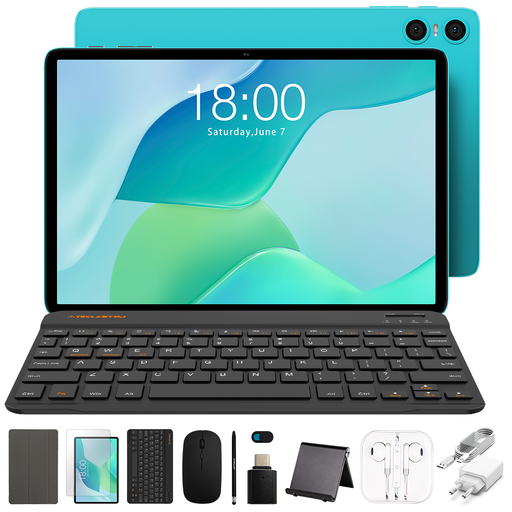
Why it stands out: The TECLAST P33 is designed as an affordable all-in-one package. It comes complete with a Bluetooth keyboard, mouse, stylus, and protective case, making it a ready-to-use solution for beginners right out of the box.
Advantages:
Who is it for? Ideal for students, families, or as a secondary device. It's well-suited for basic office applications, media consumption, and as a first device for digital learning.
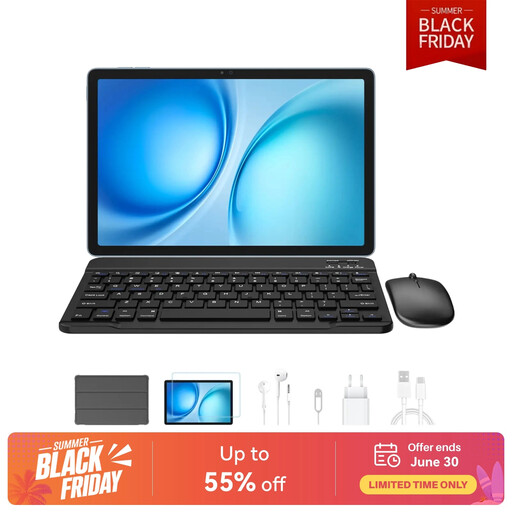
Why it stands out: The Blackview Zeno 10 offers a balanced mix of entertainment and productivity features. The 11-inch 2K display with a 90 Hz refresh rate provides an exceptionally smooth visual experience, while the PC Mode enables a desktop-like user interface for more efficient work.
Advantages:
Who is it for? This tablet appeals to users looking for a versatile device for both work and play. The PC Mode and high performance make it a compelling alternative for those who frequently use their tablet for productive tasks.
The models featured here offer a solid overview of the available tablet-keyboard combinations. If you have more specific requirements or wish to compare other devices, you can find additional choices in our comprehensive category.
? Discover more models in the Tablet with Keyboard and Stylus category
1. Can a tablet with a keyboard completely replace a laptop? For many everyday tasks like email, web browsing, video conferencing, and using office applications, a tablet as a laptop replacement can be sufficient. The user interface is optimised for touch, and a keyboard makes typing longer texts comfortable. However, for specialised software (e.g., complex video editing or specific programming environments) that is only available for desktop operating systems like Windows or macOS, a laptop often remains the more suitable choice.
2. What should I look for in an affordable tablet with a keyboard? With an affordable tablet with a keyboard, it's important to look for a well-balanced overall package. Prioritise a display with at least HD resolution for a pleasant viewing experience. The RAM should not be too limited (4 GB or more, including virtual RAM, is recommended) to avoid stuttering when using multiple apps. Also, check if the keyboard and stylus are included to prevent unexpected additional costs.
3. Do I need a SIM card for my tablet? A tablet with a SIM card makes sense if you are frequently on the move and don't want to depend on the availability of Wi-Fi networks. For students commuting between lecture halls, the library, and home, or for professionals in the field, an LTE-enabled tablet offers significant added value in flexibility and constant connectivity. If you primarily use your tablet at home or in an office with a stable Wi-Fi connection, a Wi-Fi-only model is usually sufficient.