
Lieferung heute & morgen

Qualitätsgarantie

Willkommens-Angebote freischalten: KOSTENLOSE Lieferung | Bis zu 80 % RABATT | Kostenlose 30-Tage-JoyPlus-Testphase
App herunterladen
A tablet is a versatile tool, but for writing longer texts, editing documents, or answering emails, many users hit the limits of the touchscreen. A tablet with a keyboard promises to bridge this gap and boost productivity. However, the market is flooded with options that don't always deliver on their promises. Before you make a decision, it's crucial to understand the common pitfalls that can lead to frustration and unnecessary expense.
Many buyers focus solely on price or design, overlooking critical technical flaws. Here are three common problems you should avoid:
To sidestep these issues, it's wise to focus on a few core features that define a functional and durable solution.
Instead of being swayed by marketing promises, you should base your decision on objective criteria. The following three aspects are crucial for the functionality and value of your tablet keyboard.
The connection type is the foundation for a smooth workflow. Pay attention to the Bluetooth standard. Models with Bluetooth 5.0 or higher generally offer a more stable connection, lower latency, and better energy efficiency than older versions.
Another key feature is multi-device capability. Keyboards that can pair with multiple devices simultaneously (e.g., tablet, smartphone, and PC) and allow for easy switching at the touch of a button are especially practical for users working within a flexible ecosystem. Always check for explicit compatibility with your tablet's operating system (e.g., iPadOS, Android, or Windows).
The layout determines your typing efficiency. A standard QWERTY layout is essential for users in most English-speaking regions. Also, consider whether you need a full layout with a dedicated number pad, which is particularly advantageous for data entry.
The key mechanism significantly impacts the typing feel. Keyboards with a scissor-switch mechanism, like those found in many laptops, offer a precise actuation point and satisfying key travel. This allows for faster and more comfortable typing compared to basic membrane keyboards.
The choice of form factor depends on your primary use case:
Additional features like an integrated trackpad significantly enhance convenience, as they allow for navigation without constantly reaching for the touchscreen.
Based on the criteria mentioned, we have identified several products that represent a suitable solution for different user profiles.
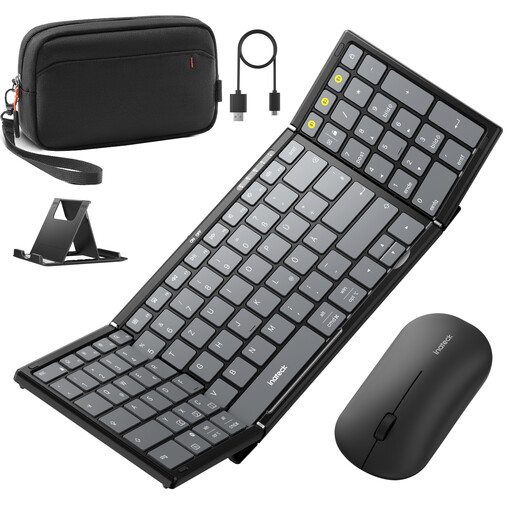
Why This Fits Their Persona: This set is designed for users who need maximum productivity on the go. The foldable keyboard with a full-size number pad and the separate mouse enable a desktop-like experience, while the compact format and carrying case ensure mobility.
The keyboard uses Bluetooth 5.3 for a stable connection and supports three devices simultaneously, minimizing compatibility issues. The full layout with a number pad bypasses the ergonomic drawbacks of many compact keyboards.
Full 99-key layout with number pad; multi-device connectivity for up to three devices; set includes mouse, stand, and carrying case.
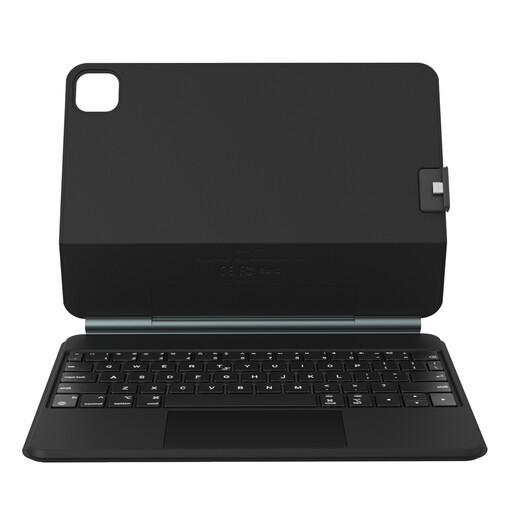
Why This Fits Their Persona: For users of an iPad Pro or iPad Air seeking a seamless, aesthetically pleasing, and highly functional solution. The magnetic "floating" design and the precise trackpad transform the iPad into a compact workstation that comes very close to a laptop.
By being specifically designed for certain iPad models, compatibility is guaranteed. The scissor-switch keys and large trackpad provide a premium typing and navigation experience, avoiding ergonomic compromises.
Magnetic "floating" design for flexible viewing angles; detachable protective case for versatile use; large precision trackpad with multi-gesture support.
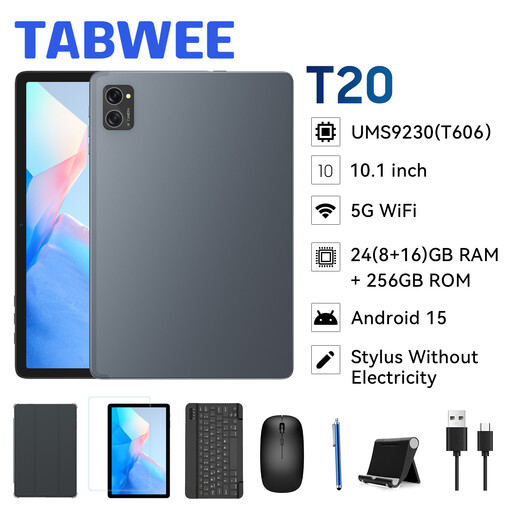
Why This Fits Their Persona: This bundle is an all-in-one solution for users looking for a complete, ready-to-use setup at an accessible price point. It is ideal for students or casual users who need a device for notes, research, and light typing tasks.
As a complete package, the tablet, keyboard, and accessories are matched, eliminating compatibility issues from the start. It provides a functional baseline setup without the need to purchase expensive individual components.
Cost-effective all-in-one bundle; includes tablet, keyboard, mouse, and stylus; Widevine L1 support for high-resolution streaming.
We have compiled a complete, up-to-date list of products that fully meet these strict selection criteria and quality standards.
Check three things: the Operating System (ensure the keyboard is explicitly listed for your system, such as iPadOS, Android, or Windows), the Bluetooth Version (at least 4.2, but preferably 5.0 or higher for a stable connection), and for keyboard cases, the physical dimensions and cutouts for ports and cameras on your specific tablet model.
It depends on your usage patterns. A keyboard case is an all-in-one solution that provides protection and a stable typing position—ideal if you often use your tablet like a laptop. A foldable keyboard is unbeatable in terms of portability and can be used flexibly with different devices. It's the right choice if you're frequently on the go and prefer to travel light.
For many everyday tasks like writing emails and texts, browsing the web, and editing Office documents, a tablet with a quality keyboard can effectively replace a laptop. It offers greater mobility and often a longer battery life. However, for demanding applications that require significant processing power (e.g., professional video editing or complex software development), or if you rely on specific desktop programs, a laptop usually remains the more powerful choice.