
Lieferung heute & morgen

Qualitätsgarantie

Willkommens-Angebote freischalten: KOSTENLOSE Lieferung | Bis zu 80 % RABATT | Kostenlose 30-Tage-JoyPlus-Testphase
App herunterladen
The search for a device that bridges the gap between the mobility of a tablet and the functionality of a laptop leads many users to a practical solution: a tablet with a keyboard. This combination can be a flexible and often more cost-effective alternative, especially for university students, pupils, or home office setups. This article aims to provide you with guidance and present a selection of models that already come with the right accessories.
The right model for you depends on your individual needs. The following points can help you make an informed choice.
The screen size significantly influences both working comfort and portability. A 12-inch tablet with a keyboard offers a larger display area, making it easier to work with multiple windows or view documents, and is comparable to a laptop screen. Smaller models around 10 inches, on the other hand, are more compact and lighter, making them ideal on-the-go companions for use on the train or in a lecture hall.
All tablets come equipped with Wi-Fi. However, if you frequently work outside of your home or office and don't want to rely on public Wi-Fi networks, a tablet with a SIM card is worth considering. With a suitable data plan, you'll have a stable internet connection anytime, anywhere, which is particularly advantageous for a tablet for university or for professional commuters.
A key advantage of many offers is the included accessories. A set that contains a tablet with a stylus and keyboard, as well as a protective case, offers a high degree of convenience and excellent value for money. You can use the device for productive tasks like writing texts or taking handwritten notes right out of the box, without needing to purchase additional accessories. This is an important factor, especially when looking for a budget-friendly tablet with a keyboard.
Here, we present three models that are offered as a complete package with a keyboard and other accessories.

What Makes It Stand Out With its large 12.7-inch 2K display and powerful Helio G99 processor, the Teclast ArtPad Pro positions itself as an option for users seeking a device for more demanding tasks and media consumption. The combination of ample RAM and 4G connectivity makes it a versatile laptop replacement tablet.
Key Specifications at a Glance
Who Is It For? For users who need a large display for productive work, creative tasks with stylus support, and entertainment. The 4G functionality also makes it appealing for people who are frequently on the move.
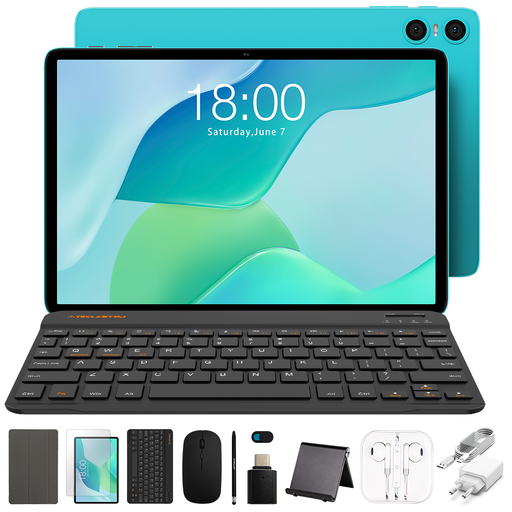
What Makes It Stand Out The TECLAST P33 is a compact and budget-friendly, entry-level model. As an Android tablet with a keyboard, mouse, and stylus included in the set, it offers a complete setup for basic office tasks, emails, and web browsing. Its compact size makes it highly portable.
Key Specifications at a Glance
Who Is It For? For budget-conscious users, pupils, and students who are looking for a lightweight and straightforward device for everyday tasks and appreciate the value of a ready-to-use, all-in-one package.
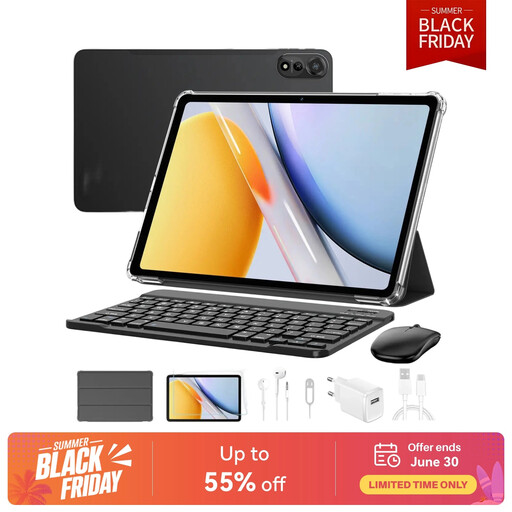
What Makes It Stand Out The Blackview Mega2 stands out with its generous memory configuration and a very comprehensive accessory bundle. With up to 36 GB of RAM (combined physical and virtual) and 4G connectivity, it is designed for demanding multitasking and entertainment. This 12-inch tablet with a keyboard also comes with a mouse, stylus, and even headphones.
Key Specifications at a Glance
Who Is It For? For power users looking for a device for intensive multitasking, gaming, and media consumption. The extensive accessory package makes it an attractive "all-in-one" solution for those who don't want to compromise on features.
Some styluses require special batteries to function. If you need a replacement or want to be prepared for the future, it can be useful to have the right batteries on hand.
Discover our selection of stylus batteries
For many everyday applications such as web browsing, editing Office documents, video conferencing, and media playback, a tablet can serve as a laptop replacement. Modern operating systems and apps are well-optimised for use with a keyboard and mouse. However, for very computationally intensive tasks or specialised software (e.g., professional video editing, CAD), a laptop is often still the more suitable choice.
For university use, long battery life, a lightweight design for easy transport, and the ability to take handwritten notes are crucial. A tablet with a stylus and keyboard meets these requirements well. It allows you to take notes in lectures both by typing and by writing by hand directly on the slides.
Yes, an Android tablet with a keyboard is well-suited for many productive tasks. Apps like Microsoft Office, Google Workspace, and other office suites offer a wide range of functions. Support for external keyboards and mice, along with improved multitasking features in newer Android versions, create a work-friendly environment.