What should you consider when choosing?
First decide whether you want to use the keyboard with several devices or prefer an option designed specifically for your tablet.
| Consideration |
What to check before buying |
Who is it most important to? |
| Device compatibility |
For a case, check your tablet’s exact model name; for a Bluetooth keyboard, check that the operating system and keyboard layout are compatible. |
If I want to keep using my existing tablet, the keyboard must fit it exactly. Around 25% of consumers put compatibility with their device first. |
| Space and portability |
Compare the dimensions and weight with your luggage and the usable table space; check whether you’ll need a separate screen stand. |
If there’s little room on my seat’s table, I need to be able to set up the keyboard and screen together in a practical way. Around 25% of consumers pay particular attention to space and portability. |
| Longer texts and navigation |
Check the keyboard layout and key size; if you often edit your work, look for a touchpad or built-in pointing device. |
For longer lesson plans, I want to type comfortably and edit the text precisely. For around 20% of consumers, typing and navigation are the main priorities. |
| Being considerate in quiet areas |
Consider how noisy the specific keyboard is and take the situation around you into account, rather than assuming it will be completely silent. |
If I want to work as quietly as possible on the train, I need a keyboard whose typing noise is suitable for the surroundings. Around 15% of consumers prioritise considerate typing. |
| Ready to use |
Check whether it uses batteries or needs charging, and find out whether you’ll need any extra accessories to prop up the screen. |
I want to know before travelling whether the keyboard needs charging or batteries, and what accessories are included. Around 15% of consumers pay particular attention to whether it’s ready to use and the ongoing effort involved. |
Deutsche Bahn points out that tables are available at many ICE seats, but not necessarily at every seat. So check what kind of surface you can actually use. According to Deutsche Bahn, noisy activities are not welcome in ICE quiet areas; this does not amount to a blanket ban on keyboards.
Keyboards for working on the go
This selection includes compact, standalone Bluetooth keyboards for switching between devices on the go, as well as a keyboard case for specific iPad models.
 No image available
Inateck Foldable Mini Keyboard N0153BK
For switching between devices, the product description says the keyboard is compatible with iPadOS, Android and Windows, and can use three Bluetooth channels.
The product is described as foldable, with a QWERTZ layout and an integrated touchpad. The description gives a weight of 228 g and says the keys are quiet.
View at Joybuy
 No image available
Inateck Foldable Bluetooth Keyboard Set N0158BK
For propping up your screen on the go, the product description mentions an adjustable stand; the product is described as a set with a mouse and carry case.
According to the product details, the keyboard has a 99-key QWERTZ layout and supports Windows, iOS and Android. Three Bluetooth channels are listed.
View at Joybuy
 No image available
NAXSIR Foldable Wireless Bluetooth Keyboard with magnetic stand
If you want to carry your keyboard and screen stand together, the product description lists a detachable magnetic stand.
This foldable model is described as a Bluetooth keyboard for Windows, iOS, Android and HarmonyOS. The product description mentions scissor keys and quiet keys.
View at Joybuy
 No image available
Foldable Bluetooth keyboard with mouse and USB-C charging
For switching between devices, the product title lists three connection modes and the ability to connect to up to three devices.
According to the product title, the keyboard is compatible with Windows, Android and iOS, and has quiet scissor keys and USB-C charging. The set includes a mouse and stand, according to the description.
View at Joybuy
 No image available
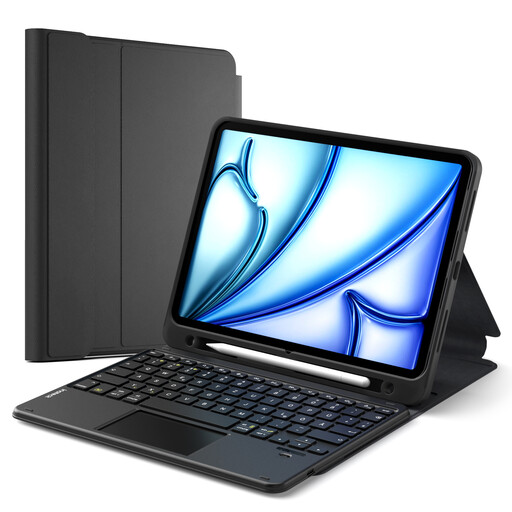
Inateck iPad Keyboard Case N0001
This case could be suitable if your iPad appears on the product description’s compatibility list and you want to use the keyboard and screen stand together.
Listed models include iPad 11 (A16, 2025), iPad 10th generation, iPad Air 11-inch (M4/M3/M2, 2026/2025/2024), iPad Air 5/4 and iPad Pro 11. The description lists a QWERTZ layout, a touchpad, a three-position stand and a detachable Bluetooth keyboard.
View at Joybuy
Frequently asked questions
Do I need a Bluetooth keyboard or a keyboard case for my tablet?
If you use several devices, a separate keyboard may offer more flexibility, but you’ll need to plan for a separate screen stand. For a case, your exact tablet generation must appear on the compatibility list, as devices that look similar aren’t automatically compatible.
What should I set up before travelling by train?
Pair a separate Bluetooth keyboard with your device in advance, and check the power supply and screen stand. For a case, make sure the connection and stand are compatible with your tablet.
Who can help if it develops a fault, and will I need batteries?
When a consumer buys from a trader in the EU, a statutory minimum guarantee of two years from receipt of the goods generally applies. The seller is your point of contact, as explained by the EU’s Your Europe service. Also check how the keyboard is powered: for example, Logitech lists two AAA batteries for the Pebble Keys 2 K380s.
What markings should I check on a Bluetooth keyboard?
The Bundesnetzagentur lists the CE marking, product traceability and correct manufacturer details among the things it checks when monitoring the market. A CE mark alone is not an independent quality assessment of the specific product on offer.
Is typing forbidden in ICE quiet areas?
Deutsche Bahn does not state a blanket ban on keyboards, but points out that noisy activities are not welcome in quiet areas. So be mindful of the typing noise and the people travelling around you.


