What should you look for when buying?
Start by checking the file format and app features, then consider screen space and ease of use. For a shared room, lighting, notifications and audio playback also matter.
| Consideration |
What to check before buying |
Who is it most relevant to? |
| Being considerate in the evening |
Test the brightness on a reader page, mute notifications and check for a suitable headphone jack or Bluetooth for audio. Apple Support explains brightness and notification settings for iPads. |
If I read next to someone who’s asleep, I want to be able to adjust the light and notifications to suit the situation. Around 28% of consumers put consideration for the person sharing the room first. |
| Looking up words |
Check in the app you plan to use and with the actual edition whether you can select words and use translation, dictionary or note-taking features. Google Play Help and Apple Support explain features in their respective e-book apps. |
When learning a language, I want to be able to look up words directly in my reader edition. Around 22% of consumers put working with words first. |
| Fixed-layout PDF pages |
Open a typical page in the app you plan to use, then test zooming and page navigation. Onleihe Help describes PDFs as having a fixed layout, unlike resizable ePub text. |
If my reader shows exercises or sidebars on fixed-layout pages, I want to read them without constantly zooming in. Around 22% of consumers prioritise the readability of these pages. |
| Reading without a stand |
Check the weight and dimensions of the exact model, including the case you want to use. Lenovo lists the Tab One at around 320 g; Apple lists the 11-inch iPad (A16) at 477 g for the Wi-Fi model. |
If I’m holding the tablet for a long time, a lighter weight matters more to me than having the largest possible screen. Around 17% of consumers put ease of handling first. |
| Total cost |
Check app availability, accessories and the reader edition separately from the device. Xiaomi Germany states that the REDMI Pad SE 8.7 doesn’t come with a power adapter. |
If I’m planning a complete reading setup, I want to take the box contents and any necessary accessories into account together. Around 11% of consumers put total cost first. |
Joybuy product selection
This Joybuy selection includes tablets with different screen sizes and formats for reader content. Check app compatibility and how your specific file displays on each one.
 No image available
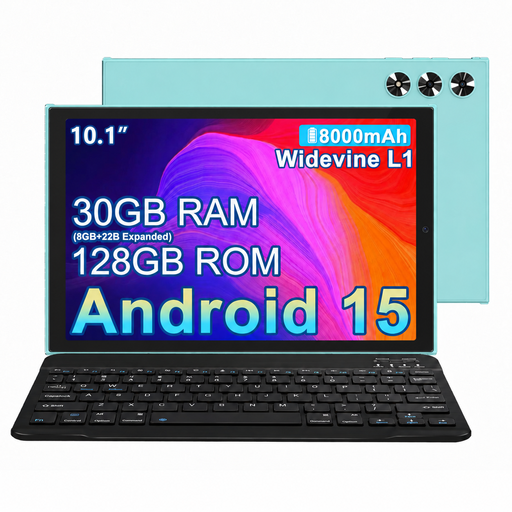
MEBERRY M8, 10.1-inch, 128 GB, Green
The stated screen size may be relevant for reader pages; check how your file displays in the app you plan to use.
HD IPS display; 128 GB storage; keyboard, mouse and case listed in the product name.
View at Joybuy
 No image available
UXD Android tablet, 13.4-inch, 256 GB
The larger screen size stated in the product name may be useful for fixed-layout reader pages; check how the page actually appears in your app.
Android 16; IPS display with 1,920 × 1,200 pixels; 256 GB storage. Keyboard, mouse and stylus listed in the product name.
View at Joybuy
 No image available
Apple iPad Air (M4, 2026), 11-inch, Wi-Fi, 128 GB, Starlight
The 11-inch format may offer more reading space for fixed-layout reader pages. Check that your file works in the app you plan to use.
Wi-Fi; 128 GB storage; Apple Pencil Pro and Apple Pencil (USB-C) listed as compatible with this model.
View at Joybuy
 No image available
TECLAST P50TCase, 11-inch, Android 16
The product name lists a 3.5 mm headphone jack, which may be useful for audio exercises in a shared room. Also check that your reader app is available.
11-inch IPS display with 90 Hz; 128 GB storage; 3.5 mm headphone jack.
View at Joybuy
 No image available
iFLYTEK AINOTE 2, 10.65-inch, E-Ink
This product is described as an E-Ink tablet for reading and writing. According to the description, the display has no front light; bear this in mind if you plan to read in a dark room in the evening.
10.65-inch E-Ink display; handwriting-to-text and transcription in 16 languages listed in the product description.
View at Joybuy
Frequently asked questions
How can I set up the tablet to disturb the other person as little as possible?
Adjust the brightness to suit a typical reader page, mute notifications and use headphones for listening exercises. Apple Support explains how to adjust brightness and colour temperature on iPads, as well as how to use the “Do Not Disturb” feature. You’ll need to decide together whether the remaining screen light is right for your sleeping arrangements.
Can I look up vocabulary in any language-learning reader?
No. Word features depend on the specific file and app. Google Play Help explains how to translate and define words in e-books in Play Books; Apple Support documents similar text features in Books. Check your edition to see whether you can select words and open the file in the app you plan to use.
What should I know about additional costs and my rights when buying online?
Check what reader and accessories you need, as well as what’s included in the box; Xiaomi states that the REDMI Pad SE 8.7 doesn’t come with a power adapter. When you buy from a trader, faulty goods are generally covered by a statutory guarantee for at least two years. For typical online distance purchases, you generally have a 14-day right to cancel from the date of delivery. A voluntary manufacturer’s warranty is different; the European Union explains these rights and their conditions.
Which product details should I check when considering a tablet listed for sale in Germany?
Look for clear manufacturer and product information, along with the required conformity details. Germany’s Federal Network Agency lists correct CE marking, manufacturer information, German-language instructions and a declaration of conformity among the checks it makes when monitoring electronic devices on the market.


