Handwritten note-takers
If you annotate slides or write freely, first check stylus compatibility, the right note-taking app and what’s included.


If you mainly take handwritten notes, look for a tablet that’s easy to carry and a stylus confirmed to work with the exact model. A larger display may be useful if you want to see your lecture notes and slides at the same time, but consider the space it takes up and its weight. Also check exactly what’s included, and make sure the files you need are available offline rather than relying solely on train Wi-Fi or the stated battery capacity.
If you annotate slides or write freely, first check stylus compatibility, the right note-taking app and what’s included.
If you often hold your tablet or work on a small tray table, you’ll need to balance writing space against size and weight. Samsung lists the Wi-Fi Galaxy Tab S10 FE at 497 g and the Wi-Fi FE+ at 664 g.
If you read documents while writing, or need specific Windows programmes, a larger workspace or a suitable keyboard set-up may matter more than choosing the smallest size.
First, check which stylus and note-taking set-up will work with your tablet. Then weigh up writing space, how much room the tablet takes up and what you need to do to prepare for offline use on your journey.
| Buying criterion | What to check before buying | Who it matters most to |
|---|---|---|
| Compatible stylus and note-taking set-up | Check compatibility with the exact model, as well as pairing, charging, the app and what’s included. | If I take handwritten notes, my stylus needs to work with my tablet and note-taking app. Around 26% of consumers put a compatible stylus and note-taking set-up first. |
| Size and weight at your train seat | Consider the device’s weight with and without a case; check that the display is large enough for your handwriting and PDF pages. | If I’m working in a confined seat or holding the device for a long time, I want enough writing space without it taking up too much room. Around 21% of consumers prioritise a manageable size and weight. |
| Working without a connection or power socket | Make sure your lecture notes are saved locally before you travel and charge the battery; don’t assume the stated capacity guarantees a certain note-taking time. | If my connection might drop out while I’m travelling, I want to access files I’ve prepared and carry on taking notes. Around 21% of consumers make uninterrupted work on the move their top priority. |
| Total cost of a ready-to-use set-up | Check the tablet and exactly what’s included together; only budget for accessories you actually need. | If I want to use my tablet with a compatible stylus and any other accessories I need, the complete set matters to me. Around 16% of consumers prioritise its total cost. |
| Working with lecture notes and slides at the same time | Try your own PDFs and note-taking app on the display size you’re considering; only factor in Windows or keyboard use if you need it. | If I want to read lecture notes and take notes at the same time, or use a keyboard, I need a suitable way of working. Around 16% of consumers prioritise working with documents side by side. |
Stylus compatibility doesn’t tell you whether the right stylus is included with the offer you’ve chosen. The 1st-generation Apple Pencil needs an adapter to pair and charge with the iPad (A16).
If you need to buy a stylus separately, and possibly an adapter too, that means extra purchases.
Check the tablet’s full model name against the stylus compatibility information and what’s included.
More writing space takes up more room in a confined space and can be awkward if you’re holding the tablet for a long time. Samsung lists the 13.1-inch Wi-Fi Galaxy Tab S10 FE+ at 664 g; the 10.9-inch Wi-Fi Galaxy Tab S10 FE weighs 497 g. Apple lists the Wi-Fi iPad mini (A17 Pro) at 293 g.
Choose based on the space available at your seat and whether you’ll be holding the tablet or setting it down. Try your own lecture notes on the size you’re considering.
A figure in mAh tells you the stated battery capacity, not how long your combination of screen brightness, app and connection will last. Train Wi-Fi and connectivity can vary from one journey to another.
Charge your tablet before travelling and make sure the files you need are available offline. Only compare battery life figures when the usage conditions are similar.
The iPad mini (A17 Pro) is aimed at users who prefer a smaller size, while the iPad (A16) offers a larger display.
The Galaxy Tab S10 FE has a 10.9-inch writing area, while the FE+ is larger at 13.1 inches.
The Pad 7 is an Android option with an 11.2-inch display and compatibility with the Xiaomi Focus Pen.
The Idea Tab is an Android alternative with note-taking apps and different stylus configurations.
The 12-inch Surface Pro is worth considering if you want to combine handwritten notes with a Windows or keyboard-based workflow.
This selection includes tablets for handwritten lecture notes, as well as keyboard use and working with documents. When choosing, consider the display size, accessories and whether the note-taking features you need are available offline too.
 Image unavailable
The Xiaomi Focus Pen is compatible with the Pad 7 for handwritten notes; the product title also mentions a keyboard.
The 11.2-inch display and stated battery capacity of 8,850 mAh are manufacturer specifications. Check whether a compatible stylus and any power adapter you need are included with the version you choose.
 Image unavailable
An option for handwritten notes on an E-Ink display; the product description mentions a stylus and notes saved locally.
The description also mentions transcription in 16 languages, which, according to the product details, requires an internet connection. Check what’s included with the version you choose.
 Image unavailable
The large display and the keyboard and stylus mentioned in the product title are better suited to a mix of writing and typing, provided there’s enough room at your seat.
The product title lists a 2K resolution, 32 GB RAM (8 GB + 24 GB) and 256 GB ROM. It also lists a mouse, case and stand.
 Image unavailable
The product title lists a stylus and an English Bluetooth keyboard, which may suit handwritten notes with occasional typing. The 12.7-inch display needs plenty of room at your seat.
Specifications listed include a 2K display, 20 GB RAM (8 GB + 12 GB virtual) and 256 GB storage.
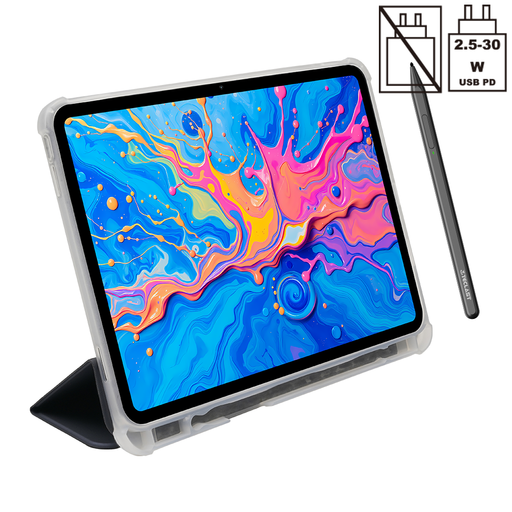 Image unavailable
The product title lists an included stylus and protective case. Unlike the keyboard version, no keyboard is listed in this title, so check exactly what’s included.
Specifications listed include a 2K display, 20 GB RAM (8 GB + 12 GB virtual) and 256 GB storage.
No. Make sure you have any files you need available offline before your journey too. Deutsche Bahn says Wi-Fi is available across its entire ICE fleet, but only on parts of its Intercity fleet and on selected regional trains. Also check your note-taking app’s offline features.
First, check which stylus works with your exact model and how it pairs and charges. Before travelling, open a PDF in your note-taking app, try writing a note, make sure the files you need are available offline, and charge your tablet and, if applicable, your stylus.
When you buy from a business seller, European Union consumer information states that you generally have a minimum two-year legal guarantee from the date you receive the goods. Claims relating to faults are generally made against the seller. A voluntary manufacturer’s warranty is separate.
For a distance purchase from a business, you generally have a 14-day right of withdrawal. Legal exceptions and the specific circumstances of the contract apply; the right of withdrawal is separate from claims relating to a fault.