Which tablet is right for you?

Writing worksheets

If you create longer lesson documents, look for a suitable keyboard, the software you need and support for the file formats you use. Apple Germany and Microsoft outline keyboard options for specific models; compatibility depends on the device and accessory in question.

Annotating teaching materials

For highlighting PDFs, sketching and adding notes in the margins, check exactly which stylus is compatible with the tablet and whether it comes with the device. Apple Germany lists compatible Pencil versions for the iPad (A16); Samsung Germany includes an S Pen with the Galaxy Tab S10 FE.

Reading several sources side by side

If you review several resources while planning lessons, a larger display can give you more room to work. But compare the screen size with the space the device, your papers and keyboard will take up on your kitchen table.

What should you look for when buying?

Buying priority What to check Who is this important for?
Writing longer documents Compatible keyboard with a UK layout; required software and file formats. If I regularly write longer drafts, I want to type comfortably and use my school software. Around 33% of consumers focus above all on typing comfort and software.
Annotating materials by hand The right stylus generation and what is actually included; importing and exporting in the materials app. If I annotate PDFs directly, I need a stylus that works with my specific tablet and want to know whether it is included. Around 27% of consumers prioritise handwritten notes.
Reading materials on a larger screen Screen size and device dimensions in relation to the space available on the table. If I want to keep sources and drafts in view at the same time, having enough screen space matters to me. Around 20% of consumers prioritise comfortable reading and comparing.
Choosing compatible software and accessories School requirements and specific apps; the keyboard and stylus you need, and what is included in your chosen bundle. If a particular app or a complete workstation is a deciding factor for me, I want to check the requirements and accessories in advance. Around 20% of consumers look first at the software and device configuration.

Common buying mistakes

  • Assuming stylus support means a stylus is included

    A tablet may be compatible with certain styluses without one being included in the box. Apple Germany lists compatible Pencil versions for the iPad (A16), but does not include a Pencil with the tablet; Samsung Germany lists an S Pen as included with the Galaxy Tab S10 FE.

    Check the exact stylus version and what comes with the specific offer before choosing a model.

    If a compatible stylus is not included, you’ll need to budget for one separately to make handwritten notes.

  • Looking only at the tablet, not the workstation you need

    A compatible keyboard or stylus may be sold separately. Microsoft sells the keyboard and Slim Pen for the Surface Pro 12-inch (2nd Edition) separately; Lenovo notes that accessories vary by bundle and region.

    Put together the input devices you need and check what is actually included in the specific offer.

    Buying extra accessories may mean choosing additional components and checking that they work together.

  • Assuming any ‘tablet’ will work with all school software

    Tablets run different operating systems, and the general label ‘tablet’ does not guarantee that a particular app will work as you need it to. In its guidance on devices for teachers, Germany’s Federal Ministry of Finance notes that a lack of compatibility with school infrastructure can cause problems.

    Check the specific software, file and storage requirements against your school’s requirements before choosing an operating system.

Brands worth considering

Apple

The iPad (A16) is an iPadOS option for reading, typing and annotating with compatible accessories.

  • Apple Germany lists 128 GB as the entry-level storage capacity and names two compatible Pencil versions.
  • The listed tablet package includes neither a Pencil nor a keyboard. Also check that the school software and file formats you need work with iPadOS.

Samsung

The Galaxy Tab S10 FE is an Android tablet with a 10.9-inch display and a stylus option for handwritten work.

  • Samsung lists an S Pen as included with the Galaxy Tab S10 FE, along with a microSD option.
  • This information applies to the model named and does not mean that a keyboard is included.

Lenovo

The Idea Tab Pro Gen 2 is an Android option with a 13-inch display for viewing materials at the table.

  • Lenovo lists a 13-inch display for this model.
  • Accessories may vary by bundle and region. Manufacturer claims about AI features do not, on their own, demonstrate a benefit for schoolwork.

Microsoft

The Surface Pro 12-inch (2nd Edition) is a Windows 2-in-1 for workflows that require a compatible Windows environment.

  • Microsoft lists Windows 11 and a compatible detachable keyboard.
  • The keyboard and Slim Pen are sold separately. Microsoft says other Surface Pro keyboards are not compatible with the 12-inch keyboard.

Xiaomi

The product range offers several Android options, including the REDMI Pad 2 Pro and Xiaomi Pad 8.

  • Xiaomi lists a 12.1-inch display for the REDMI Pad 2 Pro and support for the Focus Pen Pro with the Xiaomi Pad 8.
  • Display and accessory information applies only to the model named. Xiaomi recommends checking with your local retailer whether a power adapter is included with the REDMI Pad 2 Pro.

Tablets for working at the table

This Joybuy selection includes tablets for writing, handwritten notes and reading teaching materials at the table. Before choosing, check which accessories are included in each offer and whether the device and software suit the way you work.
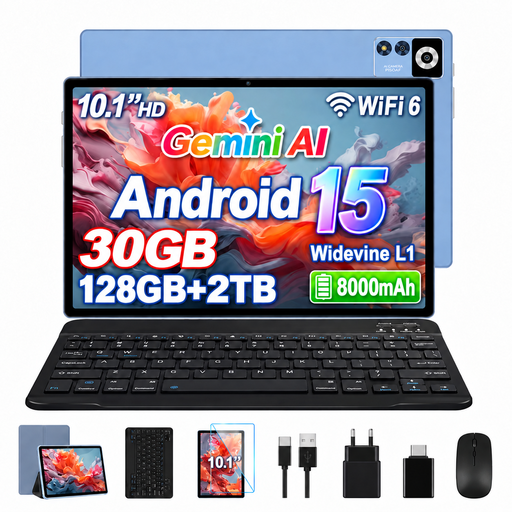
YESTEL T13 tablet, Android 15, 10.1 inches, blue

YESTEL T13, Android 15, 10.1 inches, 128 GB

The product listing says this bundle includes a Bluetooth keyboard for writing longer documents; check exactly what is included before buying.

Specifications listed include a 10.1-inch display with 1280 × 800 pixels, 8 GB RAM plus 22 GB virtual RAM, and 128 GB storage.

View on Joybuy

Android tablet, 10.1 inches, with keyboard and stylus

Android tablet, 10.1 inches, with keyboard and stylus

The listing mentions a keyboard and touch pen for different ways of working; check whether both are included in the specific bundle.

The product title lists Android 16, 256 GB storage and a 6000 mAh battery.

View on Joybuy
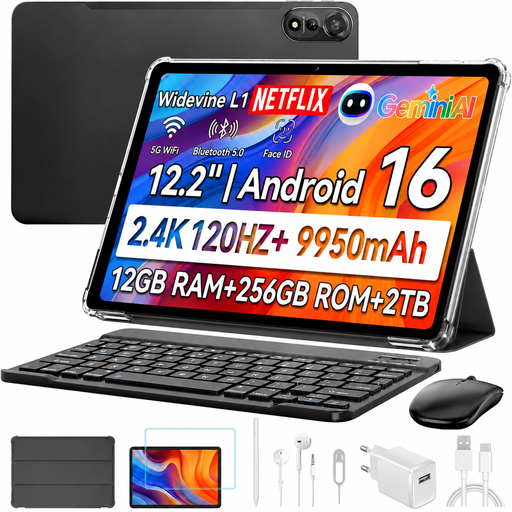
Blackview MEGA 12 5G tablet, 12.2 inches, with keyboard, stylus and mouse

Blackview MEGA 12 5G, 12.2 inches, with keyboard, stylus and mouse

The product title lists a keyboard and stylus for typing and handwriting; a mouse is also listed as included.

Specifications listed include a 12.2-inch display, 256 GB storage and Android 16.

View on Joybuy

TECLAST T65 tablet, 13.4 inches, with folio case

TECLAST T65, 13.4 inches, with folio case

If you want to read teaching materials on a larger screen, the 13.4-inch display is one option; check that its size will fit on your table.

The product title lists Android 16, 128 GB storage and a folio case.

View on Joybuy

Xiaomi Pad 7, grey, with keyboard, 128 GB

Xiaomi Pad 7, grey, with keyboard, 128 GB

The product title lists a keyboard for writing at the table; check what comes in the bundle and whether it is compatible with the software you need.

Specifications listed include 8 GB RAM, 128 GB storage and a 3.2K display.

View on Joybuy

Frequently asked questions

Can I use my existing school keyboard with the tablet?

Not based on the brand name alone. Microsoft lists a compatible 12-inch keyboard for the Surface Pro 12-inch and says that other listed Surface Pro keyboards are not compatible. Check the exact model compatibility and the UK keyboard layout you want for the specific device.

How do I set up a workstation for writing longer drafts?

First, check which keyboard is compatible with your exact tablet model, whether it is included in the offer and whether there is still room for your papers alongside the device. For the Surface Pro 12-inch (2nd Edition), Microsoft describes a separately available 12-inch keyboard that attaches magnetically.

How can I protect my tablet when working at the kitchen table?

Keep liquids away from the device and follow the cleaning and charging instructions for the exact model you buy. Protection claims for a different tablet do not automatically apply to your device.

What should I know about faults or buying online in Germany?

Your statutory rights against the seller are separate from any voluntary guarantee. For online purchases, consumers generally have a 14-day right to cancel. Germany’s Verbraucherzentrale (consumer advice centre) also explains that, since 31 July 2026, additional repair rules in Germany apply to tablets too. Which rule applies in an individual case depends, among other things, on the purchase and the fault.

Can I process pupils’ personal data on a tablet I bought privately?

You cannot assume this is allowed simply because you bought the device. If you process personal data, you must follow the instructions of the data controller and your school’s requirements. Check in advance which devices, apps and storage options are approved. If you are using teaching materials that contain no personal data, this particular check is not required solely because you bought a tablet.