What should you consider when choosing?
iPad with iPadOS
A good fit if: Your school apps work on iPadOS and you want a tablet for documents and the occasional handwritten note.
Things to weigh up: Apple Pencil Pro and Magic Keyboard are supported accessories for iPad Air M4, but they aren’t automatically included in the box. Check your school’s requirements before using iCloud for school work; North Rhine-Westphalia’s data protection authority warned against unrestricted use in 2025.
Android tablet with stylus
A good fit if: Your apps work on Android and you often annotate PDFs or sketch out lesson ideas. Samsung lists an S Pen as included with the documented Galaxy Tab S10 FE and S11 ranges.
Things to weigh up: Check your apps’ editing and export features. For the Lenovo Idea Tab Pro, the documented combination of stylus and German keyboard pack applies to the Complete Bundle; a larger screen takes up more table space.
Windows 2-in-1
A good fit if: You need a Windows app for templates or specialist software and have confirmed it will run on the specific device.
Things to weigh up: Microsoft lists the Surface keyboard and Slim Pen for the Surface Pro generation shown as separate accessories. If you’re considering a Snapdragon model, check compatibility with older programmes and any peripherals you need.
For teachers preparing lessons in a café, the choice mainly depends on the school apps you need, how much typing and handwriting you do, and the space available.
| Priority |
What should you check before buying? |
Who should pay particular attention? |
| School software and file formats |
Test a typical file and all the apps you need on the operating system you’re considering; for Windows on Arm, check older programmes and printers too. |
If you can only fully edit and return your lesson files using specific apps, this workflow should come first. Around 33% of consumers prioritise compatibility with the school software they need. |
| Longer documents and keyboard |
Check model compatibility, the German keyboard layout and exactly what’s included; try writing a typical document with the tablet set up on a table. |
If you regularly write longer lesson plans, you’ll need a compatible keyboard and enough room for the tablet and stand. Around 27% of consumers prioritise typing. |
| Handwriting and PDF annotations |
Check that the stylus works with your exact model and that the app lets you annotate and export PDFs as needed. |
If you annotate materials by hand or sketch out ideas, you’ll need a compatible stylus and the right app features. Around 20% of consumers prioritise handwritten notes. |
| Working on the go and accessing data |
Consider how much room the complete setup will take up and check which access method is approved for work files. |
If you work in a café, your tablet, accessories and available table space all need to work together; for school data, you’ll also need to use an approved method. Around 20% of consumers prioritise working on the go and secure access. |
The percentages indicate how important these buying priorities are to teachers looking for a tablet to prepare lessons in a café; they are not market-share figures.
Joybuy products for lesson preparation
The options below include Android tablets with keyboard or stylus options, as well as iPad Air models for working on documents on the go. Check the accessories and compatibility for the specific model and package.
 No image available
10.1-inch Android 16 tablet with keyboard and touch pen
The 10.1-inch format listed in the title, with keyboard and touch pen, suits a mobile workflow involving typing and handwritten notes.
The product title lists 36 GB RAM, 256 GB ROM and TF expansion up to 1 TB.
View at Joybuy
 No image available
Xiaomi Pad 7 with keyboard, grey, 8 GB RAM and 128 GB ROM
The keyboard listed in the product title is an option for writing longer documents; check that the package on offer suits the setup you want.
The title also lists a 3.2K display with 144 Hz and a Snapdragon 7+ Gen 3.
View at Joybuy
 No image available
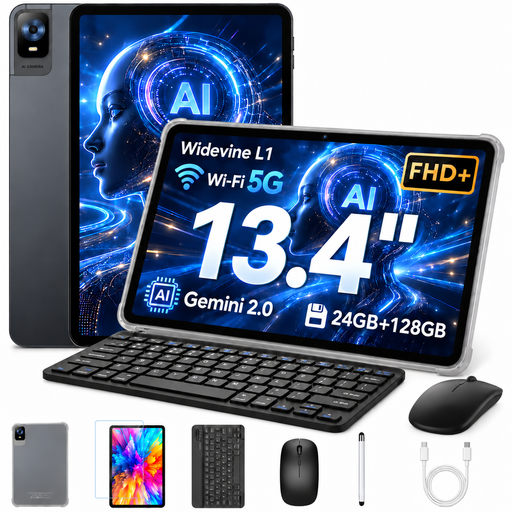
UXD 13.4-inch Android 16 tablet with keyboard, mouse and stylus
The keyboard, mouse and stylus listed in the title give you several ways to work; check that the larger setup will fit on your café table.
The 13.4-inch format takes up more table space than a more compact tablet. The title lists an FHD+ display with 1920 × 1200 pixels and storage options of 128 GB or 256 GB.
View at Joybuy
 No image available
Apple iPad Air 11-inch, M4, 2026, Wi-Fi, 128 GB, Starlight
The 11-inch iPad Air is a compact iPadOS option for working on documents on the go, provided the school apps you need are compatible.
According to the product details, the model supports Apple Pencil Pro and Magic Keyboard; the listed contents include the iPad Air and USB-C cable, but not the stylus or keyboard.
View at Joybuy
 No image available
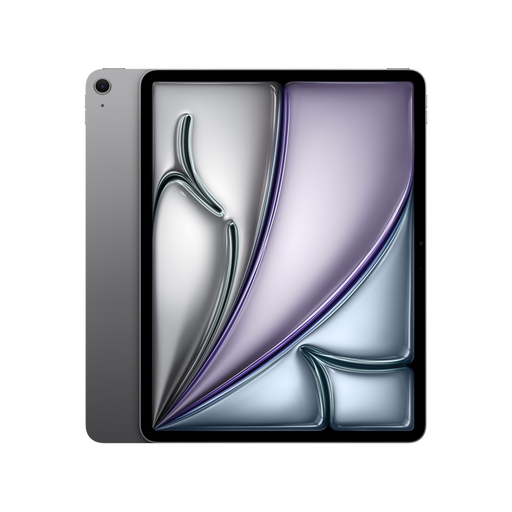
Apple iPad Air 13-inch, M4, 2026, Wi-Fi, 128 GB, Space Grey
The 13-inch iPad Air gives you a larger screen for working on documents on the go, if your school apps work on iPadOS and you have enough table space.
Apple Pencil Pro and Magic Keyboard are listed as supported accessories, but aren’t included in the listed contents. The 13-inch format takes up more room than a more compact tablet.
View at Joybuy
Frequently asked questions
Can I use any of my existing school programmes on a Windows tablet?
No, you can’t tell from the Windows label alone. Microsoft says most Windows apps run on Windows Arm PCs; before you buy, check that your specific programme and any printers you need work on the device you’ve chosen.
How should I set up my workspace in a café?
Try your complete setup—tablet, stand and, if needed, keyboard—with a typical file. For public Wi-Fi, the consumer advice centre recommends, among other measures, using a VPN client and turning off active file or folder sharing; for work files, you must also use the method approved by your school.
Does the tablet come with a keyboard and stylus?
That depends on the model and package. Samsung lists an S Pen as included with the Galaxy Tab S10 FE and S11; Microsoft says the Surface keyboard and Slim Pen for the Surface Pro generation shown are sold separately. Lenovo lists a stylus and German keyboard pack with the Idea Tab Pro Complete Bundle. Check what’s included with the offer you choose.
Can I work on personal school data on my own tablet in a café?
Check with your school or local authority which devices, apps, storage locations and access methods are permitted before processing personal data. North Rhine-Westphalia’s data protection authority specifically warned against unrestricted use of iCloud for school work in 2025; this isn’t a blanket ban on all iPads.
What applies in Germany if my tablet is faulty?
Your statutory rights against the seller are separate from any voluntary guarantee. The consumer advice centre also explains repair rights, which have applied to tablets since 31 July 2026; the rights that apply in a particular case depend, among other things, on the purchase date and the fault.


