Which tablet is right for you?

For people who type their reviews

If you write longer paragraphs and edit them several times, a compatible keyboard and what’s actually included in the box are key considerations. Apple lists the Magic Keyboard Folio as compatible with the iPad (A16); Lenovo specifies that the Pen and Keyboard are included with a particular Yoga Tab Plus bundle.

For people who make handwritten notes

If you jot down thoughts or mark passages as you read, check stylus compatibility, what’s included and how your reading or PDF app works. Samsung says the Galaxy Tab S10 FE comes with an S Pen; Apple lists compatible Pencil models for the iPad (A16).

For people who compare the source with their draft

If you often switch between your source, notes and draft while writing, display size and your apps’ viewing options are important factors. Samsung lists a 10.9-inch display for the Galaxy Tab S10 FE and a 13.1-inch display for the FE+; Lenovo lists a 12.7-inch display for the Yoga Tab Plus.

What should you look for when choosing?

Tablet with keyboard

A good fit if: You write longer paragraphs and revise your draft repeatedly.

Bear in mind: Keyboard compatibility doesn’t automatically mean the keyboard is included. For the Lenovo Yoga Tab Plus, check carefully whether the specific offer is the Pen and Keyboard bundle mentioned.

Tablet with stylus

A good fit if: You like to jot down your thoughts or mark passages by hand as you read.

Bear in mind: A stylus won’t automatically replace a keyboard for longer texts. Samsung says the Galaxy Tab S10 FE comes with an S Pen; according to Apple, a Pencil isn’t included with the iPad (A16).

Tablet with a larger display

A good fit if: You mainly work at a desk and want more screen space for your source, notes or draft.

Bear in mind: A larger screen takes up more space and doesn’t guarantee that your app will display documents side by side as you’d like. Samsung lists 10.9-inch and 13.1-inch displays for the Tab S10 FE and FE+ respectively; Lenovo lists 12.7 inches for the Yoga Tab Plus.

Priority What to check before buying Who is this particularly important to?
Typing longer texts Check keyboard compatibility and what’s actually included. If I write and edit lots of paragraphs, I want to be able to use a compatible keyboard straight away. Around 40% of consumers would say that typing longer texts is their top priority.
Making handwritten notes Check the compatible stylus model, what’s included and the features of your reading app. If I jot down thoughts or mark passages as I read, I want to know whether the stylus works with the specific version and fits my document workflow. Around 30% of consumers would prioritise making handwritten notes.
Comparing the source with a draft Consider display size, app viewing options and how much desk space you have. If I want to keep the source and draft clearly in view, the usable space in my apps matters to me. Around 20% of consumers would make comparing sources their main priority.
Working without Wi-Fi Check in advance that the files and writing apps you need are available offline. If the library connection is unreliable, I want to be able to carry on writing with files I’ve already accessed. Around 10% of consumers would make being able to work anywhere their top priority.

Common buying pitfalls

  • Assuming compatible accessories come in the box

    A tablet may be compatible with a keyboard or stylus without either accessory being included. Apple lists the tablet and a USB-C cable in the box with the iPad (A16); Lenovo’s listing for the Pen and Keyboard applies only to the specified Yoga Tab Plus bundle.

    Compare what’s included with the exact version you’re considering against what you need. For keyboards, check the layout too.

  • Assuming a larger screen automatically gives you a better workspace

    According to Samsung, the Galaxy Tab S10 FE and FE+ have different display sizes. More screen space won’t automatically solve an unsuitable app layout or a cramped library desk.

    Open a typical source and your draft at the font size you want to use, and consider the desk space you’ll have as well as how easy the tablet is to carry.

  • Confusing your statutory rights with a voluntary guarantee

    If a product is faulty, your statutory rights apply against the retailer; a guarantee is an extra voluntary service with its own terms and conditions. The consumer advice organisation Verbraucherzentrale explains the difference.

    Keep your proof of purchase and contact the retailer first if there’s a fault.

Key brands at a glance

Apple

An iPadOS option if you want to work with a compatible keyboard or stylus accessory.

  • Apple lists support for the Magic Keyboard Folio and two compatible Pencil models for the iPad (A16).
  • Apple lists the tablet and a USB-C cable as included, but not a Pencil or keyboard.

Samsung

The Galaxy Tab S10 FE models are Android options for handwritten reading notes and marginalia.

  • Samsung says the Tab S10 FE and FE+ come with an S Pen and have different display sizes: 10.9 and 13.1 inches.
  • Check whether a compatible keyboard is included with the specific offer.

Lenovo

The Yoga Tab Plus is an Android option with a 12.7-inch display, according to Lenovo.

  • Lenovo lists a specific bundle that includes a Pen and Keyboard.
  • Lenovo notes that the keyboard pack and stylus are optional, depending on the configuration. Don’t assume that a bundle’s contents are included with the tablet on its own.

Joybuy products for writing longer texts

The Joybuy offers below have been selected with longer reviews in mind, and each product title mentions a keyboard. Some titles also mention a mouse, case or stylus; check the details for the specific version.

MEBERRY M8 10.1-inch tablet with keyboard, mouse and protective case

MEBERRY M8 10.1-inch tablet with keyboard, mouse and protective case

The product title mentions a keyboard, making this an option for typing longer texts.

The title also lists 128 GB ROM, an 8000-mAh battery, Wi-Fi 6 and Bluetooth 5.0.

View on Joybuy
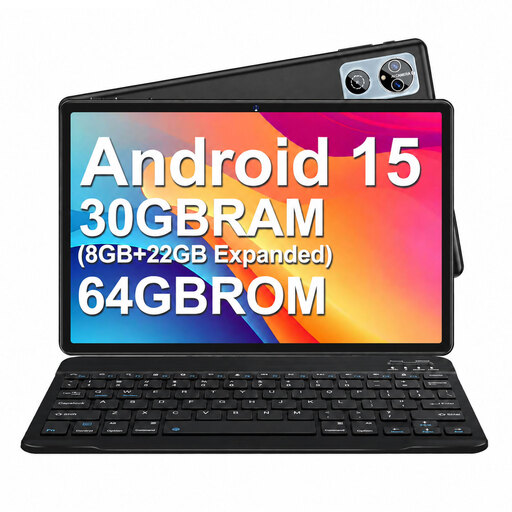
MEBERRY M6 10.1-inch Android 15 tablet with keyboard, mouse and protective case

MEBERRY M6 10.1-inch Android 15 tablet with keyboard, mouse and protective case

The product title lists a keyboard as an input option for writing longer reviews.

The title also lists 64 GB ROM, a 6000-mAh battery, Wi-Fi 6 and Bluetooth 5.0.

View on Joybuy

10.1-inch Android 16 tablet with keyboard set, 36 GB RAM and 256 GB ROM

10.1-inch Android 16 tablet with keyboard set, 36 GB RAM and 256 GB ROM

The product title lists a keyboard set for typing longer texts.

The title also lists a 10.1-inch display, 36 GB RAM, 256 GB ROM and a 6000-mAh battery.

View on Joybuy

10.1-inch Android 16 tablet with keyboard and stylus

10.1-inch Android 16 tablet with keyboard and stylus

The product title lists a keyboard and stylus for typing and handwritten notes.

The title also lists 36 GB RAM, 256 GB ROM, a 6000-mAh battery and GPS.

View on Joybuy

10.1-inch Android 16 tablet with Unisoc T310, keyboard and stylus

10.1-inch Android 16 tablet with Unisoc T310, keyboard and stylus

The product title lists a keyboard and stylus for typed reviews and handwritten notes.

The title also lists 36 GB RAM, 256 GB ROM, storage expansion up to 1 TB and Wi-Fi 6.

View on Joybuy

Frequently asked questions

How do I prepare my tablet for a writing session in the library?

Before you go, open a typical book page and your draft in the apps you plan to use. Check the font size, how easily you can switch between documents, how the keyboard or stylus works, and whether you can open the files you need and save changes without an internet connection. A display size on its own doesn’t guarantee that this workflow will work.

Can I work on my review using public library Wi-Fi?

Check with the library in question to see whether it offers Wi-Fi and what conditions apply. The Federal Office for Information Security recommends taking care when using public Wi-Fi networks. It’s also worth keeping the files you need available offline in case you can’t connect.

Which accessories should I check before buying?

Check whether a keyboard and stylus are actually included with the specific version. Apple lists a tablet and USB-C cable with the iPad (A16); Samsung lists an S Pen as an additional inclusion with the Galaxy Tab S10 FE. The Pen and Keyboard listing for the Yoga Tab Plus applies to the specific bundle mentioned.

Are tablets in Germany required to have USB-C?

The European Commission describes common USB-C charging requirements that have applied to covered tablets since 28 December 2024. The requirements depend, among other things, on the type of device, whether it has a rechargeable battery and whether it charges by cable; the date alone doesn’t mean the rule applies to every older device. A USB-C port also doesn’t mean a charging adaptor is included.