Crime-fiction readers with a library card
If you’d like to read borrowed crime novels on your tablet, first check whether your library offers the titles you want and the right way to access them.


If you usually read crime novels while holding your tablet, a compact model is an obvious choice. If you’d like more room for text or want to use your tablet for other tasks, consider a larger display. For library e-books, check your library’s access arrangements and app compatibility before you buy: the Onleihe 3 app requires at least Android 10 or iOS 15.1. Onleihe Help also points out that offline use does not work reliably on every device.
If you’d like to read borrowed crime novels on your tablet, first check whether your library offers the titles you want and the right way to access them.
If you read for long periods without resting your tablet on anything, the dimensions and weight of the exact model matter more than screen size alone.
If you usually read at a table, a larger display lets you find the right balance between font size and the amount of text on screen.
If you want to use Onleihe, start by checking access and app compatibility. Then compare size and weight while reading a sample of your choice.
| What matters to you | What to check before buying | Who will find this most important? |
|---|---|---|
| Access to borrowed crime novels | Check the available titles and library access. For the Onleihe 3 app, make sure you have at least Android 10 or iOS 15.1 and access to the relevant app store. | If I want to borrow particular crime novels, I need to know before buying whether my library and device will let me access them. Around 31% of consumers put borrowing first. |
| Weight when reading in your hand | Compare the weight of the exact device model, including any case you plan to use. | If I read for a long time without putting my tablet down, it needs to feel comfortable in my hand. Around 25% of consumers prioritise comfort when holding a tablet. |
| Text and display area | Compare the same reading sample at your preferred font size on different display sizes. | When I read at a table, I want to set the font size and the amount of text on the page to suit me. Around 25% of consumers prioritise how text is displayed. |
| Reading without reliable Wi-Fi | Download your chosen title in advance and try opening it offline. Turn off sounds and notifications where you read. | If the connection might drop, I still want to be able to open my book without disturbing others nearby. Around 19% of consumers prioritise uninterrupted reading. |
A suitable display does not, by itself, guarantee that you’ll be able to borrow books in the way you want.
First check the Onleihe 3 app requirements, access to the app store and your library’s access arrangements.
Onleihe Help points out that downloaded content does not currently work reliably offline on every device.
Before visiting the library, try opening a borrowed title offline. If you have problems, follow Onleihe’s advice about syncing online.
Models in the same tablet range can vary, and a case adds weight when you’re reading in your hand.
Check the exact model, the manufacturer’s stated weight and what’s included in the box separately. For example, Xiaomi says the REDMI Pad SE 8.7 does not include a power adapter, so check whether the product you choose comes with one.
The Galaxy Tab A11 is a compact tablet range with a choice of Wi-Fi and LTE models.
The Tab One is a compact Android option for reading while holding your tablet.
The iPad (A16) has a larger display for crime novels and other tablet tasks.
The REDMI Pad SE 8.7 is a compact option; remember to check the display settings and what’s included.
This selection includes compact Android tablets for reading while holding your device, as well as larger models with more display space for reading at a table.
 No image available
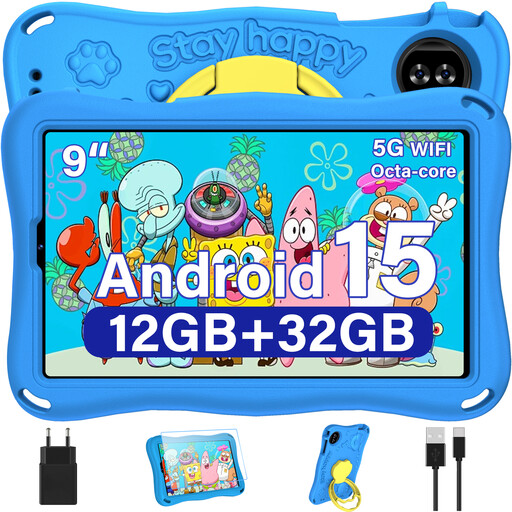
The 9-inch format is a compact option for reading crime novels in your hand. The product title lists Android 15 and a display with a resolution of 1,340 × 800 pixels. For Onleihe 3, you’ll also need access to the relevant app store.
 No image available
The larger display is a good option if you prefer to read crime novels at a table. The product title lists a 13.4-inch IPS display with a resolution of 1,920 × 1,200 pixels, along with a keyboard, mouse and stylus. For Onleihe 3, also check that you can access the required app store.
 No image available
The 13.4-inch display gives you more room to read at a table. The product title also lists Android 16, 128 GB of storage and a folio case. For Onleihe 3, you’ll need to check app store access as well as the Android version.
 No image available
The compact 8.8-inch format is a handy option for reading crime novels in your hand. The product title lists Android 14 and 12GB+256GB; according to the product information, no power adapter is included. For Onleihe 3, also check that you can access the relevant app store.
 No image available
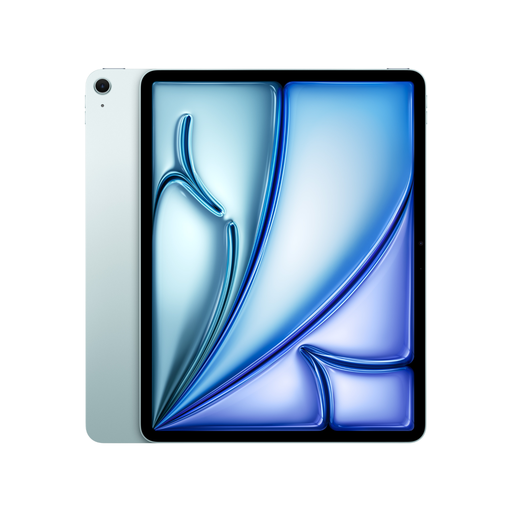
The 13-inch iPad Air is a larger iPadOS option for reading at a table and taking care of other tablet tasks. The product name lists Wi-Fi and 128 GB; the Onleihe 3 app requires at least iOS 15.1 on iPad.
No, not through the same app. The Onleihe 3 app for tablets requires at least Android 10 or iOS 15.1, as well as access to the relevant Google Play Store or Apple App Store. You’ll also need a valid library card and your login details to borrow books. Check whether your library has the titles you want, too.
Download the title you want in advance and check that it opens without an internet connection. Onleihe Help notes that offline problems can vary by device and recommends briefly opening the app online about every two days as a temporary workaround. This does not guarantee offline use on any particular device.
Ask your library about any possible fees, and check what’s included with the tablet and whether you’ll need accessories. If something is faulty, your statutory rights against the seller are separate from any voluntary guarantee, as explained by the Verbraucherzentrale.
That depends on the rules at the library you visit. For example, the Reinickendorf City Library allows visitors to bring their own mobile devices, but prohibits loud noises and phone calls in the reading area. Check the rules at your local library and turn off sounds and distracting notifications.