Readers with a library card
If you want to borrow digital short stories, make sure you can access your library’s borrowing service on the specific device variant. For Onleihe 3, you’ll need a valid library card and the associated password.


A compact tablet is a practical starting point for short stories in adjustable text format; for fixed-layout PDFs, a larger display may matter more. Before you buy, check that your library offers the borrowing service you want and that its app works on the specific device variant: for Onleihe 3, Onleihe Help specifies Android 10 or later, or iOS 15.1 or later. At present, you shouldn’t rely on Onleihe 3 for dependable offline reading.
If you want to borrow digital short stories, make sure you can access your library’s borrowing service on the specific device variant. For Onleihe 3, you’ll need a valid library card and the associated password.
If you read between the shelves or at a reading table, you’ll need to weigh up screen size and portability. Compare the dimensions and weight of the exact variant.
If you want to read a borrowed story without a live connection, check how the service handles offline reading beforehand. Onleihe Help notes that Onleihe 3 has limitations on offline access.
A good fit if: you often read short texts while holding your device and want to use the Android app for Onleihe 3. Onleihe Help lists Android 10 or later as the minimum requirement.
Consider: Smaller displays are less suited to fixed-layout PDFs; according to Onleihe Help, offline access isn’t reliable on every device.
A good fit if: you prefer iPadOS and want to use the Onleihe 3 app. Check the iPadOS version and access to the App Store; Onleihe lists iOS 15.1 as the minimum version.
Consider: A compact design is convenient to hold, but offers less space for fixed PDF pages than a larger tablet. Features and weight vary by generation.
A good fit if: your stories are often PDFs with a fixed page layout, or you need larger text without having to move around the page frequently.
Consider: More screen space doesn’t automatically make a particular document easier to read, and a larger tablet may be less portable.
A good fit if: you’re happy to access Onleihe 3 through Onleihe on the web in the Silk browser and don’t need the app.
Consider: Onleihe 3 doesn’t support an app for Fire tablets; browser access isn’t a confirmed app or offline feature.
A good fit if: you mainly read longer reflowable texts and the specific model is compatible with your library’s borrowing service.
Consider: Onleihe lists certain PocketBook and tolino devices with compatible software versions; Kindle e-readers can’t open protected Onleihe e-books. E-magazines and e-papers aren’t supported on e-readers.
| Priority | What to check when buying | Who it matters most to |
|---|---|---|
| Access to digital borrowing | Check the library service, operating system version and access to the app store you need; Onleihe 3 requires Android 10 or iOS 15.1 or later as the minimum app version. | If access to library e-books is my priority, the service needs to work on my device variant. Around 29% of consumers put access to borrowing first. |
| Comfort while reading | Compare the dimensions and weight of the exact variant, and if possible, hold the device in your usual reading position. | If I’m holding the tablet for a long time or taking it to the library, I want to weigh up the size and weight carefully. Around 23% of consumers prioritise portability. |
| How the text is displayed | Check whether the stories you want are available as ePub or PDF; view a typical page and text size on the device you plan to use. | If the text and page layout of my stories are important, the actual file format matters: ePub text can adapt to the screen, while PDF pages have a fixed layout. Around 18% of consumers prioritise how text is displayed. |
| Reading offline | Download the title you want in advance and open it without Wi-Fi; for Onleihe 3, bear in mind the provider’s recommendation to sync online regularly. | If I want to keep reading without reliable Wi-Fi, I need to know how my borrowing service handles offline access. Around 18% of consumers prioritise reading without a connection. |
| Cost and accessories | Check what’s included with the exact variant and whether you may need to buy a power adapter; check your local library’s terms. | If I want to keep track of the cost of the device and any essential accessories, what’s included matters too. Around 12% of consumers prioritise cost and accessories. |
With Onleihe 3, you can access the service on Fire tablets using the Silk browser, but there’s no Onleihe 3 app. According to Onleihe Help, protected Onleihe e-books can’t be opened on Kindle e-readers.
Check whether you mean a Fire tablet or a Kindle e-reader, and whether browser access is enough for your library.
The issue described by Onleihe Help affects offline access to borrowed media; a higher battery capacity won’t solve it.
Try opening a downloaded title on your device without a connection. For Onleihe 3, the provider recommends briefly going online and opening the app about every two days.
Apple lists different iPad mini generations with varying display and weight specifications. So don’t compare figures from different generations.
Before ordering, check the full model number and the wireless and storage variant, then compare the details with the manufacturer’s specifications.
A power adapter isn’t listed as included with the Redmi Pad SE 8.7 and Fire HD 8 variants mentioned here.
Check what’s included with the specific variant and whether an existing compatible power adapter will do.
Compact Android tablets for readers who need an app from Google Play. Specifications refer to the relevant device variant.
Compact iPads for readers who prefer iPadOS; the device generation is key when checking technical specifications.
The Redmi Pad SE 8.7 is a compact Android model worth comparing for its display, weight and what’s included.
The Tab One is another compact Android model. Check that the specific variant works with the borrowing service you want.
The selection includes compact e-readers and tablets in a range of display sizes. Check whether each model suits your borrowing service and preferred way of reading.
 No image available
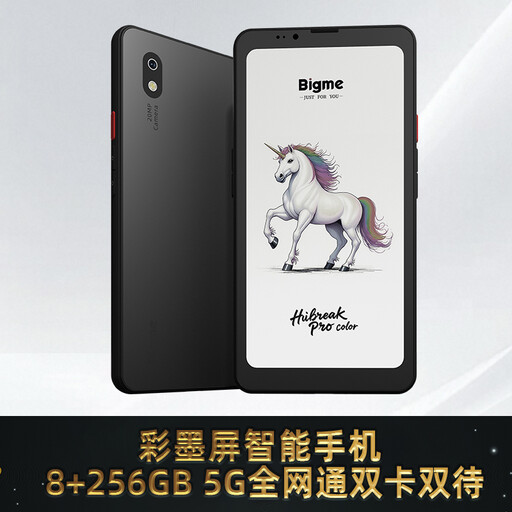
This compact e-book reader could suit short reading sessions; first check that your chosen library service works on this variant.
The product title lists a colour E Ink display, Android 14 and 8 GB + 256 GB.
 No image available
This compact e-reader could be a good fit for short reading sessions. If you want to use the Onleihe app, check that the specific device variant meets the service’s requirements.
The product title lists an E Ink display, Android 14, built-in Google Play and a 36-level front light.
 No image available
This compact tablet could suit you if you want to read stories on a tablet. Before buying, check that the library app you want works on this variant.
The product title lists Android 14, 12 GB RAM and 256 GB storage.
 No image available
The larger display could be useful for stories with a fixed page layout; the 11-inch format is less compact if you want to hold the device while reading.
The product title lists Wi-Fi, 6 GB RAM and 128 GB storage. Check the full model number against your borrowing service’s app requirements.
 No image available
The 11-inch display gives you more space for reading stories at a table, but is less compact to hold. Check app compatibility for the exact variant.
The product title lists Android 15, an EVA case, 16 GB RAM (8 GB + 8 GB virtual) and 256 GB storage.
If your library uses Onleihe 3, you’ll need a valid library card and the associated password. Install the app from Google Play or the Apple App Store, select your library and sign in. First check whether your library has switched to Onleihe 3; Onleihe Help lists Android 10 or iOS 15.1 as the minimum version.
According to Onleihe Help, offline access with Onleihe 3 isn’t currently reliable on every device. As a temporary workaround, the provider recommends briefly going online and opening the app about every two days. Try a downloaded title on your device before relying on an offline reading session.
Onleihe Help describes the tablet app as free. You’ll need a valid library card to sign in; check with your library to see whether it charges a membership fee. Whether you need a power adapter depends on what’s included with the specific tablet.
Products covered by the relevant EU regulations must carry a CE mark. For devices with Wi-Fi or Bluetooth, the Bundesnetzagentur lists marking and a declaration of conformity among the things to check. According to Verbraucherzentrale, consumers generally have 14 days from receiving an online order to notify the seller that they wish to cancel; this is different from a voluntary returns period.
An old tablet shouldn’t go in your household rubbish. Umweltbundesamt lists local recycling centres and retailer take-back schemes as options. If the battery can be removed, you should dispose of it separately where possible.