If you’ll mainly be reading continuous text and often holding your tablet, a compact model is a natural choice. A larger screen gives you more room for illustrations, maps and fixed-layout PDFs, but is less easy to handle. If you’d like to borrow e-books from your library, also check that the right app works on your chosen device and confirm your library access and offline options.
Which tablet is right for you?
Readers of continuous text
If you mainly read prose and hold your device as you move between the shelves and your reading spot, check that the text is large enough for you on a compact screen. Onleihe Help notes that fixed-layout PDF e-books may be less suitable for smaller mobile devices.
Readers of illustrated editions
More screen space can make maps, illustrations and fixed-layout PDF pages easier to take in, especially if you read at a library table. Onleihe Help explains the limitations of smaller screens for PDF e-books.
Readers who like to make notes
If you’d like to jot down character connections or questions by hand, check that the specific device supports a stylus and that your reading app offers the note-taking features you want. Apple and Samsung list stylus options for certain models, but that doesn’t automatically mean every borrowed file supports annotations.
What should you look for when buying?
Compact tablet
Right for you if: You mainly read continuous text and often hold your device.
The trade-off: Fixed-layout PDF pages can be harder to view at a glance on smaller screens.
Larger tablet
Right for you if: You usually view illustrated pages, maps or PDFs at a table.
The trade-off: More screen space makes the tablet less comfortable to hold for long periods.
Tablet with a stylus
Right for you if: You regularly want to take handwritten notes while reading.
The trade-off: The stylus and app need to suit the way you take notes. Also check whether the stylus is included.
| Buying consideration |
What to look for |
Who is it important to? |
| Comfort to hold and continuous text |
Try your preferred text size and compare the dimensions and weight of the specific model. |
If I want to read longer passages while holding the tablet, a comfortable grip matters more than a large display. Around 33% of consumers prioritise comfort to hold and continuous text. |
| Illustrations and PDFs |
Open a typical illustrated page in the app you plan to use and check the page view and zoom. |
If I want to take in maps and illustrations at a glance, I pay particular attention to the usable screen area. Around 25% of consumers prioritise illustrated pages and PDFs. |
| Library e-books |
Check whether your library offers the service, which app you need and whether it works on your device. |
If I want to read books from my library, I need the right access and a compatible app. Around 25% of consumers prioritise access to library e-books. |
| Handwritten notes |
Check the stylus model, what’s included and the note-taking features in your reading app. |
If I want to note down character connections or questions as I read, the combination of stylus and app is key. Around 17% of consumers prioritise handwritten reading notes. |
For Onleihe 3, Onleihe Help says you’ll need a valid library card and the associated login details. Onleihe Help / divibib GmbH also highlights limitations with offline use, so before visiting the library, check that you can open your chosen title on your device without Wi-Fi.
Common pitfalls
-
Choosing a small screen based on its diagonal measurement alone
Fixed-layout PDF pages can be harder to view on smaller mobile devices. You may need to zoom in frequently to see maps and illustrations.
Before you decide, try viewing a typical illustrated page in the app you plan to use.
-
Assuming every offline download will work offline
Onleihe Help / divibib GmbH reports that Onleihe 3 has device-specific limitations. These may affect downloaded media that you haven’t opened before.
Open the title before visiting the library and test offline mode on your device.
-
Confusing stylus support with an included stylus or app functionality
Samsung says the Galaxy Tab S10 FE comes with an S Pen. Apple lists compatible Pencil models for the iPad (A16); one version needs an adapter for pairing and charging. This doesn’t tell you whether every borrowed file allows annotations.
Check what’s included with the exact model and try the note-taking feature you want in your reading app.
Brands to help you choose
Lenovo
The Tab One is a compact Android option for reading text while holding your device.
- For the documented version with 4 GB RAM and 64 GB storage, Lenovo lists a weight of around 320 g and Android 14 or later.
- The 8.7-inch screen offers less space for fixed-layout PDFs. The battery life advertised by the manufacturer is based on YouTube streaming, not measured reading time. Information: Lenovo Germany.
Samsung
The Galaxy Tab A11 is a compact option, while the Galaxy Tab S10 FE has a larger screen and is offered with an S Pen.
- Samsung lists Galaxy Tab A11 versions with 4 GB RAM and 64 GB storage or 8 GB RAM and 128 GB storage. The Galaxy Tab S10 FE comes with an S Pen, according to Samsung.
- Galaxy Tab A11 specifications apply to the specific version only. Manufacturer claims are not independent reading tests. Information: Samsung Germany.
Apple
The iPad (A16) offers an 11-inch option for reading at a table and supports certain Apple Pencil models.
- Apple lists the Wi-Fi model as weighing 477 g, with a resolution of 2,360 × 1,640 pixels.
- According to Apple, the 1st generation Apple Pencil needs an adapter for pairing and charging. Check which stylus is compatible with the specific version. Information: Apple Germany.
Xiaomi
The Redmi Pad SE 8.7 adds to the choice of compact Android tablets; make sure you distinguish the 4G version from the Wi-Fi version.
- Xiaomi lists the Redmi Pad SE 8.7 4G as having an 8.7-inch LCD with 1,340 × 800 pixels and a weight of no more than 375 g, based on internal lab data.
- According to Xiaomi, the 4G version does not include a power adapter. These details do not automatically apply to every version. Information: Xiaomi Germany.
Joybuy tablets for reading
These Joybuy tablets offer a range of screen, storage and stylus options for digital reading. For illustrated pages, PDFs and note-taking, check that the size and specification suit the way you’ll use your tablet.
 No image available
Samsung Galaxy Tab A11+ X230, Wi-Fi, 6 GB RAM, 128 GB
This 11-inch model is worth considering for reading at a table if you’re looking for more screen space than a compact tablet offers.
Product details: 11 inch, Wi-Fi, 6 GB RAM, 128 GB storage, Grey.
View at Joybuy
 No image available
Xiaomi Pad 8, 8 GB RAM, 256 GB
This model could be an option for reading mythology digitally if you’re looking for the listed storage and memory specification.
Product details: 8 GB RAM, 256 GB storage, Pine Green.
View at Joybuy
 No image available
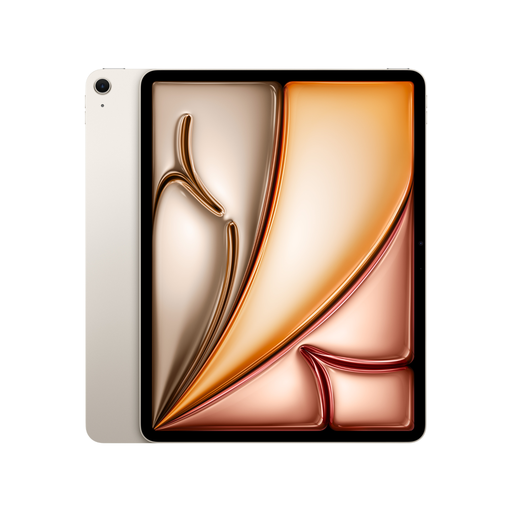
Apple 13-inch iPad Air (M4, 2026), Wi-Fi, 128 GB
The 13-inch format could suit illustrated editions and pages viewed at a table if a large screen is important to you.
Product details: 13 inch, M4, Wi-Fi, 128 GB storage, Starlight.
View at Joybuy
 No image available
Apple 11-inch iPad Air (M4, 2026), Wi-Fi, 128 GB
This 11-inch model could work for viewing illustrated pages at a table or taking handwritten reading notes if you’d like to use a compatible Apple Pencil model.
Product details: 11 inch, M4, Wi-Fi, 128 GB storage, Starlight.
View at Joybuy
 No image available
Lenovo Yoga Tab Plus TB520FU (2024), ZAEG0083SE
This model could be suitable for maps, illustrations or PDFs at a library table if you’re looking for a tablet with plenty of screen space for reading.
Product details: Model TB520FU (2024), ZAEG0083SE.
View at Joybuy
Frequently asked questions
Can I read e-books from my library on a tablet?
Yes, if your library offers the service and your tablet supports the app it requires. For Onleihe 3, Onleihe Help says you’ll need a valid library card and the associated login details. Whether a particular mythology title is available depends on your library’s collection.
Can I read a borrowed title without the library’s Wi-Fi?
It may not work reliably on every device: Onleihe Help / divibib GmbH notes that Onleihe 3 has limitations with offline use. Download the title before your visit and check whether it opens on your tablet without Wi-Fi.
Do I need a permit to buy a tablet online?
You don’t need a special government permit to buy a tablet for personal use. Digital borrowing is subject to your library’s access requirements.
What are my rights in Germany if a tablet I bought online is faulty?
The statutory warranty is different from a voluntary guarantee. Under Section 438 of the German Civil Code (BGB), claims relating to defects in ordinary goods generally become time-barred two years after delivery. If a product is faulty, repair or replacement may be the first remedy. Online purchases generally come with a right to cancel, usually within 14 days. The Federal Ministry of Justice and Consumer Protection / Federal Office of Justice and the Verbraucherzentrale explain these rules. Check the terms and exceptions that apply to your specific contract.


