What should you look for in a tablet for logic puzzles?
First, check that your chosen game is available for the operating system and launches offline. Then consider grid visibility, portability and power when choosing the right size of device.
| What matters |
What to look for when buying |
Who will find this most important? |
| Seeing the grid and tapping squares |
Check the grid size, zoom and touch controls in your chosen app; only count on stylus input if it’s explicitly supported. |
If I want to see and select small squares and number clues comfortably, how they appear in my app is crucial. Around 36% of consumers prioritise grid visibility and input. |
| Portability on the bus |
Compare the dimensions and weight of the specific version, and consider whether you’ll usually hold the device or rest it somewhere. |
If you often hold your tablet during the journey and have little space, a compact design is especially important. Around 29% of consumers put portability first. |
| Offline play and battery life |
Install the game in advance and test it without an internet connection; check what usage the manufacturer’s battery-life claim refers to. |
If I don’t want to rely on an internet connection while I’m out, I test my game and puzzles in aeroplane mode before setting off. Around 21% of consumers prioritise offline use and battery life. |
| Your preferred app |
Search for the exact game title in your operating system’s app store and check that the features you need are available. |
If you already have a particular puzzle app in mind, check that it’s available on your chosen device first. Around 14% of consumers put their preferred app first. |
Joybuy tablets for logic puzzles
The following Joybuy models may suit consumers looking for a tablet for logic puzzles. Before buying, check that your app is available and that the screen size and device will fit your space on the bus.
 No image available
Samsung Galaxy Tab A11+ X230, 11 inches, Wi-Fi, 6 GB RAM, 128 GB, Grey
This 11-inch model may suit you if you prefer a larger grid view when solving puzzles.
Wi-Fi; 6 GB RAM; 128 GB storage.
View at Joybuy
 No image available
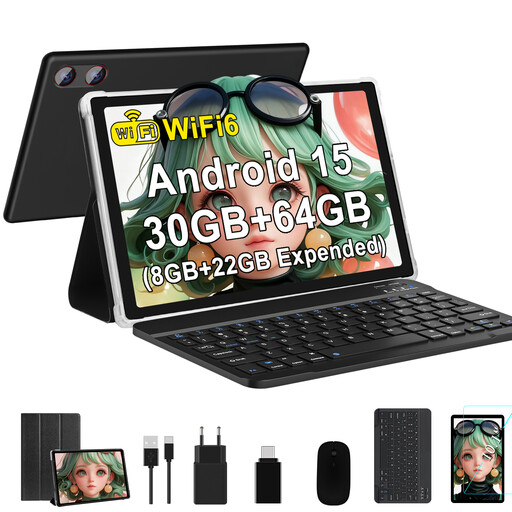
GOODTEL G9, 10.1 inches, Android 15
This model may suit you if your chosen puzzle app is available on the device and you’d like a 10.1-inch screen.
Android 15; 8 GB RAM plus 22 GB virtual RAM; 64 GB ROM. The product name specifies TF card expansion up to 2 TB.
View at Joybuy
 No image available
Xiaomi Pad 8, Pine Green, 8 GB RAM, 256 GB storage
If your chosen puzzle app is available on this device, you can assess this model based on its listed storage and how the app looks on screen.
8 GB RAM; 256 GB storage.
View at Joybuy
 No image available
Apple 11-inch iPad Air (M4, 2026), Wi-Fi, 128 GB, Blue
This iPad may suit you if your preferred puzzle app is available for iPadOS and you’re looking for an 11-inch screen.
Wi-Fi; 128 GB storage.
View at Joybuy
 No image available
Teclast P50, 11 inches, Android 15, 8 GB RAM, 128 GB storage
This 11-inch model may suit you if you prefer a larger grid view and your puzzle app is available on the device.
Android 15; 8 GB RAM; 128 GB storage.
View at Joybuy
Frequently asked questions
Can I play any logic puzzle offline on the bus?
No, you can’t tell from the tablet model alone. The description of Offline Nonogram says its puzzles are generated locally without Wi-Fi. Before your journey, test your chosen game, including its installation and puzzles, without an internet connection.
Do I need a stylus for small grids?
No. Depending on the app, zoom or a precise pointer function may be an alternative; Nonogram Katana lists an optional pointer for its iPad version. If you want to use a stylus, also check that it’s supported by your specific tablet and game.
How should I prepare my tablet for the journey?
Install your game and any puzzles you need in advance, test that it launches offline and charge the device before you set off. Manufacturer claims, such as Lenovo’s figure for YouTube streaming, depend on usage and don’t guarantee puzzle-playing time.
What are my rights when buying online or if a product is faulty in Germany?
According to the Verbraucherzentrale, online purchases generally come with a 14-day right to cancel; the period starts when the contract is made or the goods are received. This is separate from your rights if goods are faulty. The German Federal Government describes an extension of the warranty period from two to three years if, under the rules in force since July 2026, you choose a repair instead of a replacement for a qualifying fault. The specific circumstances of each case determine whether this applies.


