What should you consider when choosing?
First, check that the app and your chosen game mode work without a connection, then consider the display and your seat. After that, you can plan how to charge the tablet and check any parental controls you may need.
| Buying consideration |
What to check before buying |
Who it matters most to |
| App and offline mode |
Check the exact app title in the device’s app store, then test your chosen game mode and any content it needs in aeroplane mode before you set off. |
If I want to keep playing where there’s no signal, my puzzle needs to start without a connection. Around 33% of consumers are likely to prioritise this offline test. |
| Ease of handling and grid size |
Compare the display and weight with the space available in the seat where you’ll use the tablet. Samsung, Xiaomi and Lenovo list 8.7-inch models; Apple specifies an 11-inch display and a weight of 477 g for the Wi-Fi model of the iPad (A16). |
If I want to see the numbers clearly and hold the tablet comfortably, I’ll compare the grid with the space available. Around 27% of consumers are likely to prioritise this size consideration. |
| Power supply |
Test the app in advance and plan to bring a suitable cable and a compatible way to charge the tablet. Lenovo claims up to 12.5 hours of YouTube streaming for the Tab One, not for a number puzzle. |
Being able to play between charging opportunities matters to me on a longer journey. Around 20% of consumers are likely to prioritise power supply. |
| Child profile and ongoing costs |
Check app permissions, time limits and any subscriptions in the profile and app store you’ll actually use. Google and Apple provide their own management features for this. |
If children are playing too, I want to set suitable rules and know about any extra costs. Around 20% of consumers are likely to consider controls and ongoing costs first. |
Joybuy tablets for number puzzles on the go
The following Joybuy tablets have larger displays, making them a good match for passengers who prefer a number grid that’s easy to see. Before you travel, check that your specific puzzle app is available and that its offline mode works on each device.
 No image available
SAMSUNG Galaxy Tab A11+ X230, 11-inch, Wi-Fi, 6 GB RAM, 128 GB
An option for passengers who prefer a larger number grid. Test the specific puzzle app on the device and in your chosen game mode.
Product name: 11-inch display, Wi-Fi, 6 GB RAM and 128 GB storage.
View at Joybuy
 No image available
TECLAST P50, 11-inch, Android 15, 8 GB RAM, 128 GB storage
The 11-inch size suits passengers who prefer a larger number grid. You’ll need to check separately whether your chosen app is available and works offline.
Product name: Android 15, dual SIM 4G LTE and 5G WiFi.
View at Joybuy
 No image available
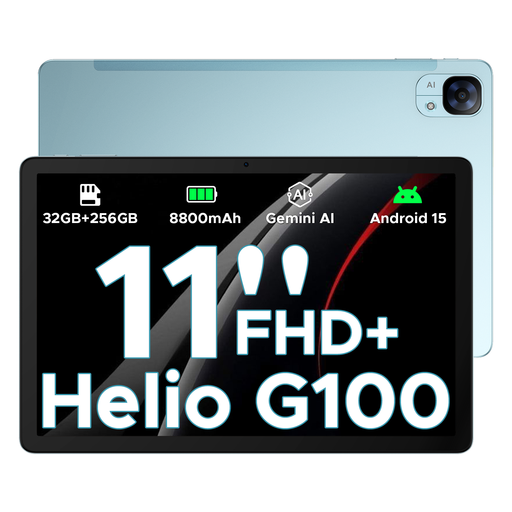
DOOGEE Tab E3 Android 15 AI tablet, 11-inch FHD+, 90 Hz
For passengers who prefer a larger grid on an Android tablet. Check app compatibility and offline functionality before you travel.
Product name: 11-inch FHD+ display with 90 Hz refresh rate, dual SIM slots and an 8,800-mAh battery.
View at Joybuy
 No image available
TECLAST P50TCase, 11-inch, Android 16, tablet kit
Another larger-display option for passengers who want to see numbers clearly. Test your specific puzzle in the game mode you plan to use.
Product name: 90 Hz IPS display, 16 GB RAM (3 GB + 13 GB virtual) and 128 GB ROM.
View at Joybuy
 No image available
TECLAST T65, 13.4-inch, Android 16, dual SIM 4G
The larger display may suit a spacious number grid, but it takes up more room in your seat than a smaller model.
Product name: 120 Hz display, 26 GB RAM (6 GB + 20 GB virtual), 128 GB storage and folio case included. The refresh rate alone doesn’t prove that a puzzle app will perform better.
View at Joybuy
Frequently asked questions
Can I open any installed number puzzle on the go without an internet connection?
No. You can’t tell from the tablet’s hardware alone. Install the specific app and any content it needs in advance, then test your chosen mode without a connection. Also check that the app is available in the app store for your chosen device.
How do I set up a tablet for a child who’ll be playing too?
Set your preferred app and time limits before you travel, then test the puzzle in the child profile you’ll actually use. Google explains app limits for eligible Android devices with a supervised child account; Apple provides Screen Time settings for iPad.
Can the driver play puzzles on a tablet while driving?
No. Playing puzzles on a tablet is not permitted while driving. Section 23(1a) of the German Road Traffic Regulations (StVO) restricts the use of electronic devices, including portable computers and touchscreens, to narrowly defined circumstances. The brief, traffic-aware glance allowed by the rules does not permit playing games. The relevant provision is set out by the German Federal Ministry of Justice and the Federal Office of Justice.
Do I need to secure the tablet in the car?
If the tablet is being carried as cargo, Section 22(1) of the German Road Traffic Regulations (StVO) requires it to be secured so that it won’t slide, tip over or roll around, even during emergency braking or a sudden evasive manoeuvre. Don’t leave it loose; the right way to store it depends on the vehicle and how you’re using it. The relevant provision is set out in the legislation published by the German Federal Ministry of Justice and the Federal Office of Justice.
What should I know when buying online if the tablet isn’t right for me or is faulty?
If you change your mind, check the cancellation information for the specific purchase and distinguish this from a fault with the device. If it’s defective, you can contact the seller to discuss what to do next. The consumer advice centre explains the difference between cancelling an order and making a complaint about a faulty product.


