What should you look for when buying?
Start by checking your offline workflow, then consider how you’ll use the tablet and finally how much room the device and accessories will take up in your bag.
| What matters |
What to check before buying |
Who is it important for? |
| Using sources offline |
Test whether you can open and edit your sources, attachments and draft in your app without an internet connection. |
If you rely on prepared evidence while travelling, offline access should be your top priority; around 40% of consumers would prioritise this. |
| Typing longer texts |
Check keyboard compatibility, the German keyboard layout, the stand function and what’s included. |
If you want to write longer arguments and rebuttals at a table, a suitable keyboard is particularly important; around 30% of consumers would prioritise typing. |
| Annotating sources |
Check the exact stylus name and whether your app can save and export annotations. |
If you want to add handwritten notes directly to your evidence, choosing the right stylus matters; around 20% of consumers would put this first. |
| Carrying your tablet |
Compare the model’s dimensions and check that the tablet and planned accessories will fit in your bag together. |
If you’ll need to carry and store your tablet frequently between stops, a compact overall set-up is essential; around 10% of consumers would prioritise portability. |
Joybuy tablets for life on the go
This selection includes tablets for writing on the move and working with prepared documents; check whether a keyboard or stylus is included with each model.
 No image available
MEBERRY M8, 10.1 inches, 128 GB, keyboard set
The product title lists a keyboard and protective case in the set, making it suitable for writing longer texts on the go.
10.1-inch display, 128 GB storage and 8000 mAh battery, according to the product title.
Joybuy
 No image available
10.1-inch Android tablet with keyboard and stylus, 256 GB
The product title lists a keyboard and stylus for typing and handwritten notes.
10.1-inch display, Android 16, Unisoc T310, 256 GB storage and 6000 mAh battery, according to the product title.
Joybuy
 No image available
Xiaomi Pad 7 with keyboard, grey, 8 GB RAM, 128 GB
This version is listed with a keyboard in the product title, making it suitable for typing longer texts.
Xiaomi lists an 11.2-inch display for the Pad 7; the product title for this version lists 8 GB RAM, 128 GB storage and an 8850 mAh battery.
According to Xiaomi, a power adapter isn’t included.
Joybuy
 No image available
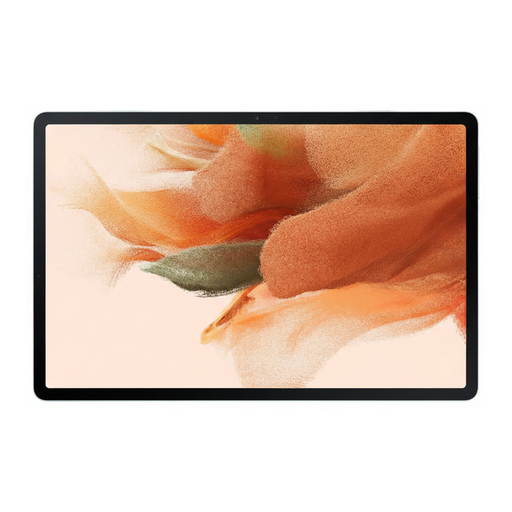
Samsung Galaxy Tab S7 FE, 64 GB, Wi-Fi, green
The product description lists an S Pen as included for handwritten notes and annotating sources.
12.4-inch display, 64 GB internal storage and expandable storage, according to the product description.
Joybuy
 No image available
TECLAST ArtPad Pro, 12.7 inches, 256 GB, with stylus and keyboard
The larger display gives you more room to view documents; according to the product title, the included keyboard has an English layout.
12.7-inch 2K display, Android 15 and 256 GB storage, according to the product title. A stylus, protective case and English Bluetooth keyboard are also listed.
Joybuy
Frequently asked questions
Can I keep writing my arguments during the journey without internet access?
Yes, as long as you’ve prepared the app you’re using and the files you need. Google Docs Editors Help explains how to make files available offline in the Android Docs apps. Before setting off, test your attachments and changes without an internet connection too; you won’t be able to do new online research this way.
Do I need a tablet with mobile connectivity for a trip?
Not necessarily: you don’t need an active mobile connection to access files you’ve saved offline beforehand. If you want to access up-to-date online sources while travelling, check the device version, network coverage and data plan. When travelling to other EU countries, home-tariff rules generally apply, with some exceptions, such as limits on available data; the specific destination matters.
How should I plan for a stylus, keyboard and charging accessories?
Check what’s included with the exact configuration. Apple says that neither a Pencil nor a keyboard is included with the iPad (A16); Samsung lists an S Pen with the Galaxy Tab S10 FE, but no charging adapter. Lenovo offers a German Keyboard Pack as an add-on for the Idea Tab Pro configuration reviewed here, while Xiaomi says that the Pad 7 doesn’t include a power adapter.
What are my rights in Germany if my tablet is faulty?
If you buy new goods that are faulty, consumers can generally claim their statutory rights against the seller within two years of receiving them; a voluntary guarantee is separate. For purchases made from 31 July 2026, the Verbraucherzentrale also describes a possible extension of the statutory warranty period to three years if the goods are repaired instead of replaced within the first two years. The relevant conditions still apply.


