Choose based on how many people will be viewing, the light at the table and how your photos will get onto the tablet. A larger display can make it easier to view images together, but it takes up more space. If reflections are an issue, the specific screen finish may matter more. Prepare your image selection in your app before the meeting, then test it offline at the brightness you plan to use.
Which tablet is right for you?
Photographers meeting clients
If you need to show a prepared selection at the table, reliable access to your images and clear viewing from the usual seat are key. Apple Support (Germany) explains how to export iCloud Photos to a chosen storage location.
Creatives reviewing images together
If several people need to see details at the same time, weigh up a larger viewing area against the space it takes up and how easy it is to handle. Lenovo Germany lists a 12.7-inch display for the Idea Tab Pro.
Presenters with a large selection of images
If you want to bring lots of photos, you’ll need a practical way to store and import them locally. Samsung Business Germany lists microSD support for the Galaxy Tab S10 FE. Also check that your photo app works with the way you store your images.
What should you look for when buying?
First decide how many people will be viewing at once and what the light is like at the table. Then check that your selection will be available offline in your photo app.
| Consideration |
What to check before buying |
Who is this important for? |
| Viewing area and detail |
View your photos with everyone sitting in their usual places. Apple Support (Germany) lists the iPad (A16) as 10.86 inches; Lenovo Germany lists the Idea Tab Pro as 12.7 inches. Screen size alone doesn’t prove image quality. |
If several people need to make out details at once, a suitable viewing area matters more than an especially compact design. Around 31% of consumers put screen size first. |
| Visibility in reflective conditions |
Test your photos from your usual seat and viewing angle. Huawei describes the PaperMatte finish as reducing reflections, but that’s no substitute for comparing it with your own images. |
If windows or lights are reflected on the screen, you’ll want to assess your images clearly from your usual seat. Around 25% of consumers prioritise minimising disruption from reflections. |
| Offline access and photo import |
Import a representative selection and open it in your chosen app offline beforehand. Apple Support (Germany) explains how to export originals to a chosen storage location. |
If you don’t want to rely on an internet connection during your meeting, you’ll want to be able to open the finished images locally and in the right order. Around 25% of consumers prioritise offline access. |
| Battery life and portability |
Try out the planned presentation duration at the brightness you intend to use. If you’ll be carrying it often, also check the weight, charging accessories and what’s included with the specific version. |
For longer meetings or frequent travel, battery life and portability matter alongside screen size. Around 19% of consumers give these factors priority. |
What could go wrong when choosing?
-
Assuming cloud photos are available offline
Just because photos appear in a synced library, it doesn’t automatically mean you can open the selection you want in your app without an internet connection.
Before your meeting, create a local selection and test it offline in the app you’ll actually be using.
Depending on how you store your images, you may need extra device storage or a suitable way to import them.
-
Assuming a maximum brightness figure means there’ll be no reflections
Manufacturers’ figures apply under the conditions they specify. Reflections also depend on where you’re sitting, your viewing angle and the screen finish.
View your own photos in similar lighting, and don’t treat claims about an anti-reflective finish as an independent test of colour reproduction.
-
Taking model names and what’s included at face value
For one Galaxy Tab S10 FE listing we checked, the model code in the technical details didn’t match the model number given by Samsung. Xiaomi notes that the Pad 7 doesn’t include a power adapter.
Check the full model code and what’s included with the specific version against the manufacturer’s information.
Key brands to consider
Apple
The iPad (A16) is a portable option for a prepared selection of images.
- Apple Support (Germany) lists a 10.86-inch display, 500 nits and storage options starting at 128 GB.
- For cloud photos, check that you’ll have local access and that any accessories you need are included with the specific version.
Samsung
The Galaxy Tab S10 FE is worth considering if you want to use a microSD card as part of your photo workflow.
- Samsung Business Germany lists a 10.9-inch display, microSD support and up to 800 nits in High Brightness Mode for the FE.
- The brightness figure applies to the specified mode. Check that the model code on the specific listing matches the version you want.
Lenovo
According to Lenovo, the Idea Tab Pro offers a larger viewing area for looking at images together.
- Lenovo Germany lists a 12.7-inch 3K display and an included Tab Pen Plus.
- Screen size alone doesn’t prove low reflectivity or colour accuracy. Check what’s included with the specific listing.
Xiaomi
The Pad 7 is an 11.2-inch option for a more portable presentation at the table.
- Xiaomi Germany lists a 3:2 display with 3200 × 2136 pixels and a maximum brightness of 800 cd/m².
- The maximum figure doesn’t tell you how clearly you’ll see the display at your table. The German specifications page says that no power adapter is included.
Huawei
The MatePad 11,5 S 2026 in the PaperMatte version is worth considering if reflections are a problem where you usually sit.
- Huawei describes the finish as reducing reflections.
- This is a manufacturer claim, not an independent comparison of colour reproduction for photo portfolios. Check the specific display version and the photo app you need.
Joybuy products for viewing at the table
The Joybuy products below are 10.1-inch tablets for compact viewing at the table. Several models list local storage and TF card expansion; check beforehand that they’ll work with your import method and photo app.
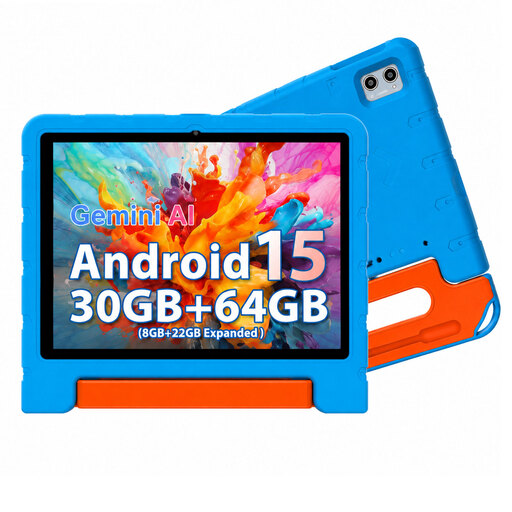 Image unavailable
MEBERRY M7 2026, 10.1 inches, 64 GB, blue
Its compact size is well suited to a selection of images you can view at the table.
HD IPS touchscreen with 1280 × 800 pixels; 64 GB of internal storage and TF expansion up to 2 TB listed. TF card not included.
View at Joybuy
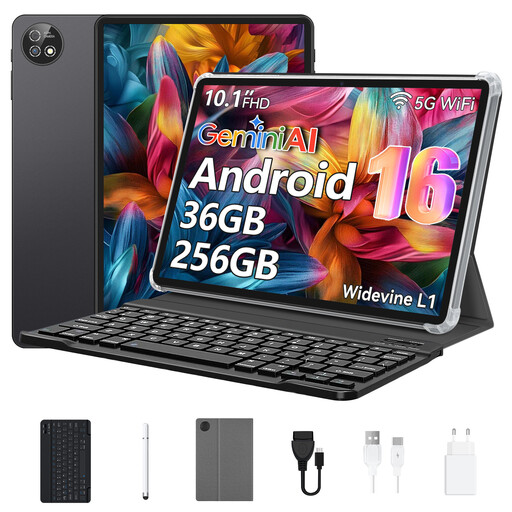 Image unavailable
10.1-inch tablet with keyboard and protective case, 256 GB
An option if you’re looking for a compact screen and a set that includes a keyboard and protective case.
256 GB storage; support for a TF card up to 1 TB listed. The product title names a Unisoc T310 octa-core processor.
View at Joybuy
 Image unavailable
Android 16 tablet, 10.1 inches, 256 GB, keyboard set
The 10.1-inch format is designed for compact viewing of your image selection at the table.
256 GB of internal storage and TF expansion up to 1 TB listed. The product title also names a 6000-mAh battery, Wi-Fi 6 and GPS.
View at Joybuy
 Image unavailable
10.1-inch tablet with keyboard and stylus, 256 GB
If having a set with a keyboard and stylus matters to you, check that it suits the way you present your images.
256 GB storage and TF expansion up to 1 TB listed; the product title names a 6000-mAh battery and Bluetooth 5.0.
View at Joybuy
Image unavailable
Android 16 tablet, 10.1 inches, 256 GB, keyboard and touch pen
The compact format is designed for viewing a selection of images at the table. The included input devices are only relevant if you plan to use them.
256 GB storage and TF expansion up to 1 TB listed. The product title also names a 6000-mAh battery and Bluetooth 5.0.
View at Joybuy
Frequently asked questions
Does my photo portfolio need to be stored on the tablet?
If you don’t want to rely on a dependable connection during your meeting, you should be able to open your chosen files in your preferred app without an internet connection. Apple Support (Germany) distinguishes between iCloud Photos and exporting originals to a chosen storage location.
Does a higher nits rating automatically mean a better view at the kitchen table?
No. Samsung specifies up to 800 nits in High Brightness Mode, while Xiaomi gives a maximum of 800 cd/m². Compare your photos in the actual lighting conditions rather than treating these different manufacturers’ figures as a like-for-like test.
What should I test before my first presentation?
Import a small, representative selection and check how it looks and whether the images are in the right order in your preferred app. Then open the images without an internet connection and test them at the brightness you plan to use.
What rights apply to online purchases in Germany?
Consumers in Germany generally have a 14-day right to cancel online purchases of goods, although exceptions and when the period starts depend on the circumstances. The Verbraucherzentrale (13 August 2026) distinguishes this statutory right from rights relating to faulty goods and a voluntary guarantee.


