What should you look for when buying?
First, check that your learning platform and question format work with the tablet’s operating system and input method. Then consider whether a stylus, more screen space for reading, a lighter weight or the right accessories will matter most in your day-to-day use.
| What matters |
What to check when buying |
Who should pay particular attention |
| Platform and question format |
Check the operating system, input, display and saving options in your specific learning platform. |
If you want to make sure your practice questions work on the tablet before buying, make the platform your first priority. Around 28% of consumers prioritise compatibility with their platform and question format. |
| Handwritten answers |
Compare stylus compatibility, the right stylus version and what’s included with the specific model. |
If you want to work through calculations or make notes directly on worksheets, the right stylus and how your app works are key. Around 22% of consumers prioritise handwritten input. |
| Reading lengthy tasks |
Compare screen size and device dimensions; try viewing a typical practice page in your preferred layout. |
If you read lengthy PDFs and sample answers at a library desk, a larger screen could make things easier. Around 17% of consumers prioritise screen space for worksheets. |
| Portability and session length |
Compare the weight, how long you study for and battery life figures based on similar usage. |
If you often carry your tablet with you and study for long periods without access to a power socket, weight and suitable battery life figures are important. Around 17% of consumers prioritise portability and battery life. |
| What’s included |
Check whether the stylus, keyboard or power adapter you need is included with the exact variant. |
If you want to know which items you’ll actually need for your study routine before buying, compare what’s included with the specific offer. Around 16% of consumers prioritise getting the device and accessories they need. |
Tablets at Joybuy
This selection includes compact tablets for digital questions and larger devices for worksheets. Stylus compatibility and what’s included vary between models with stylus input.
 No image available
Samsung Galaxy Tab A11+ X230, 11-inch, Wi-Fi, 6 GB RAM, 128 GB, Grey
The 11-inch size is a specific display measurement to consider for digital practice questions at a library desk.
Wi-Fi; Android; 6 GB RAM; 128 GB storage.
Joybuy
 No image available
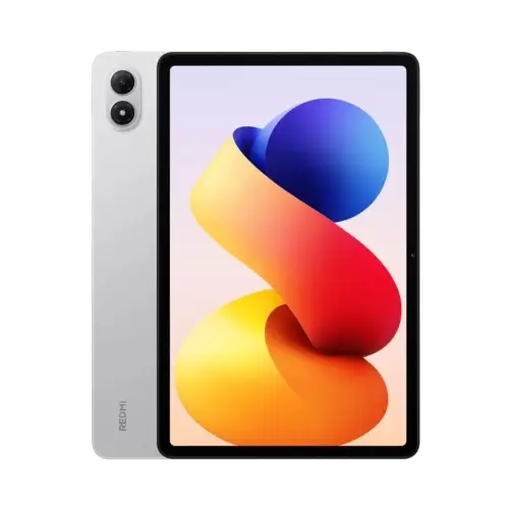
REDMI Pad 2 Pro Wi-Fi, 8 GB + 256 GB, Silver
The 12.1-inch display is a size worth considering when reading longer worksheets.
12.1 inches; 2.5K resolution; 120 Hz; 8 GB RAM; 256 GB storage.
Joybuy
 No image available
Apple 11-inch iPad Air (M4, 2026), Wi-Fi, 128 GB, Blue
According to the product details, the iPad Air supports Apple Pencil Pro and Apple Pencil (USB-C) if you want to make handwritten notes.
11-inch Multi-Touch display; iPadOS 26; 128 GB storage.
The listed contents include the iPad Air and a USB-C charging cable, but no Apple Pencil.
Joybuy
 No image available
Lenovo YOGA Tab Plus TB520FU (2024), 12.7-inch, 256 GB
The 12.7-inch display is a size to consider for reading longer tasks and answers at a desk.
Android 14; IPS display; 2944 × 1840 pixels; 256 GB storage.
Joybuy
 No image available
TECLAST ArtPad Pro, 12.7-inch, 2K, Android 15
The product title lists a T-Pen as included; check whether your learning platform supports handwritten input in your question format.
12.7-inch display; 2K; Android 15; T-Pen with 4096 pressure levels; 256 GB storage.
The product name also lists a protective case and an English Bluetooth keyboard as included.
Joybuy
Frequently asked questions
Do I need a stylus for practice exams?
Only if your study routine involves handwritten calculations or notes. If so, check compatibility and what’s included: Samsung Business Germany lists an S Pen as included with the Galaxy Tab S10 FE; Apple lists supported Pencil versions for the iPad (A16), but no Pencil in the stated contents.
What should I set up before my first library session?
Test your specific learning platform on the operating system you plan to use, open a typical worksheet, and check input and saving. If you want to work without reliable Wi-Fi, also check with the platform whether it makes questions and results available offline; you can’t tell this from the tablet specifications.
Which accessories should I check when buying a tablet?
Check whether you need a stylus, keyboard or power adapter for your study routine, and whether they’re included with the specific offer. Xiaomi’s German specifications page for the Redmi Pad 2 Pro doesn’t list a power adapter as included, while one specific Joybuy variant lists a charger. The confirmed contents of the variant you choose are what matter.
What are my rights if a tablet is faulty or bought online in Germany?
When you buy from a business seller, statutory rights for faulty goods generally apply; Your Europe’s consumer information states that this protection lasts for at least two years from receipt. For a standard online purchase from a retailer, you generally have a 14-day right to cancel from the date of delivery. Exceptions and rules on return postage apply; a voluntary manufacturer’s guarantee doesn’t replace your statutory rights.


