For answering questions in a cramped seat
If you mainly answer questions with a tap, a compact device may be more practical than making room for writing features you’ll rarely use. Samsung lists the Galaxy Tab A11 as an 8.7-inch model.


If you’ll mostly be tapping answers on the train and space is limited, a compact tablet could be a good fit. For longer questions or handwritten working, a larger screen and a stylus that’s explicitly compatible are likely to be more useful. Samsung lists an 8.7-inch display for the Galaxy Tab A11 and an 11-inch display for the A11+; stylus and accessory compatibility depends on the exact model and offer. You should also check whether your learning app is available and works offline. Deutsche Bahn says WIFIonICE is available on all ICE trains and increasingly on IC trains, but don’t count on train Wi-Fi or mobile reception being available throughout your journey.
If you mainly answer questions with a tap, a compact device may be more practical than making room for writing features you’ll rarely use. Samsung lists the Galaxy Tab A11 as an 8.7-inch model.
If you read longer questions or switch between exercises and study materials, a larger screen may matter more than having the smallest possible device. Apple lists the iPad (A16) with an 11-inch display; Samsung also lists an 11-inch display for the Galaxy Tab A11+.
If you want to add sketches, calculations or notes, check that the stylus is compatible and confirm exactly what’s included. Apple lists compatible Pencil models for the iPad (A16); Lenovo describes a specific Tab M11 configuration as a Pen bundle.
First, check whether your learning app works offline. Then consider how much space you have and how you’ll enter your answers: will a compact device for tapping be enough, or would you benefit from a larger screen or a stylus?
| What matters | What to check before buying | Who will find this most important? |
|---|---|---|
| Portability | Check the device’s dimensions and how a real question looks in your learning app. | If I’m mainly tapping answers in a cramped seat, I want to be able to hold and use the tablet comfortably. Around 25% of consumers put portability first. |
| Access to questions | Before your journey, open and answer a complete set of questions offline in your app, then check that it syncs afterwards. Make sure you know whether the model has Wi-Fi or mobile connectivity. | If I need my questions to be available throughout the journey, I don’t want to rely on an internet connection on the train. Around 34% of consumers prioritise access to questions. |
| Room for text | View your own questions and, if relevant, PDF materials on the screen size you’re considering; allow for the storage space needed for downloaded content. | If I’m reading longer questions and study materials, screen space matters more to me than having the smallest possible device. Around 25% of consumers prioritise screen space for text. |
| Handwriting and accessories | Check the full model name, a compatible stylus, any adapters you’ll need and what’s included in the specific offer. | If I’m adding working or notes in the margins by hand, I want to be sure the stylus and tablet are compatible. Around 16% of consumers put handwriting first. |
Deutsche Bahn says WIFIonICE is available on all ICE trains and increasingly on IC trains; it also warns that connection problems can occur. A model with mobile connectivity is no guarantee of reception along the route either.
Before travelling, test whether your specific learning app makes a full set of questions available offline and syncs your answers afterwards. Then decide whether you need mobile connectivity for the app.
A separate mobile plan may come with additional data charges.
Google Play isn’t supported on Fire tablets. Before buying, check whether your specific learning app is available with all the features you need.
Search for the app on the exact device you’re considering and check whether it can make questions available offline and sync your answers later.
Compatibility and what’s included vary by model and offer. Apple lists a USB-C to Apple Pencil Adapter for pairing and charging the 1st generation Apple Pencil; Lenovo’s Pen bundle applies to a specific Tab M11 configuration.
Before buying, check the exact model name, the right stylus, any adapters you need and what’s included in the package on offer.
Any necessary accessories that aren’t included mean extra purchases and more to carry.
The Galaxy Tab A11 and A11+ differ in several respects, including screen size; the right Wi-Fi or mobile model depends on the specific version.
The 11-inch iPad (A16) considered here is an option if you’re looking for a larger screen, a choice of storage capacities or clearly stated Pencil compatibility.
The Tab M11 ZADB0226ES is an example of an 11-inch configuration with Wi-Fi, LTE and a Pen bundle.
This selection from Joybuy is for learners weighing up screen size, input method and connectivity on the go when answering practice questions. Check that each model works with your app and has the features you need.
 No image available
If you want to read longer questions, this 11-inch model could be a good fit; just bear in mind how much room it takes up in your seat.
Listed as a Wi-Fi model, with 6 GB RAM and 128 GB of storage.
 No image available
If you’re looking for more screen space to read and work through questions, this 11-inch model could be a good fit.
Listed as a Wi-Fi model with 128 GB of storage. Before buying, check which stylus is compatible with this exact model and whether it’s included.
 No image available
If you want to type as well as answer questions, this offer is worth considering as it’s specifically described as a tablet with a keyboard.
8 GB RAM and 128 GB of storage are listed in the product name.
 No image available
If your learning app needs its own mobile connection while you’re on the go, this model, which is listed as supporting 4G LTE, could be an option; you’ll still need to check reception along your route.
The product name also lists an 11-inch screen, Android 15, 8 GB RAM and 128 GB of storage. The 5G reference there relates to Wi-Fi.
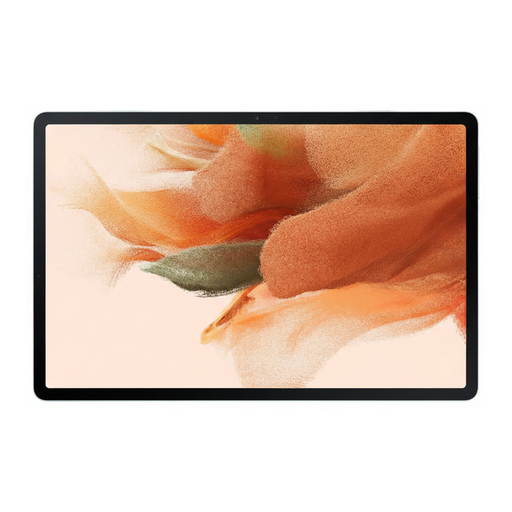 No image available
If you want plenty of room for handwritten working, this 12.4-inch model could be an option, with an S Pen listed in the description.
It’s listed with 64 GB of storage and Wi-Fi; the product description also mentions microSD expansion. At 12.4 inches and 608 g, it may be less convenient to use in a cramped seat.
Don’t make it your only option. According to Deutsche Bahn, WIFIonICE is available on all ICE trains and increasingly on IC trains, but connection problems can occur. Check whether your specific learning app lets you complete a full set of questions offline and syncs your answers afterwards.
Download the content you need in your learning app in advance and test a question without an internet connection, including checking that the answer is displayed and syncs afterwards. This is especially important if you’re using a Wi-Fi-only model.
You don’t necessarily need a stylus to tap out answers, but if you want to write out calculations or add notes by hand, check that it’s compatible with your specific model. For the iPad (A16), Apple lists the Apple Pencil (USB-C) and the 1st generation Pencil; Apple says an adapter is needed to pair and charge the latter.
If you buy as a consumer from a business seller in the EU, EU consumer information says you’re entitled to a minimum two-year legal guarantee from the date you receive the goods. Any additional guarantee offered is separate; the EU information excludes purchases from private individuals from these rules.