If you want to review PDF plans together, choose a screen size that suits your table and drawings. For handwritten annotations, the stylus, app and process for saving or sharing the file all need to work together. Apple Germany and Samsung Germany list larger-screen options, while Apple does not include a Pencil with the iPad Air and Samsung lists an S Pen in the box for the Galaxy Tab S10 FE series. If you need a particular Windows desktop application, check its requirements before choosing a device: a mobile PDF app will not necessarily offer the same features.
Who is this selection for?
People reviewing plans together
You look at drawings with one or more people around a table and want everyone to be able to read the annotations without constantly adjusting the view. Apple Germany and Samsung Germany list different screen sizes across their tablet ranges.
People annotating plans
You want to record questions or changes directly in a file. The stylus, app you use and process for saving and sharing annotations all need to work together. Apple Germany and Samsung Germany describe stylus support and the contents of the box for their respective models.
Users of specialist applications
You rely on a particular project file format or desktop application. So check the software requirements and try a sample file before comparing screen sizes or accessories. For Revu on Surface Pro, Bluebeam lists an Intel processor and Windows outside S mode among its requirements.
What should you look for when buying?
First, check that your file opens and can be edited as needed in the app you plan to use. Then consider the screen, stylus and portability in the context of how you work in meetings.
| What matters |
What to check when buying |
Who is this important to? |
| Reading plans together |
Try a typical plan in the app you intend to use, and compare how legible the annotations are alongside the screen and device size. |
If I review drawings with others around a table, I want to read the annotations clearly without constantly zooming in; around 33% of consumers are likely to make readability for group viewing their top buying consideration. |
| Recording changes |
Check stylus compatibility, what’s included in the box, and whether you can save and share annotations on your sample file. |
If I note down questions or changes during a discussion, the whole process needs to work, from using the stylus to sharing the file; around 25% of consumers are likely to place the greatest importance on annotations. |
| Files and specialist software |
Use an approved sample file to check the file format, required app version and licence. For Revu on Surface Pro, Bluebeam lists an Intel processor and Windows outside S mode among its requirements. |
If my project depends on a particular file format or desktop application, I check compatibility first; around 25% of consumers are likely to prioritise access to their files. |
| Space and portability |
Compare the dimensions and weight of the specific model with the space available at your table and how often you’ll want to hold the device. |
If there’s limited room on the table or I want to hold the tablet often, the screen shouldn’t make it unnecessarily awkward to handle; around 17% of consumers are likely to prioritise space and portability. |
Common misconceptions
-
A large screen doesn’t automatically mean the software will work
Being able to see a PDF clearly doesn’t prove that a desktop application you need will run on a tablet with iPadOS or Android. Bluebeam distinguishes Revu for Windows from its web and mobile offerings.
Check the essential features you need using an approved sample file in the app you intend to use.
Depending on your workflow, you may need an additional software licence or a different device.
-
Stylus support doesn’t always mean a stylus is included
Apple lists compatible Pencil models for the iPad Air, but doesn’t include a Pencil with the tablet. Samsung lists an S Pen in the box for the Galaxy Tab S10 FE series.
Check stylus compatibility and what’s included with the specific model before choosing a tablet.
If you need to buy a stylus separately, factor that accessory into your planned setup too.
-
Different models in a range may come with different specifications
Lenovo lists different screen finishes and accessory configurations for the Idea Tab Pro. So a bundle with a pen may not apply to every offer in the range.
Check the screen finish, pen and other accessories included with the specific offer.
Key brands at a glance
Apple
The 11- and 13-inch iPad Air may suit mobile PDF reviews if the iPadOS app you need fits your workflow.
- Apple Germany lists the 13-inch model’s actual measured screen diagonal as 12.9 inches, with support for Apple Pencil Pro and Apple Pencil (USB-C).
- The listed contents include the tablet and a USB-C cable, but no Pencil. You’ll need to check separately that your project file and app are compatible.
Samsung
The Galaxy Tab S10 FE and FE+ offer different screen sizes for viewing plans and adding annotations with a stylus.
- Samsung Germany lists a 10.9-inch screen for the Tab S10 FE and a 13.1-inch screen for the Tab S10 FE+. An S Pen is listed in the box for the S10 FE series.
- Samsung does not list a power adapter among the included items. The screen and stylus alone don’t guarantee that a particular project file will work in the app you need.
Lenovo
The Idea Tab Pro is a 12.7-inch Android tablet, and the specific model and pen bundle matter.
- Lenovo lists a screen resolution of 2944 × 1840 pixels.
- Lenovo says models vary, with either a glossy or paper-like anti-glare finish. Check whether a pen is included with each offer.
Microsoft
The Intel-powered Surface Pro for Business may suit you as a Windows 2-in-1 if you need a compatible desktop application.
- Microsoft lists a resolution of 2880 × 1920 pixels for the 13-inch Intel model, which weighs 895 g in the Wi-Fi version.
- Bluebeam lists requirements for running Revu on Surface Pro. Hardware specifications alone don’t confirm compatibility with every specialist application or the right licence.
Xiaomi
The Pad 7 is an 11.2-inch Android alternative if portability matters more to you than having the largest possible screen for group plan reviews.
- Xiaomi lists a 3:2 aspect ratio and a resolution of 3200 × 2136 pixels for the screen. The Pad 7 is compatible with the Focus Pen.
- Stylus compatibility doesn’t mean the pen is included with every offer or that a particular plan app supports all the features you need.
Tablets for reviewing project drawings at the table
This selection includes tablets for viewing project drawings together at a table and, depending on the model and compatible app, making handwritten notes.
 No image available
Microsoft Surface Pro 11, 13-inch, Snapdragon X Plus, 16 GB RAM, 512 GB
For viewing plans at the table, provided the application you need is compatible with this Snapdragon model and your Windows workflow.
As stated in the product name: 13-inch screen, Snapdragon X Plus, 16 GB RAM and 512 GB storage.
Check the requirements of your specific specialist application before buying.
View at Joybuy
 No image available
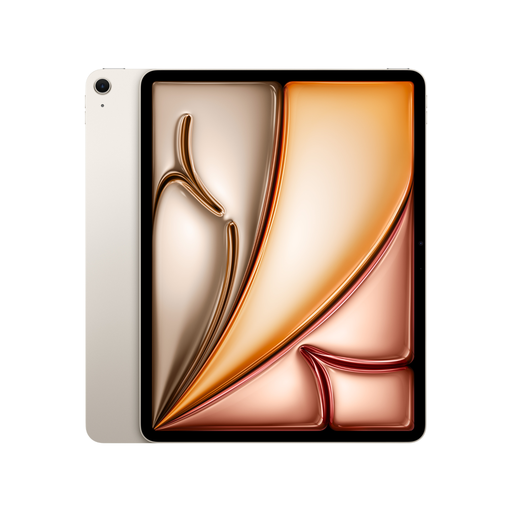
Apple 13-inch iPad Air (M4, 2026), Wi-Fi, 128 GB, Starlight
For viewing plans together and adding handwritten annotations, provided your project file and iPadOS app suit your workflow.
As stated in the product name: 13-inch screen, M4, Wi-Fi and 128 GB storage. Apple lists support for Apple Pencil Pro and Apple Pencil (USB-C) for the iPad Air.
The listed contents include the iPad Air and a USB-C charging cable, but no Apple Pencil.
View at Joybuy
 No image available
TECLAST T65, 13.4-inch, 120 Hz, Android 16, 128 GB, with folio case
For viewing plans on a large screen at the table, provided the app you intend to use works on the device.
As stated in the product name: 13.4-inch screen, 120 Hz, Android 16, 128 GB storage and a folio case.
View at Joybuy
 No image available
TECLAST ArtPad Pro 2025, 13.4-inch, 2K display, T-Pen, 256 GB
For viewing plans together and adding annotations with a stylus, provided the plan app and included T-Pen suit your workflow.
As stated in the product name: 13.4-inch screen, 2K display, T-Pen and 256 GB storage.
Check in advance that the app you need supports the file and annotation process you want to use.
View at Joybuy
 No image available
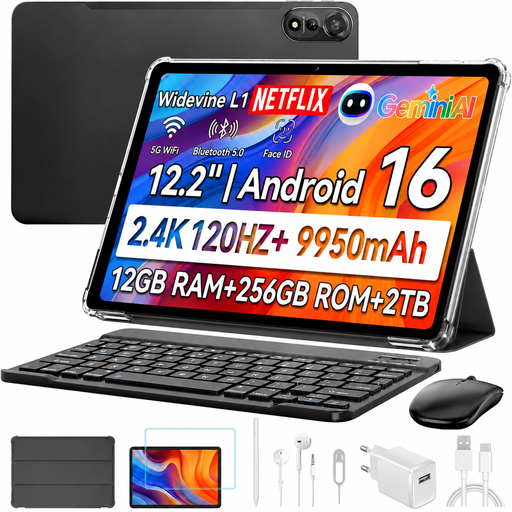
Blackview MEGA 12 5G, 12.2-inch, 2.4K, 12 GB RAM, 256 GB
For reviewing plans at the table, if the input devices listed in the product name suit your setup.
As stated in the product name: 12.2-inch screen, 2.4K, 120 Hz, 12 GB RAM and 256 GB storage. A keyboard, stylus and mouse are also listed.
Check that your specific plan app works with the device and the stylus workflow you want to use.
View at Joybuy
Frequently asked questions
Is a PDF app enough if my drawings come from specialist software?
Only if you can use it to edit the PDF file and add the comments you need. Adobe documents mobile PDF viewing and annotation, while Bluebeam offers Revu as a Windows desktop app, as well as separate web and mobile products. Test a sample file, the features and the licence in your intended workflow.
How can I prepare for a plan review without reliable Wi-Fi?
Save an authorised copy of the file you need in the app you plan to use, then check before the meeting that you can open it offline. Also check that annotations are saved correctly and can be shared later; this depends on the app and how it is set up.
Does a tablet automatically come with a stylus?
No, what’s included depends on the model and offer. Samsung lists an S Pen in the box for the Galaxy Tab S10 FE series; Apple lists compatible Pencil models for the iPad Air, but does not include a Pencil with the tablet. Check the specific model.
What rights apply when buying online in Germany?
Consumers generally have a 14-day right to cancel an online distance sale, although exceptions and the terms of the specific contract apply. The EU’s Your Europe website also explains that faulty goods are covered by a legal guarantee of at least two years. These consumer rights do not automatically apply to purchases made for a business.


