If you mainly read reflowable text and hold your tablet for long periods, a compact model is a sensible place to start. For fixed-layout PDFs with images and footnotes, a larger screen is a better fit. With e-paper, look beyond greyscale to the lighting on the specific model and the file formats it supports. Check your essays and the reading app’s offline functionality before you buy and before you fly.
Which tablets suit different readers?
Readers of PDFs with images
If you read essays as fixed-layout PDFs, you’ll want to see the text, footnotes and graphics together as much as possible. To compare screens, view a typical original page on the display rather than relying on the stated screen size alone.
Hand-luggage and reflowable-text readers
If you mainly read reflowable text and often hold your device, weight and portability are important considerations. However, a compact screen shows less of a fixed-layout PDF page.
Readers who make margin notes
If you annotate by hand, check not only the screen size but also whether your stylus is compatible with the specific tablet, whether it’s included and how you can import and annotate your PDFs.
What should you look for when buying?
Compact colour tablet
A good fit if: You mainly read text that can be resized and often hold your device.
The trade-off: You may need to zoom in more often when reading small print in fixed-layout PDFs.
Larger colour tablet
A good fit if: You like to view PDF pages with equations, tables or images all together.
The trade-off: A larger device takes up more room in your seat, so check that it suits the way you like to read.
E-paper tablet
A good fit if: Black-and-white text and PDF annotations are your priorities, and you don’t need colour.
The trade-off: For colour graphics and low-light conditions, the specific display and suitable lighting both matter.
| Your priority |
What to check before buying |
Who it matters most to |
| PDF readability |
View a typical page with equations, footnotes and captions in your intended app and at your preferred text size. For colour graphics, check that the colours remain distinguishable. |
If you want to see complete fixed-layout pages at a glance, choosing the right screen size is key. Around 28% of consumers put PDF readability first. |
| Offline access |
Download your essays in advance and open the actual file, including its graphics, in the intended app while in flight mode. |
If you don’t want to rely on an internet connection during your flight, test access to your own files beforehand. Around 22% of consumers prioritise offline access. |
| Comfort in your seat |
Consider the weight of the exact model, and its case if applicable; check how it feels in your preferred reading position. |
If you do a lot of reading while holding your tablet and have limited space, a light device that’s easy to stow is especially important. Around 22% of consumers prioritise portability. |
| Battery reserve |
Compare battery-life claims only when they’re based on the same test conditions. Also check charging requirements and what’s included with the specific model. |
If your tablet needs to last through a long journey without reliable access to charging, battery reserve matters more than a manufacturer’s figure measured in different conditions. Around 17% of consumers prioritise battery life. |
| Handwritten notes |
Check stylus compatibility and what’s included, then test PDF import, annotation and export using one of your own files. |
If you want to add handwritten notes to your essays, the stylus and file workflow need to suit the way you work. Around 11% of consumers prioritise annotation. |
Which buying mistakes should you avoid?
-
Choosing a small screen based on weight alone
A compact tablet saves space, but shows less of a fixed-layout page. PDFs with footnotes and images may require frequent zooming.
Before you choose, open a typical essay page on the screen you’re considering and check whether you can read the text and graphics in your preferred view.
-
Assuming stylus support means a stylus is included
A tablet may be compatible with a stylus even if one isn’t included in the specific package.
If you want to make handwritten annotations, you may need to buy a compatible stylus separately.
Check the exact tablet generation, compatible stylus model and what’s included with the offer.
-
Treating the manufacturer’s battery-life claim as guaranteed reading time
Lenovo’s figures for the Tab M11 are based on video or web use under its internal test conditions, not on your PDF reading time.
Charge your tablet before your flight and allow for a reserve, rather than assuming a figure measured in different conditions will reflect your own use.
-
Choosing e-paper without considering lighting and graphics
According to the manufacturer, the original BOOX Go 10.3 has no front light; BOOX describes the Go 10.3 (Gen II) Lumi as having a front light. Greyscale may also be unsuitable for colour-coded images.
If your chosen model isn’t bright enough in low light, you may need an additional reading light.
Check the exact model and try viewing an original colour graphic on the device.
Brands worth considering
Apple
The models listed mainly differ in size and screen area: the iPad mini is more compact, while the iPad (A16) has a larger display.
- Apple lists the iPad mini at 8.5 inches and 255 g for the Wi-Fi model, and the iPad (A16) at 11 inches and 477 g for the Wi-Fi model.
- The models support different Pencil versions. Apple doesn’t list a stylus as included with the iPad (A16), so check compatibility and what’s included with the specific offer.
Samsung
The Galaxy Tab A11 is a more compact Android option, while the Galaxy Tab S10 FE offers a larger screen and, according to Samsung, comes with an S Pen.
- Samsung lists the A11 as having an 8.7-inch display with a resolution of 1340 × 800 pixels, and storage options of 64 or 128 GB. The S10 FE is listed at 10.9 inches.
- RAM specifications don’t necessarily apply to every A11 version. Check the model and package if storage or a stylus will influence your choice.
BOOX
The Go 10.3 range is aimed at readers considering e-paper and PDF annotation.
- BOOX describes the Go 10.3 as supporting PDF annotations. The manufacturer lists a front light for the Go 10.3 (Gen II) Lumi.
- According to BOOX, the original Go 10.3 has no front light. Also check whether greyscale and the app you want to use will work for your graphics and files.
Lenovo
The Tab M11 is a larger Android option. For a long journey, the test conditions behind its battery-life claim and the exact package configuration are important.
- Lenovo quotes around 10 hours of video or web use under its internal test conditions, and notes that actual battery life may vary.
- Lenovo also lists Tab M11 packages without a mains adapter. Check what’s included with the specific model, and don’t assume the manufacturer’s figure guarantees PDF reading time.
HONOR
The Pad 10 is an Android option with a large screen, making it worth considering if seeing a complete document matters more than choosing a particularly compact device.
- HONOR lists a 12.1-inch display and a typical battery capacity of 10,100 mAh, or a rated capacity of 10,000 mAh.
- Battery capacity alone doesn’t tell you how long you can read PDFs. HONOR notes that package contents may vary by market or offer.
Tablets for academic essays
This Joybuy selection includes tablets with different screen sizes for reading essays and PDFs. Before buying, check that your files and preferred reading app work offline.
 No image available
Samsung Galaxy Tab A11+ X230, 11 inches, WiFi, 6 GB RAM, 128 GB, Grey
An option if you’re looking for an 11-inch tablet for essays; test your PDF pages and offline access in the app you plan to use.
WiFi, 6 GB RAM and 128 GB storage.
View at Joybuy
 No image available
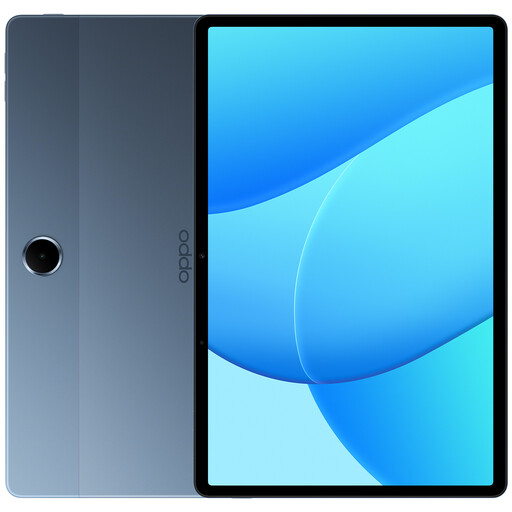
OPPO Pad SE, model OPD2419 EUN, 128 GB, 4 GB RAM, Twilight Blue, WiFi
An option for readers looking for a tablet for their essays; check how it displays your PDFs and whether your files are available offline.
128 GB storage, 4 GB RAM and WiFi.
View at Joybuy
 No image available
HONOR Pad 10, 12.1 inches, WiFi, 256 GB, Grey
The larger format is worth considering if you prefer more screen space for essays; test a typical page and access to local files.
12.1 inches, WiFi and 256 GB storage.
View at Joybuy
 No image available
Microsoft Surface Pro 12 Snapdragon Plus, 24 GB RAM, 1 TB, Platinum
An option if you’re looking for a tablet with plenty of storage for academic PDFs; check that it supports your preferred reading app and offline file access.
Snapdragon Plus, 24 GB RAM and 1 TB storage.
View at Joybuy
 No image available
Teclast ArtPad Pro 2025, 13.4 inches, 2K, 256 GB, with T-Pen
The large display and included stylus may suit you if you want more room to view PDF pages and make handwritten notes. Test importing and annotating your own files.
13.4 inches, 2K display and T-Pen with 4096 pressure levels.
View at Joybuy
Frequently asked questions
Can I use a tablet to read on a plane?
According to the European Union Aviation Safety Agency (EASA), tablets can generally be used for reading on board. Follow your airline’s and crew’s instructions for your specific flight. EASA recommends carrying devices with lithium batteries in your hand luggage rather than in checked baggage.
Do I need a mobile data connection to read essays I’ve downloaded?
Not necessarily: Google Play Books explains how to download books to read offline on mobile devices. The important thing is to check that your specific reading app and essays work in flight mode before departure.
How should I prepare my tablet for reading on a flight?
Download your actual files before you travel, then open a typical essay file in flight mode. Check the text, graphics and, if needed, annotations in the app you plan to use on board.
How should I plan battery life for a long flight?
Compare battery-life claims only when they’re based on the same test conditions. Lenovo quotes around 10 hours of video or web use for the Tab M11 under its internal test conditions; this isn’t a guarantee of PDF reading time. Charge your tablet before departure and check whether a mains adapter is included with your specific model.


