Train readers who look up words
You read texts in another language and need a reading app that lets you highlight text and use the language tools you want with your chosen reading material – even without an internet connection, if needed.


A compact tablet is a good fit for reading in another language on the train if your chosen reading and language apps work with your file, and you mainly read adjustable text. For PDFs with fixed layouts, a larger display may be more important, but it takes up more room and, depending on the model, may weigh more too. Download your reading app and any language data you need before you travel, and test that you can access them offline rather than relying on train Wi-Fi.
You read texts in another language and need a reading app that lets you highlight text and use the language tools you want with your chosen reading material – even without an internet connection, if needed.
You have little room to put things down, so you compare the device’s dimensions and weight with the space it will take up at your seat.
Your language-learning or study material has fixed pages. You’re weighing up whether you want to see the whole page or would rather hold a more compact device.
First check that the specific app works with your file, then make sure you can access it offline. Only then consider which display size works best at your seat.
| Priority | What to check before buying | Who is this important to? |
|---|---|---|
| Looking up words | Test text selection, highlighting and your chosen language pair in the app and file you plan to use. Also check whether you can access any language data you need offline. | If I want to highlight and look up words in my reading material, it needs to work with the specific file I use. Around 24 % of consumers put language tools first. |
| Comfort at your seat | Compare the dimensions and weight of the exact device version; a case will add to both. Smaller displays save space, but show less of a fixed page. | If you want to hold your tablet for longer in a confined space, weight and dimensions matter most. Around 24 % of consumers prioritise portability. |
| Offline access | Download your reading app before travelling and test it without Wi-Fi or mobile data. Check separately that dictionaries and any language data you need are available offline. | If the connection on my route isn’t reliable, I want to be able to open my reading material offline. Around 19 % of consumers put offline access first. |
| Fixed PDF pages | Compare the same original page on a compact display and a larger one. A larger screen takes up more room and may weigh more, depending on the model. | If you want to see tables, notes in the margins or a whole PDF page, you’ll need to balance screen space against portability. Around 19 % of consumers prioritise fixed page layouts. |
| App access and ongoing costs | Check the app store, whether your edition of the reading material is available, and what’s included with the exact device version. Google Play isn’t available on Fire tablets. | If it’s important to me that I can actually use the app and book edition I want, I check access before buying a device. Around 14 % of consumers prioritise app access and overall costs. |
A compact display may be fine for adjustable text, but a whole page from a fixed-layout reading app can look small on it.
Try an original page in the app you plan to use and compare fixed and adjustable layouts before deciding based on screen size alone.
Wi-Fi availability varies by train and route. Having a connection while travelling isn’t a substitute for downloading your content in advance.
Download your book and any language data you need before your journey, then check that you can access them without a connection.
Google Play isn’t available on Fire tablets, so an app you need may not be accessible.
Before buying, check that your reading app, language tools and purchased titles will work through the available options.
The iPad mini range is worth considering if you’re looking for a compact iPad and compatible iPadOS apps.
The Galaxy Tab A11 is a compact Android option. Larger models such as the A9+ involve a different trade-off between screen space and portability.
The Tab One is another compact Android option.
The Joybuy products below include compact Android tablets and larger displays for reading material with fixed page layouts. Before buying, check that your specific reading and language apps work with the operating system on each device.
 No image available
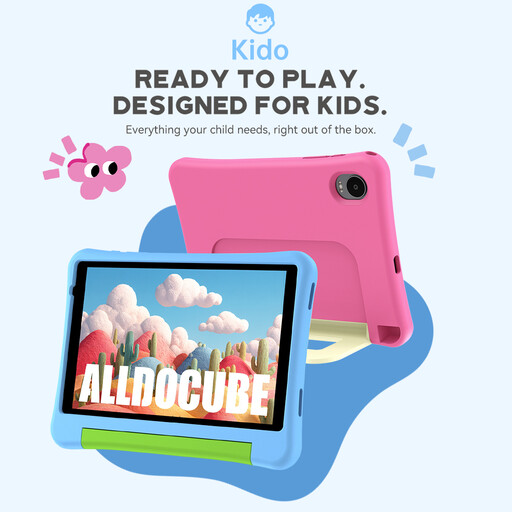
This compact Android tablet may suit you if your reading app works with Android 15; check the app’s features in advance.
The product description lists an 8-inch screen, Android 15, 3 GB RAM and 32 GB storage, plus a pink protective case, parental controls and no adapter.
 No image available
Its 8.8-inch screen is a compact option if your reading app works with Android 14 and you want to use your device in a confined space.
The product description lists Android 14, 12 GB RAM, 256 GB storage, Qualcomm Snapdragon 7+ Gen 3 and a 7.300 mAh battery. An adapter isn’t included.
 No image available
The larger display may suit you if you want more room for fixed-layout pages and have enough space at your seat.
The product description lists an 11-inch Wi-Fi model with 6 GB RAM and 128 GB storage.
 No image available
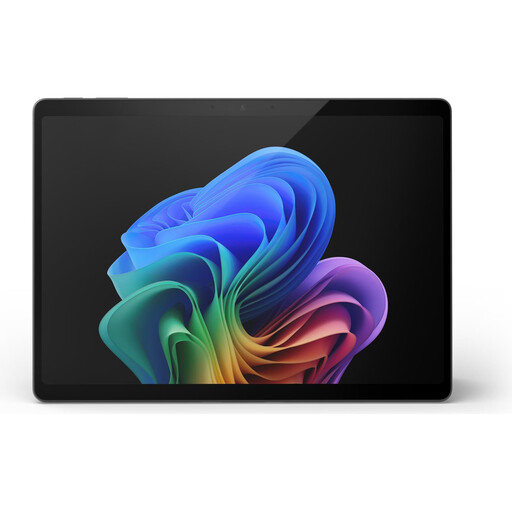
A 13-inch display gives you more room for reading pages, but takes up more space on the train than a compact tablet.
The product description lists 16 GB RAM and 512 GB storage.
 No image available
The large display may be useful for fixed-layout pages, but takes up more room on the train than compact devices.
The product description lists a 13.4-inch FHD IPS display with 1.920 × 1.200 pixels, 20 GB RAM (8 GB + 12 GB virtual), Wi-Fi and a set with keyboard, mouse and stylus.
Don’t rely on it alone. Deutsche Bahn says Wi-Fi is available throughout its ICE fleet, but only on parts of its Intercity fleet and on selected regional trains; the connection can fluctuate. Download the title you want in advance and test it offline.
Google Play distinguishes between fixed original pages and text that can be resized dynamically. Check which layout your specific file supports in your reading app; a larger tablet doesn’t automatically let you adjust the text.
Install the reading app you plan to use, download your reading material and try opening it without a connection. If you need translations, check the offline settings for your language service and chosen language pair. For example, Apple explains how to download certain languages for translation on iPad.
No. Google Play isn’t supported on Fire tablets. Before buying, check that your reading and language apps, as well as the titles you need, are available on the specific model.