What should you look for when buying?
First, work out whether you need to read, add comments to PDFs or track changes in a Word document. Then weigh up screen size and accessories to suit your seat and the way you work.
| What matters to you |
What to check when buying |
Who is it important for? |
| Reading and ease of use |
Screen size and dimensions; open a contract page in the app you plan to use, while sitting in your usual seat. |
If I want to read longer pages in a confined space and hold the device comfortably, ease of use matters to me. Around 29% of consumers put readability and ease of use first. |
| PDF annotations |
Check the stylus model and what’s included; try importing and exporting a PDF using a non-confidential test file. |
If I want to mark clauses by hand and share the annotated PDF, I need a suitable stylus and reliable export. Around 29% of consumers prioritise PDF annotations. |
| Offline access |
Save the correct version of the contract locally, then test opening and editing it in the app you plan to use, as well as syncing it later. |
If I need to open the correct version of a contract even when the connection is unreliable, I want it ready to access offline before I travel. Around 21% of consumers put offline access first. |
| Confidentiality |
Check which devices, apps and storage locations are approved; make sure transfers and protection from onlookers meet your organisation’s policies. |
If my contract contains confidential or personal information, I first check which working methods are approved and protect the screen from prying eyes. Around 21% of consumers prioritise protecting confidential information. |
Deutsche Bahn describes WIFIonICE as public Wi-Fi and says it is available on all ICE trains and on an increasing number of IC trains. So don’t rely on having a connection throughout your journey: prepare the approved file in advance and check that you can access it offline.
For personal data, the European Data Protection Board requires controllers and processors to put appropriate technical and organisational measures in place, based on the level of risk. Check with the relevant organisation which devices, apps and transfer methods are permitted for the specific work contract you’re reviewing.
Joybuy products for working on the go
This selection includes tablets for reading documents and taking handwritten notes on the go. Before buying, check that the app and file workflow for each model suit the way you review contracts.
 No image available
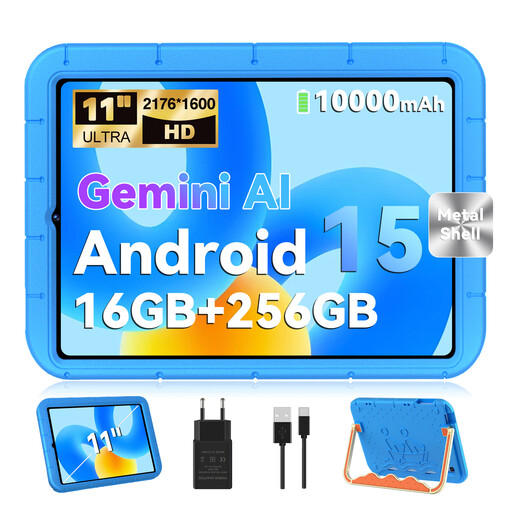
GOODTEL G11, Android 15, 11-inch, 256 GB, Blue
The 11-inch format gives you a practical screen size for reading in your seat; check that its dimensions will fit your space.
The listing title specifies a 2176 × 1600-pixel screen, 16 GB RAM (8 GB + 8 GB virtual), 256 GB ROM and an EVA case.
View at Joybuy
 No image available
iFLYTEK AINOTE 2, 10.65-inch E Ink tablet with protective case
This device is described as an E Ink tablet for reading and note-taking. Check that it supports the contract features you need and the required return format.
The product description lists an included stylus, local note storage and a thickness of around 4.2 mm. An internet connection is required for the speech transcription described there.
View at Joybuy
 No image available
Samsung Galaxy Tab S7 FE, 64 GB, Wi-Fi, Green
The larger screen could be useful for reading longer pages, but it takes up more room in a limited seating area.
The product description lists a 12.4-inch screen and an included S Pen.
View at Joybuy
 No image available
TECLAST ArtPad Pro, 12.7-inch, T-Pen, case and English Bluetooth keyboard
The larger-screen option may suit reading longer pages, provided it’s still manageable in your seat.
The listing title specifies a 12.7-inch screen, a T-Pen with 4096 pressure levels, a protective case and an English Bluetooth keyboard.
View at Joybuy
 No image available
Apple 11-inch iPad Air (M4, 2026), Wi-Fi, 128 GB, Blue
The 11-inch iPad Air could suit you if you already work with iPad files and apps and want to annotate PDFs on the go.
Apple lists the Wi-Fi model as weighing 464 g. If you want to make handwritten notes, you’ll need to budget for a compatible Apple Pencil separately; the listed contents don’t include one.
View at Joybuy
Frequently asked questions
Is train Wi-Fi reliable enough to review a contract during your journey?
Don’t rely on train Wi-Fi alone for a file you need. Deutsche Bahn says WIFIonICE is available on all ICE trains, but only on an increasing number of IC trains; mobile reception can also vary. Before you travel, check that you can open the approved version of the contract offline.
Are PDF annotations the same as tracked changes in Word?
No. Apple and Samsung describe tools for adding PDF annotations, while Microsoft documents comments and tracked changes in Word on iPad as separate features. Choose an app that supports the required output format and test sending back a sample file.
Can I access personal contract data over WIFIonICE?
There’s no simple yes-or-no answer. The European Data Protection Board requires controllers and processors to use measures that are appropriate to the level of risk. Deutsche Bahn describes WIFIonICE as public Wi-Fi and recommends using a VPN or HTTPS. For work documents, you must also follow the policies of the organisation responsible for them.
What should I set up before my first train journey?
Open an approved test file in the app you plan to use, try adding annotations and exporting it, and check where it’s stored locally. In the Files app, Apple distinguishes files stored locally from those in cloud storage locations.
What should I check about the stylus and warranty?
Check whether a compatible stylus is actually included or needs to be bought separately. Your statutory rights against the seller are separate from any voluntary manufacturer’s guarantee; the Verbraucherzentrale recommends checking the terms of the specific offer.


