Annotating PDFs by hand
If you want to note questions beside relevant passages as you read, consider the stylus, note-taking app and storage for your seminar materials as one complete workflow.


For adding short questions directly beside the relevant text, stylus compatibility and a reliable PDF workflow are essential. If you’ll be writing longer questions, a suitable keyboard matters more. A compact device is easier to fit on a cramped train seat, while a larger display gives you more room for documents. Save your materials and test them offline before you travel, as Wi-Fi isn’t available on every type of train and the connection can be patchy.
If you want to note questions beside relevant passages as you read, consider the stylus, note-taking app and storage for your seminar materials as one complete workflow.
If you work at your train seat and want to get your device out and put it away quickly, compare the tablet’s dimensions and weight with the case or keyboard you’ll need.
If you write fully developed questions rather than brief notes in the margins, look for a suitable keyboard and check that your text app supports the workflow you need while travelling.
First, consider whether you’ll mainly write by hand or use a keyboard. Then think about the space available at your seat and whether your documents will be accessible without an internet connection.
| What you need | What to check before buying | Who is it important to? |
|---|---|---|
| Write questions by hand on documents | Check stylus and tablet compatibility, what’s included and the PDF features of the app you plan to use. | If I want to jot down short questions beside highlighted passages, I need a compatible stylus and a seamless PDF workflow. This is a priority for around 33% of consumers who value handwriting most. |
| Make the most of limited space | Compare the dimensions and weight of the specific version, including any accessories you’ll actually need. | If I have little space at my train seat, I want to use my tablet comfortably and put it away quickly. Around 27% of consumers prioritise keeping their space requirements to a minimum. |
| Type longer questions | Check that the keyboard is compatible with the exact tablet model and see what’s included with that version. | If I’m writing detailed seminar questions, a compatible keyboard matters more to me than a stylus for short notes in the margins. Around 20% of consumers prioritise longer typing. |
| Work without reliable train Wi-Fi | Before you travel, test whether you can open and edit your PDFs and notes without an internet connection. Deutsche Bahn says Wi-Fi is available across its entire ICE fleet, as well as on some Intercity trains and selected regional trains; speeds can vary. | If I want to work on my seminar materials even when the connection drops, my workflow needs to work offline. Around 20% of consumers prioritise working independently of an internet connection. |
Apple’s details for the iPad (A16) list a compatible Apple Pencil, while Samsung says the S Pen is included with the Galaxy Tab S10 FE. Compatibility and what’s in the box are two different things.
Check the exact model name, the compatible stylus and what’s included with the specific offer separately.
More screen space can make reading and writing easier, but it takes up more room at your seat. A manufacturer’s size and weight specifications won’t tell you how easy a device will be for you to handle.
Decide whether you’d rather have more document space on screen or a smaller device that’s easier to put away.
Deutsche Bahn notes that Wi-Fi availability and connection speeds vary. Some sharing features may also depend on a service or subscription.
Before you travel, test whether you can open and edit your materials in your chosen app without an internet connection.
The iPad (A16) and iPad Air are worth considering if you’re looking for a versatile tablet that works with a compatible Apple Pencil.
The Galaxy Tab S10 FE range is an option for handwritten notes with an S Pen.
The Pad 7 could suit an Android workflow using a stylus and compatible keyboard.
The Paper Pro Move is designed for handwritten notes, reading and PDF annotations, rather than the broad app selection of a versatile tablet.
The Tab K11 could be a good fit if a compatible stylus, sold separately, and the stated software support period matter to you.
This selection includes tablets with keyboards for longer questions, as well as stylus and E-Ink models for handwritten notes.
 No image available
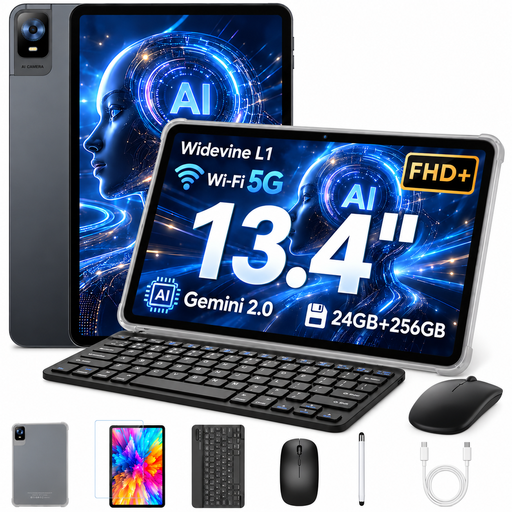
For typing longer questions, with the option to add notes using the stylus; the product name also lists a mouse and protective case.
13.4-inch display with 1920 × 1200 resolution; 256 GB storage.
 No image available
For handwritten questions and longer texts, if you’re happy to buy a compatible stylus and keyboard separately.
The product details list support for Apple Pencil Pro, Apple Pencil (USB-C) and Magic Keyboard. The box contents are listed as iPad Air and USB-C charging cable; no stylus or keyboard is listed.
 No image available
An option for typing seminar questions, if the keyboard suits the way you want to work.
3.2K display with 144 Hz; 8 GB RAM and 128 GB ROM.
 No image available
For handwritten notes and a reading-focused workflow; the product name also lists speech-to-text and handwriting-to-text features.
According to the product description, speech transcription requires an internet connection.
 No image available
For combining handwritten additions with longer typed questions; note that the included Bluetooth keyboard is described as English.
The product name lists a T-Pen with 4096 pressure levels and a 12.7-inch 2K display.
No, not if you mainly highlight passages and jot down short questions beside them. First, check the stylus and PDF app. For longer, fully written-out questions, a keyboard that works with your tablet may be more useful. Whether one is included depends on the specific version.
Save the seminar PDF in your chosen app before you travel, then test editing it and syncing it later without a connection. Deutsche Bahn says Wi-Fi is available across its entire ICE fleet, as well as on some Intercity trains and selected regional trains; speeds can vary too.
Your statutory rights against the seller for faulty goods are separate from any voluntary guarantee. According to Germany’s consumer advice centres, online contracts generally come with a 14-day right to cancel. Check the conditions and any possible exceptions for your specific purchase.
For electrical and radio-enabled devices, the Federal Network Agency lists checks including correct CE marking, manufacturer details, instructions and warnings in German, and a declaration of conformity. A CE mark alone is not an independent quality assessment.