If you mainly read continuous text in bed and hold the tablet in your hand, a more compact size is likely to suit you better. A larger display gives you more room for maps and finds drawings, provided you can prop the device up. Try a typical PDF in your usual reading position, and check the weight, note-taking app and what’s actually included in the box. Screen size alone doesn’t prove that small labels in your file will be legible.
Which size is right for you?
Readers of large plans
If you want to view maps, finds drawings and labels together, a clear, usable PDF view matters more than an especially compact design. The University of York’s Archaeology Data Service includes unpublished reports and specialist publications in its archive.
Readers who hold their tablet
If you read for long stretches in bed without a firm surface to rest the tablet on, you’ll need to weigh up the larger viewing area against the weight and how comfortable it is to hold. Try holding the device in your usual position, or see whether you’d rather prop it up.
Readers who make notes in the margins
If you want to mark finds by hand and find or share them later, the stylus, PDF app and file export all need to work together. Try these features with one of your own files.
What should you look for when buying?
A more compact tablet of around 11 inches
A better fit if: you mainly read text, hold the device yourself and zoom in on PDFs when needed. Apple Germany lists the iPad Air 11 Wi-Fi at 464 g; Xiaomi Germany gives the Pad 7’s weight as 500 g.
The trade-off: You may need to zoom and pan more on fixed PDF pages with lots of detail. These weights refer to the devices themselves, not to use with a case.
A larger tablet of around 12.7 inches or more
A better fit if: you want to see plans, tables and captions together more often, and can prop the device up. Lenovo lists the Idea Tab Pro as 12.7 inches; Apple offers a 13-inch version of the iPad Air.
The trade-off: A larger display doesn’t guarantee that tiny labels will be legible. Apple lists the iPad Air 13 Wi-Fi at 616 g, compared with 464 g for the 11-inch Wi-Fi model.
| Buying priority |
What to look for |
Who is this important to? |
| A clear view of large PDF pages |
Open a typical report page and check whether the legends remain legible at a comfortable zoom level, and how often you need to pan. Apple Germany lists the iPad Air 13 at 2732 × 2048 pixels; Lenovo Germany lists 2944 × 1840 pixels for one Idea Tab Pro configuration. These figures are no substitute for trying your own file. |
If I want to view a map, its legend and text together on a fixed PDF page, I check the view using my own file. Around 36% of consumers put this full-page overview first. |
| Comfort when holding the tablet to read |
Compare the weight of the exact model with the case you plan to use, and try reading both while holding it and with it propped up. Apple Germany lists the iPad Air 11 Wi-Fi at 464 g and the iPad Air 13 Wi-Fi at 616 g; Xiaomi Germany gives the Pad 7’s weight as 500 g. |
If I want to read for long stretches without a surface to rest the tablet on, the weight and grip need to suit my usual position. Around 29% of consumers put comfort when holding the tablet first. |
| Handwritten notes and PDF export |
Check whether a stylus is included, whether it works with your preferred app, and whether you can import, annotate, export and reopen a test PDF. Samsung Germany says the S Pen is included with the Tab S10 FE; Apple Germany lists compatible Pencil models, but no Pencil in the iPad Air package described. Samsung lists PDF as an export format in Samsung Notes. |
If I want to mark finds and use the edited file again later, I test the whole process rather than just checking stylus compatibility. Around 21% of consumers prioritise editable handwritten notes in the margins. |
| Viewing in the evening |
Try the display settings and check for reflections where you usually read, using your own PDF. Xiaomi Germany lists a reading mode for the Pad 7; Apple Germany lists an anti-reflective coating for iPad Air displays. Neither tells you how comfortable the display will be for you. |
If I read in the evening under my usual room lighting, I want to check small captions and spot any distracting reflections. Around 14% of consumers make the display in these conditions their main priority. |
Common misconceptions
-
A large screen automatically makes reading in bed more comfortable
Apple Germany lists the Wi-Fi iPad Air 11 at 464 g and the iPad Air 13 at 616 g. Both figures are for the devices without accessories.
Try one of your own PDFs both in your hand and with the tablet propped up, and include the case you plan to use in your test.
-
Stylus compatibility means a stylus is included
Apple Germany lists compatible Pencil models, but no Pencil in the iPad Air package described. Samsung Germany says the S Pen is included with the Tab S10 FE.
Check what comes with the exact model and test the PDF export you want before deciding which accessories you’ll need.
-
Similar model names prove the configurations are identical
One Joybuy listing we checked has Galaxy Tab S10 FE X520 in the title, while the technical details give the model code SM-X210NDBAEUB. This differs from the SM-X520NZAREUB listed on Samsung Germany’s website.
Check the full model code and key details of the specific listing before matching it to a manufacturer’s configuration.
-
A tablet always comes with a mains charger
Xiaomi Germany notes that no mains charger is included with the Pad 7.
Check that any suitable USB-C charging accessories you already own meet the requirements of the model you’ve chosen.
Brands to consider
The details refer to the product ranges and models mentioned, not to every product from each brand.
Apple
Apple Germany lists the iPad Air range in 11-inch and 13-inch versions. This makes it easier to compare screen size and device weight.
- Apple Germany lists the Wi-Fi models at 464 g for 11 inches and 616 g for 13 inches, and notes support for certain Pencil models.
- No Pencil is listed in the iPad Air package described. Check the model and accessories separately; these details aren’t an independent assessment of comfort.
Samsung
Samsung Germany lists the Galaxy Tab S10 FE in a 10.9-inch version and the FE+ in a 13.1-inch version. The range may suit readers planning to use an S Pen.
- Samsung says the S Pen is included with the Tab S10 FE and lists PDF as an export format in Samsung Notes.
- The export details don’t prove that every annotated file will transfer without issues. In one Joybuy listing we checked, the model code in the technical details differs from the code listed on Samsung Germany’s website.
Lenovo
Lenovo Germany lists a 12.7-inch display for the Idea Tab Pro; a pen is available for one configuration we checked.
- The screen size gives readers another option to consider if they want to compare a larger PDF view.
- A larger screen doesn’t prove that a particular page will be legible. Storage and bundles can vary by part number, so check what’s included with the model you’ve chosen.
Xiaomi
According to Xiaomi Germany, the Xiaomi Pad 7 is another option balancing portability with screen space: the specifications list an 11.2-inch display in a 3:2 aspect ratio.
- Xiaomi Germany lists a weight of 500 g, a resolution of 3200 × 2136 pixels and a reading mode.
- The specifications note that no mains charger is included. One Joybuy version we checked is also offered with a keyboard; don’t assume this bundle is the same as a listing without that accessory.
Suitable tablets at Joybuy
Joybuy tablets for reading digital reports; check how your PDF looks before choosing a screen size.
 No image available
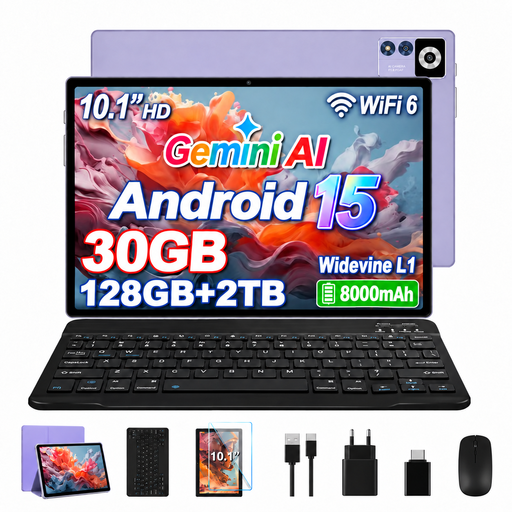
YESTEL T13 tablet, Android 15, 10.1 inches, 128 GB, purple
May be suitable for reading digital reports; for maps and plan pages, check whether the 10.1-inch view is large enough for your PDFs.
IPS display with 1280 × 800 pixels.
8 GB RAM plus 22 GB virtual RAM; 128 GB ROM.
Listed in the product name: TF 2 TB, 8000 mAh battery and dual-band Wi-Fi.
View at Joybuy
Frequently asked questions
Is screen size enough to make finds plans easy to read?
No, screen size alone isn’t enough. Check one of your own plan pages, including its legend and labels, in the PDF app and reading position you intend to use. Display details such as screen size and pixel count don’t prove that your particular file will be legible.
How can I check that my PDF notes will be saved?
Import a test PDF, mark a section, export the edited file and open it again. Samsung lists PDF as an export format in Samsung Notes; try your own file to check whether the process works as you want it to.
Should I budget for extra accessories?
It depends on the model and specific listing. Apple doesn’t list a Pencil in the iPad Air package described, Samsung says the S Pen is included with the Tab S10 FE, and Xiaomi notes that the Pad 7 doesn’t come with a mains charger. Check the exact version and what’s included.
Do you have a statutory right to cancel when buying a tablet online in Germany?
A corresponding distance contract with a consumer generally carries a right to cancel under § 312g BGB. § 355 BGB sets a 14-day period; for an ordinary consumer sale of goods, this generally starts when you receive the goods. Statutory exceptions and the required information should be considered in each case; the statutory conditions apply.


