For writing longer speech drafts in a café, a tablet with a compatible physical keyboard is an obvious choice. If you prefer to make handwritten corrections directly on the text, a compatible stylus may be more important. Also check that your writing app works on your chosen device and that you can open and edit your draft without the café’s Wi-Fi.
Which writing setup is right for you?
Writers working on longer speech drafts
If you write and edit lots of paragraphs in a café, first check that the writing app, physical keyboard and space you have available suit your needs. Apple describes keyboard support for the iPad (A16), while Lenovo lists a German keyboard for its Idea Tab Pro Complete Bundle.
Writers with limited table space
If you often move around or work at small tables, consider the footprint of the complete setup rather than just the size of the tablet. Samsung lists a 10.9-inch display for the Galaxy Tab S10 FE; Lenovo gives the Idea Tab Pro Bundle a 12.7-inch display.
Writers who annotate and edit
If you reread your draft and add handwritten notes, check the stylus, display version and whether your chosen app can edit the files you use. Samsung says the Galaxy Tab S10 FE includes an S Pen; HUAWEI describes a PaperMatte version of the MatePad 11.5 (2025).
What matters when writing in a café?
| What you need |
What to check before buying |
Who is it important to? |
| Typing longer texts |
Keyboard compatibility, what’s included and the keyboard layout. |
If I’m writing lots of paragraphs, I want to know in advance whether the keyboard and writing app will work with my device. Around 36% of consumers with this café-writing use case would say that typing longer texts is their top priority. |
| Working with limited table space |
The dimensions of the setup with the tablet, keyboard and stand. |
If I often sit at small tables, I need enough room for the complete writing setup. Around 29% of consumers would say that a space-saving setup is their top priority. |
| Working without Wi-Fi |
Offline access in the app you use and how changes are synced later. |
If the café’s connection drops, I still want to be able to open and edit my prepared draft. Around 21% of consumers would put reliable offline access first. |
| Making handwritten corrections |
Whether a stylus is included and whether it supports the file editing you need. |
If I make notes in the margins of my draft, a compatible stylus is essential to the way I work. Around 14% of consumers would say that handwritten annotations are their top priority. |
Common misconceptions when buying a tablet
-
Assuming keyboard support means a keyboard is included
A tablet’s support for a keyboard doesn’t mean that one is included in the offer you choose. Apple describes accessory support for the iPad (A16), while Lenovo specifically lists a keyboard and pen for its Idea Tab Pro Complete Bundle.
Compare the contents listed for the exact version and check that the tablet, keyboard and stand will fit on the café table you usually use.
-
Confusing cloud access with offline access
A speech draft stored in the cloud isn’t automatically available offline. Google explains how to make individual files available offline in Docs for Android; Microsoft recommends downloading and opening any mobile documents you’ll need before going offline.
Prepare your speech in the app you use and test a copy to check that you can open and edit it without a connection, and that your changes sync later.
-
Assuming all display versions or manufacturer battery-life claims are the same
HUAWEI offers the MatePad 11.5 (2025) in Standard and PaperMatte versions. A manufacturer’s quoted video playback time doesn’t necessarily reflect battery life when you’re writing.
Check which display version you’re buying and assess battery-life claims based on the usage specified, rather than assuming they’ll apply to your writing routine.
Suitable brands and product ranges
Apple
The iPad (A16) is an iPadOS option for speech drafts, with a suitable writing app and compatible accessories.
- Apple lists an 11-inch display for this model, along with support for Magic Keyboard Folio and Apple Pencil.
- Support doesn’t mean the keyboard or Pencil is included. Check the accessories, app and setup for the exact configuration.
Samsung
According to Samsung, the Galaxy Tab S10 FE combines a 10.9-inch display with an included S Pen for handwritten notes.
- The manufacturer lists the S Pen as an included accessory for this model.
- If you want to type longer passages, check keyboard compatibility and what’s included with the specific version separately.
Lenovo
The Idea Tab Pro Complete Bundle is aimed at writers looking for a larger display, a pen and a German keyboard in one package.
- Lenovo lists a 12.7-inch tablet, a pen and a German keyboard pack for this bundle.
- This specification applies to the bundle described, not necessarily to devices sold individually. Also check how much room you’ll need on the table.
HUAWEI
According to the manufacturer, the MatePad 11.5 (2025) is available in a PaperMatte version for readers and anyone who likes to edit by hand.
- HUAWEI describes PaperMatte as a separate display version, so check the exact edition you’re considering.
- The anti-glare description isn’t an independent measurement for every café lighting condition. HUAWEI says the detachable keyboard for this model is sold separately; also check app compatibility and the version you’re buying.
Joybuy products with a keyboard
The following offers are mainly suited to longer typed drafts and list a keyboard in the product title; the TECLAST model also mentions a stylus.
 No image available
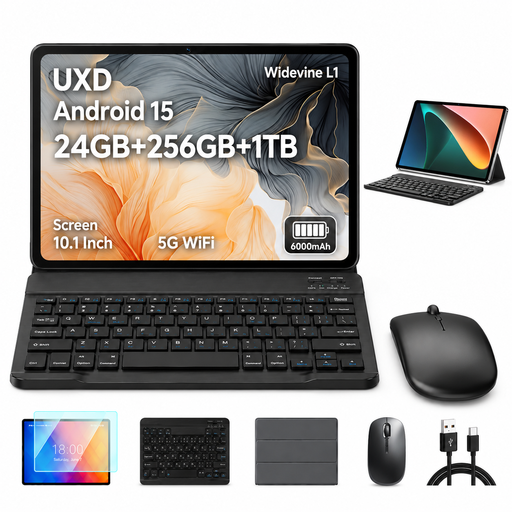
UXD A5 10.1-inch tablet with keyboard
The keyboard listed in the product title is useful for typing longer drafts; check that your writing app is compatible with Android.
The title lists Android 15, a 10.1-inch HD IPS display, 256 GB ROM, plus a keyboard, mouse and case.
View at Joybuy
 No image available
MEBERRY M8 10.1-inch tablet with keyboard
If you want to type at a café table, check the layout of the listed keyboard and whether the writing app you use suits your workflow.
The title lists a 10.1-inch HD IPS display, plus a keyboard, mouse and case.
View at Joybuy
 No image available
VANWIN 10.1-inch tablet with keyboard
The listed keyboard may be useful for typing speech drafts; check in advance that the app you need is available on the device.
The title lists a 10.1-inch touchscreen tablet with Android 16 and a keyboard.
View at Joybuy
 No image available
Xiaomi Pad 7 with keyboard, 8 GB/128 GB
If you’re typing longer passages, check that the keyboard listed in the title and your writing app suit the way you work.
The title lists 8 GB RAM, 128 GB ROM and a 3.2K display with a 144 Hz refresh rate.
View at Joybuy
 No image available
TECLAST ArtPad Pro 12.7-inch tablet with stylus and keyboard
The stylus listed in the title is useful for handwritten corrections. If you need a German keyboard layout, note that the Bluetooth keyboard is described as English.
The title lists a 12.7-inch 2K display and 256 GB of storage.
View at Joybuy
Frequently asked questions
How can I prepare my speech draft for a café with unreliable Wi-Fi?
Set up offline access in the app you actually use and test it in advance with a copy. Google Docs Help explains the ‘Make available offline’ feature for Android; Microsoft recommends downloading and opening any mobile documents you’ll need before going offline. Then check that your changes sync later, too.
Does a tablet with a stylus also come with a keyboard?
Not simply because a stylus is mentioned. Samsung lists an S Pen as included with the Galaxy Tab S10 FE; Lenovo specifically lists a German keyboard pack for the Idea Tab Pro Complete Bundle. Always check the accessories listed for the exact version.
What should I look for if I want to make handwritten corrections?
Check that a compatible stylus is included and that your app supports annotations in the file format you need. If you’re considering a display version such as the PaperMatte edition of the HUAWEI MatePad 11.5 (2025), make sure you check exactly which edition is on offer.
Can I return a tablet bought online in Germany?
According to the Verbraucherzentrale, consumers who buy online generally have a 14-day right of withdrawal from the date they receive the goods; you must notify the other party to the contract that you wish to withdraw. Check the terms of your specific contract and any exceptions that may apply.
Who should I contact if my new tablet is faulty?
For statutory consumer rights, the retailer is generally your point of contact. According to the Verbraucherzentrale, consumers can assert their statutory rights for new faulty goods within two years of receiving them; this is separate from any voluntary guarantee.


