For writing longer speeches, first check that the physical keyboard, layout and writing app suit the way you work. If you want to annotate sources by hand, a compatible stylus may be more important. A compact tablet saves space, while a Windows 2-in-1 could be a good choice if you need a particular desktop application. Also check exactly what’s included with the model and test offline access using one of your own files.
Which tablet is right for you?
Prolific writers
If you write and edit longer sections of a speech at a desk, a suitable keyboard, the right layout and compatibility with your files all matter. Apple lists the Magic Keyboard Folio as compatible with the iPad (A16), while Microsoft offers a dedicated keyboard for the Surface Pro 12-inch.
Readers who annotate sources
If you gather arguments from documents and mark up passages before writing, check stylus compatibility and the features available in your note-taking app. Samsung lists the S Pen as included with the Galaxy Tab S10 FE, while Apple lists compatible Pencil models for the iPad (A16).
Offline workers
If you want to work on prepared documents without reliable Wi-Fi, make your files available offline in advance and plan how you’ll sync them later. Google and Microsoft explain how to prepare their documents and apps for offline use.
What should you look for?
Compact iPad with a keyboard
A good fit if: You mainly write in an app designed for iPadOS and want a compact device. The iPad (A16) has an 11-inch display and supports the Magic Keyboard Folio.
The trade-off: Apple doesn’t list a keyboard or Pencil as part of the stated tablet package. Check the accessories and German keyboard layout for the exact version.
Android tablet with a stylus or keyboard
A good fit if: You want to annotate sources by hand or need a suitable keyboard for longer texts. Samsung lists the S Pen as included with the Galaxy Tab S10 FE.
The trade-off: Screen size and accessories vary by model. A listing that includes a stylus doesn’t mean a suitable keyboard is included too.
Windows 2-in-1
A good fit if: Your speech-writing work depends on a particular desktop application or workflow.
The trade-off: Check that the required application works with your chosen device configuration, using a sample file if possible. Keyboards and bundles can vary by offer.
| Priority |
What to check before buying |
Who is this important to? |
| Typing longer texts |
Check compatibility with the model and generation, the German keyboard layout and how it handles one of your own speech files. |
If I write lots of paragraphs at a desk, the keyboard needs to suit my device and work well with my files. Longer typing sessions are likely to be the top buying priority for around 36% of consumers. |
| Annotating sources by hand |
Check stylus compatibility, what’s included and the annotation features in the app you use. |
If I organise arguments with highlights and notes before writing, I need the right stylus and app features. Around 29% of consumers put handwritten source work first. |
| Working without Wi-Fi |
Make the files you need available offline in advance and test that you can edit them without a connection. |
If I want to open and edit my draft without a reliable Wi-Fi connection, I’ll want to test access before visiting the library. Around 21% of consumers prioritise offline file access. |
| Keeping desk space and accessories to a minimum |
Consider the display size, the space it takes up and all the accessories you actually need. |
If my workspace is small or I want to carry as few accessories as possible, a compact setup matters more than a larger screen. Around 14% of consumers prioritise keeping space and accessory requirements to a minimum. |
Common tablet-buying pitfalls
-
Assuming compatible accessories are included
A compatible keyboard or supported stylus won’t necessarily come in the box. Apple lists the tablet and a USB-C cable in the stated package for the iPad (A16); Samsung says the S Pen is included with the Galaxy Tab S10 FE.
Check what’s included with the exact version and make sure the keyboard layout you want is available.
Key brands at a glance
Apple
The iPad (A16) is an 11-inch option for writing on the go, with compatible keyboard and stylus accessories available.
- Apple lists the Magic Keyboard Folio, Apple Pencil (USB-C) and 1st-generation Apple Pencil as compatible input options for the iPad (A16).
- The stated tablet package doesn’t include a keyboard or stylus. Check the accessories and features of your writing app for the exact version.
Samsung
The Galaxy Tab S10 FE models come in different screen sizes for annotating sources by hand and editing text.
- Samsung lists an S Pen as included, with a 10.9-inch display on the Galaxy Tab S10 FE and a 13.1-inch display on the Galaxy Tab S10 FE+.
- The larger version takes up more desk space. Check which keyboard is compatible with the exact model variant.
Lenovo
The German version of the Idea Tab Pro, model ZAE40020SE, combines a 12.7-inch display with a stylus option.
- Lenovo describes this version as “+ Pen” and lists the Tab Pen Plus as included.
- The Keyboard Pack is sold separately. Weigh up the larger display against the space available on your library desk.
HONOR
The Pad 10 is an Android option with a 12.1-inch display and a Bluetooth keyboard designed for it.
- HONOR describes a keyboard designed for the Pad 10.
- According to HONOR, a stylus isn’t included with the tablet. Check the layout and the accessories included in the specific offer.
Microsoft
The Surface Pro 12-inch (1st Edition) is a Windows 2-in-1 option if you need a particular desktop application.
- Microsoft lists an attachable Surface Pro 12-inch keyboard and a German QWERTZ layout for the accessory offer shown.
- Check whether the keyboard, stylus and bundle are included with the configuration you’re considering. Make sure the required application works with your chosen device version.
Joybuy products for writing speeches
This selection includes tablets with keyboards for writing longer texts, plus a Windows 2-in-1 for workflows that require Windows.
 No image available
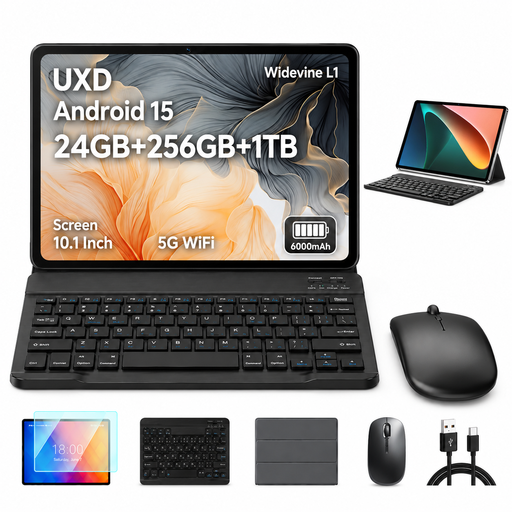
UXD A5 10.1-inch Android tablet with keyboard, mouse and case
If you want to type longer texts at a desk and use a mouse and case, the product name lists a keyboard for this Android tablet.
Android 15; 24 GB RAM (16 GB + 8 GB virtual); 256 GB storage, expandable to 1 TB; 10.1 inches; octa-core; Wi-Fi 5; Bluetooth 5.0.
View at Joybuy
 No image available
Microsoft Surface Pro 11 for Business, 13-inch OLED, Core Ultra 7 266V, 16 GB/512 GB SSD
If your writing software requires a Windows workflow, the product name specifies Windows 11 Pro. Check that it supports the application you need and whether a suitable keyboard is included with the exact version.
13-inch OLED display; Core Ultra 7 266V; 16 GB RAM; 512 GB SSD; Windows 11 Pro; 2-in-1.
View at Joybuy
 No image available
VANWIN YC101T310K30, 10.1-inch Android tablet with keyboard and case
If you want to type longer texts and prop up the tablet in a case, the product name lists a keyboard and case for this version.
10.1-inch touchscreen; Android; Unisoc T310 octa-core; 32 GB RAM; 256 GB/1 TB TF; keyboard and case.
View at Joybuy
 No image available
Xiaomi Pad 7 with keyboard, grey, 8 GB RAM/128 GB
If you want to type longer texts using a keyboard, the product title describes this version of the Xiaomi Pad 7 as a model with a keyboard.
8 GB RAM; 128 GB storage; 8850 mAh battery.
View at Joybuy
 No image available
TECLAST ArtPad Pro, 12.7 inches, with stylus and English Bluetooth keyboard
If you want to annotate sources with a stylus and write longer texts using a keyboard, the product title lists both as part of this version.
2K display; Android 15; 20 GB RAM (8 GB + 12 GB virtual); 256 GB storage; stylus supports 4096 levels of pressure sensitivity.
The Bluetooth keyboard is described as English-language in the product name. Check that the layout suits the way you type.
View at Joybuy
Frequently asked questions
Can I work on my speech on a tablet without the library’s Wi-Fi?
Yes, as long as you prepare the app and file you need in advance. Google explains how to make individual Docs files available offline on Android; Microsoft recommends downloading and opening any Office documents you’ll need on your mobile device beforehand. Test the exact file without a connection before visiting the library.
How do I set up a tablet for longer writing sessions?
Check that the keyboard is compatible with your tablet’s generation and has the layout you want, then open the files you need in advance. Apple lists the Magic Keyboard Folio for the iPad (A16); Microsoft describes a dedicated attachable keyboard for the Surface Pro 12-inch.
What additional costs and rights should I consider when buying online?
Compare the tablet with the accessories you actually need; the keyboard isn’t included in the stated tablet package for the iPad (A16). According to Verbraucherzentrale, consumers buying online in Germany generally have a 14-day right to cancel. Your statutory rights against the seller are separate from any voluntary guarantee.


