For writing a speech at the kitchen table, choose an input method that suits the way you work: a keyboard is handy for typing longer passages, while a stylus is useful for planning and editing by hand. Apple, Samsung, Lenovo and Microsoft list suitable accessories for specific models, but that doesn’t mean a keyboard or stylus is included with every offer. So check the model, compatibility, what’s included and how the set-up will fit on your table. For Word files stored in the cloud, Microsoft says you must open the file online at least once before working offline.
Who is this relevant for?
Anyone writing a full-length speech
If you’re drafting and editing longer passages at the kitchen table, a suitable keyboard, a comfortable set-up and easy-to-read text are important. Apple, Samsung and Microsoft list keyboard options for specific tablet models.
Anyone planning a speech by hand
If you’re gathering ideas, rearranging outlines and making edits with a stylus, check which models it works with and what’s included. Apple, Samsung and Lenovo describe stylus options for specific models or a particular bundle.
Anyone checking files and offline access
If you want to continue working on existing speech files, check which app you need and what it can do with your files. Microsoft also explains what you need to do to work offline with cloud files in Word.
What should you look for when buying?
First decide whether you’ll mainly be typing, planning by hand or editing existing files. Then you can narrow down the right combination of tablet and accessories.
iPadOS with a compatible keyboard
A good fit if: You type longer passages and can use your writing app on iPadOS. Apple lists the Magic Keyboard Folio for the iPad (A16) and a different Magic Keyboard option for the iPad Air (M4).
Bear in mind: Accessory support depends on the exact model and doesn’t automatically mean the keyboard is included with the offer.
Android tablet with a stylus option
A good fit if: You like to jot down ideas by hand before typing them up. Samsung lists an S Pen as included with the Galaxy Tab S10 FE, while Lenovo describes a Pen and Keyboard for the Idea Tab Pro Gen 2 bundle.
Bear in mind: Samsung describes the compatible QWERTZ Keyboard Cover as a separate accessory; Lenovo’s details apply to the named bundle.
Windows tablet with a keyboard
A good fit if: You want to keep your speech-writing workflow on Windows. Microsoft confirms that there’s a compatible keyboard for the Surface Pro 12-inch.
Bear in mind: Microsoft says the Surface Pro 12-inch Keyboard is sold separately and isn’t interchangeable with the Surface Pro 13-inch keyboards mentioned.
| What you need |
What to check when buying |
Who it matters most to |
| Type longer sections of a speech |
Compatible keyboard model, German layout and a comfortable set-up on the table. |
If I’m writing longer passages, I need a suitable keyboard and a comfortable set-up. Around 33% of consumers prioritise typing longer passages. |
| Plan an outline by hand |
Stylus compatibility, what’s actually included and how to turn notes into finished text. |
If I’m organising and editing notes with a stylus, I want to know exactly which stylus option I’m buying. Around 25% of consumers prioritise planning and editing by hand. |
| Speech files and offline work |
Open and edit a sample file in the app you plan to use; open Word cloud files online before working offline. |
If I need to edit an existing speech, it should work in my app and be available offline when needed. Around 25% of consumers focus on file compatibility and offline access. |
| Complete set-up and space on the table |
Compatible accessories, what’s actually included and how much space the assembled set needs. |
If I want to set up my complete writing kit on the kitchen table, I need to know which parts come with the specific offer and how much space they’ll take up. Around 17% of consumers focus on a complete set that fits their space. |
Common buying mistakes
-
Assuming compatible accessories are included
Confirmation that a keyboard is compatible doesn’t tell you whether it comes with the specific offer. Microsoft lists the Surface Pro 12-inch Keyboard as sold separately.
Check the full offer and make sure the keyboard matches the exact device generation.
-
Looking only at screen size
Samsung’s stated 10.9 and 13.1 inches refer to the screen diagonal, not the space needed for the tablet, stand and keyboard together.
Check how the set-up fits where you’ll be writing, and choose a larger screen only if it’s useful for your text and notes.
-
Expecting to open cloud files offline without preparing them first
For the Word offline workflow described, Microsoft says cloud files must first have been opened online at least once.
Open a sample speech online beforehand and check that you can edit, save and reopen it.
Key brands at a glance
Apple
The iPad (A16) and iPad Air (M4) offer different, model-specific keyboard options for an iPadOS writing set-up.
- Apple lists the Magic Keyboard Folio for the iPad (A16), and Magic Keyboard and Pencil Pro support for the iPad Air (M4).
- Check which accessory version works with your exact model and whether the stylus and keyboard are included with the specific offer.
Samsung
The Galaxy Tab S10 FE and FE+ combine Android with a choice of screen sizes.
- Samsung lists an S Pen as included with the Galaxy Tab S10 FE, alongside a compatible QWERTZ Keyboard Cover.
- The Keyboard Cover is a separate accessory. Samsung lists a 10.9-inch screen for the FE and a 13.1-inch screen for the FE+; check how much space the set will need.
Lenovo
The Idea Tab Pro Gen 2 bundle is an Android option for anyone looking for a Pen and Keyboard set that’s explicitly offered together.
- Lenovo describes the German bundle as including a 13-inch screen, Pen and Keyboard.
- These details apply to the named bundle and shouldn’t be assumed to apply to separately offered versions or older models.
Microsoft
The Surface Pro 12-inch is an option for a Windows-based speech-writing workflow.
- Microsoft confirms that the Surface Pro 12-inch Keyboard is compatible with this model.
- The keyboard is sold separately and, according to Microsoft, isn’t interchangeable with the Surface Pro 13-inch keyboards mentioned.
Joybuy products
These Android tablets and accessory sets are worth considering if you want to type and add handwritten notes to a speech at the table.
 No image available
13.4-inch Android tablet with keyboard and passive stylus, 256 GB
The set named in the product title combines a keyboard for typing with a passive stylus for handwritten additions.
13.4-inch FHD+ screen; Android 16.
24 GB RAM (8 GB + 16 GB virtual); 256 GB storage, expandable to up to 2 TB according to the product title.
The product title also lists a mouse, protective case and stand.
Joybuy
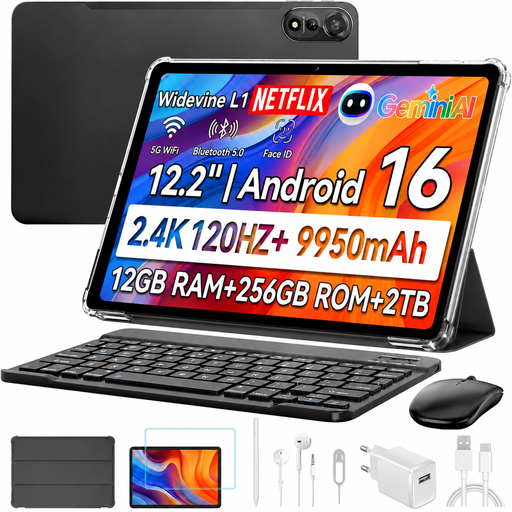 No image available
Blackview MEGA 12 5G, 12.2-inch, with keyboard and stylus
According to the product title, this tablet comes with a keyboard and stylus for typing and handwritten notes.
12.2-inch screen with 2.4K resolution.
12 GB RAM and 256 GB storage; the product title also lists a mouse.
Android 16; 10,000mAh battery with 55W fast charging according to the product title.
Joybuy
 No image available
Xiaomi Pad 7 with keyboard, grey, 8 GB RAM and 128 GB storage
The keyboard listed in the product title is suitable for typing longer sections of a speech; no stylus is mentioned.
3.2K screen with 144 Hz according to the product title.
8 GB RAM and 128 GB storage.
Joybuy
 No image available
Teclast ArtPad Pro 2025, 13.4-inch, with T-Pen
The T-Pen listed in the product title is useful for handwritten speech ideas and outlines; no keyboard is mentioned.
13.4-inch screen with 2K resolution and 4,096 pressure sensitivity levels according to the product title.
Android 15; 20 GB RAM (8 GB + 12 GB virtual) and 256 GB storage.
Joybuy
 No image available
Teclast ArtPad Pro, 12.7-inch, with stylus and English Bluetooth keyboard
The set includes a stylus and Bluetooth keyboard for planning and typing; the product title specifies that the keyboard is English-language.
12.7-inch screen with 2K resolution and support for 4,096 pressure sensitivity levels.
Android 15; 20 GB RAM (8 GB + 12 GB virtual) and 256 GB storage.
A German QWERTZ layout isn’t specified for the included English-language keyboard.
Joybuy
Frequently asked questions
Does a keyboard need to be included for typing longer sections of a speech?
No. Check what’s included with the specific offer and make sure the keyboard is compatible with the exact tablet model. Microsoft describes the Surface Pro 12-inch Keyboard as sold separately; Apple lists the Magic Keyboard Folio as a supported accessory for the iPad (A16).
How can I prepare a Word speech for working offline for a while?
Open a file saved in the cloud on your device while you’re online at least once. Microsoft says you can then edit it offline in Word on an iPad or Android tablet; any outstanding changes will sync when you reconnect.
What happens if there’s a fault and I have an additional warranty?
The statutory legal guarantee for faulty goods is different from an additional commercial warranty. EU consumer information states that goods bought from a trader come with a statutory minimum guarantee of two years from the date you receive them.
Can I cancel an online tablet purchase made in Germany?
In general, consumers buying online have a 14-day right to cancel; you must notify the trader that you wish to cancel. The specific circumstances of the contract and any legal exceptions still apply.


