What should you look for in a tablet for the train?
First, check the format of your sports memoir and how you’ll access it. Then decide whether a device that’s easy to hold or a larger display matters more for your journey.
| What matters to you |
What to look for when buying |
Who is this particularly important for? |
| Portability |
Check the weight and dimensions with the case you plan to use, and consider how you’ll hold the tablet in your seat. |
If I often hold my tablet on the train, I look at its weight and how easy it is to stow in a confined space. Around 36% of consumers put portability first. |
| Access to books and apps |
Check that the edition and reading app you want work with the specific model and operating system. |
If my memoir comes from a particular library or reading app, I need to make sure I can access it on the device. Around 29% of consumers prioritise access to books and apps. |
| Reading offline |
Download the specific title before your journey and test it in aeroplane mode. For Onleihe 3, check the Onleihe help pages for information about possible offline restrictions. |
If I expect my connection to be unreliable while travelling, I want to know in advance whether I can open my borrowed title without internet access. Around 21% of consumers prioritise offline availability. |
| Photos and PDF pages |
Check the format of the edition and, if possible, preview a sample with images and captions. The Onleihe help pages highlight the limitations of smaller screens for PDFs. |
If my edition has lots of photos or a fixed PDF layout, I want enough screen space to read the pages and captions comfortably. Around 14% of consumers put image and PDF readability first. |
Joybuy tablets for reading sports memoirs on the train
This selection includes compact tablets for reading flowing text on the go, as well as larger models for when photos or PDFs need more screen space. Also check that your preferred reading app and the specific edition work with each device.
 No image available
ALLDOCUBE Kido children's tablet, pink protective case, 8 inches, Android 15, 3GB+32GB
The 8-inch format is a compact option for reading flowing text in your seat. Check in advance that your reading app works with the device.
According to the product name: Android 15, 3GB+32GB, parental controls and a pink protective case. Mains adapter not included.
View at Joybuy
 No image available
ALLDOCUBE iPlay 70 mini Ultra, 8.8-inch, Android 14, 12GB+256GB
The 8.8-inch format is worth considering if you read frequently on the go. Before buying, check that the specific model supports the reading app you need.
According to the product name: Android 14, Qualcomm Snapdragon 7+ Gen3 and 7300mAh. Mains adapter not included.
View at Joybuy
 No image available
Samsung Galaxy Tab A11+ X230, 11-inch, Wi-Fi, 6GB RAM, 128GB
The 11-inch display gives you more room for photos and PDF pages, but takes up more space on the train than a compact model.
According to the product name: Wi-Fi, 6GB RAM and 128GB storage. The product description lists a resolution of 1920 × 1200 pixels.
View at Joybuy
 No image available
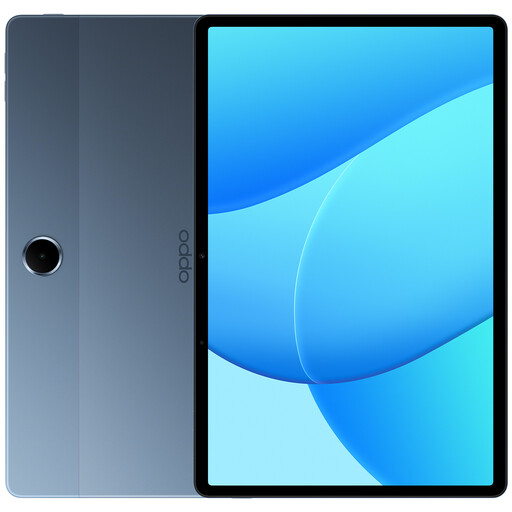
OPPO Pad SE, 11 inches, 6GB+128GB, LTE, model OPD2420 EUN
The 11-inch format is worth considering if you want more room for image-rich editions or PDFs and have enough space for it on the train.
According to the product name: 6GB RAM, 128GB storage and LTE.
View at Joybuy
 No image available
Apple 11-inch iPad Air (M4, 2026), Wi-Fi, 128GB, Blue
The 11-inch display gives you more room for photos and fixed-layout book pages, but takes up more space on the go than a compact tablet.
The product description lists a resolution of 2360 × 1640 pixels, an anti-reflective coating and a weight of 464 g.
View at Joybuy
Frequently asked questions about reading on the train
Is a small tablet big enough for sports memoirs with lots of pictures?
A small display can work well for reflowable ePub text, but check the specific edition if it’s a PDF with a fixed page layout. The Onleihe help pages describe PDF e-books as less suitable for smaller mobile screens. If possible, preview a sample with images and captions.
How do I set up Onleihe to read on the train?
According to the Onleihe help pages, you’ll need Android 10 or later or iOS 15.1 or later to use the Onleihe 3 app, as well as a valid library card and login details. Install the app from a supported app store, sign in to your library and test that you can open your borrowed title without an internet connection before you travel.
Can I rely on the train’s Wi-Fi when I’m reading?
Not on every journey. Deutsche Bahn says Wi-Fi is available across its ICE fleet, as well as on parts of its Intercity fleet and selected regional trains. Download any content you need in advance where possible. For Onleihe titles, also bear in mind the possible offline restrictions described in the Onleihe help pages.
What rights do I have when buying a tablet online in Germany?
Consumers generally have a statutory right of withdrawal for distance contracts. Section 355 of the German Civil Code (BGB) sets a 14-day period, subject to the statutory requirements and exceptions, including Section 312g BGB. For ordinary goods, claims for defects generally become time-barred two years after delivery. These statutory rules are published by the Federal Ministry of Justice and the Federal Office of Justice.


