Which tablet is right for you?

Review storyboard files in your existing workflow

If you want to open or continue editing project files in the app you normally use, first check its device and file requirements. Adobe lists iPad, iPhone and Windows devices for Fresco, among others; this doesn’t tell you whether other storyboard apps are compatible.

Mark up changes directly

If you want to annotate panels by hand at the table, you’ll need a stylus that’s compatible with the specific tablet. Apple lists compatible Pencil models, while Samsung says an S Pen is included with the Galaxy Tab S10 FE series. For other offers, check exactly what’s included.

View panels together

If several people will be looking at the sequence, compare the screen size you need with the space available on the table and the device’s weight. The models listed have different screen sizes, and a larger option will also take up more room.

What should you look for when buying?

What matters What to check when buying Who it matters most to
App and file compatibility Check the operating system and app version, and whether you can open, annotate and export a typical project file. If you want to keep using existing files in your usual workflow, access to the right app is essential. Around 36% of consumers would make compatibility their top priority.
Stylus and what’s included Check that the exact tablet variant is compatible with the stylus, and confirm what’s included with the offer. If you want to add handwritten notes directly to panels, a suitable input device and the right accessories matter. Around 29% of consumers would put stylus-based editing first.
Viewing together Compare the screen size, device dimensions and weight of the specific variant with the space available on your table. If several people will be viewing storyboard panels at once, a clear, easy-to-use display is important. Around 21% of consumers would prioritise viewing together. Samsung lists the Galaxy Tab S10 FE at 10.9 inches and the FE+ at 13.1 inches; in the Wi-Fi comparison, the FE+ weighs 664 g compared with 497 g for the FE.
Positioning and accessories Check whether a stand, a compatible stylus and the charging accessories you need are actually included. If you want to keep the tablet propped up on the kitchen table, its positioning and the accessories you need are worth considering. Around 14% of consumers would make positioning and included accessories their main priority.

Common buying decisions to check

  • Assuming stylus support means one is included

    A tablet may be compatible with a particular stylus without including it in the box. This affects what accessories you’ll need to budget for if you want to give handwritten feedback.

    Check the list of items included with the exact variant on offer. Samsung says the S Pen is included with the Galaxy Tab S10 FE series. Apple lists compatible Pencil models for the iPad Air, but doesn’t list a Pencil as included.

  • Choosing a larger screen without considering table space

    A larger screen takes up more room. Samsung also lists the Wi-Fi version of the Galaxy Tab S10 FE+ as heavier than the FE.

    Compare a typical panel layout on the screen sizes you’re considering, and allow room for your hands, paperwork and the tablet’s stand.

  • Assuming similar product names mean the same model variant

    For a Joybuy offer listed as the Galaxy Tab S10 FE X520, the model number in the technical details differs from the reference SM-X520NZAREUB that Samsung gives for the variant researched.

    Before treating two offers as the same variant, check the full model number and key features against the manufacturer’s details.

  • Assuming a power adapter is included

    Xiaomi notes that a power adapter isn’t included with the Pad 7.

    Before buying, check what’s included and whether you already have a compatible charger.

Key brands at a glance

Apple

Apple lists 11-inch and 13-inch iPad Air models, with support for Apple Pencil Pro and Apple Pencil (USB-C).

  • Apple UK lists compatible Pencil models for both screen sizes.
  • The listed iPad Air contents don’t include a Pencil. Whether a particular storyboard app is suitable depends on its requirements.

Samsung

Samsung lists the Galaxy Tab S10 FE at 10.9 inches and the FE+ at 13.1 inches, giving you a choice of screen sizes for viewing at the table.

  • Samsung says an S Pen is included with the FE series.
  • According to Samsung’s comparison, the Wi-Fi FE+ weighs 664 g and the FE 497 g. You’ll need to check separately whether your storyboard app is compatible.

Lenovo

Lenovo describes a Tab Plus bundle that includes an 11.5-inch tablet, Tab Pen Plus and a built-in kickstand.

  • The stand listed in the bundle lets you prop the tablet up on the table.
  • The bundle details don’t automatically apply to Tab Plus devices sold separately, and don’t confirm that a particular storyboard app will work.

Xiaomi

Xiaomi lists an 11.2-inch display for the Pad 7 and confirms that it’s compatible with the Focus Pen.

  • The manufacturer’s details specify a compatible stylus option for handwritten notes.
  • Stylus compatibility doesn’t confirm that the stylus is included with the specific offer. Xiaomi also notes that a power adapter isn’t included.

Joybuy products for viewing storyboards

This selection includes tablets and 2-in-1 devices for viewing storyboard panels, with options for larger screens, stylus-based annotation or different app workflows. Check the requirements of the storyboard app you use and what’s included with the variant you choose.

Microsoft Surface Pro 11 for Business, 13-inch OLED, Core Ultra 7 266V, 16 GB and 512 GB SSD

Microsoft Surface Pro 11 for Business, 13-inch OLED, Core Ultra 7 266V, 16 GB/512 GB SSD

If your workflow requires a Windows environment, this device, listed as a 2-in-1, is a suitable category to consider. You’ll still need to check whether your specific app is compatible.

The product title lists a 13-inch OLED display, Windows 11 Pro and 512 GB SSD storage.

View at Joybuy
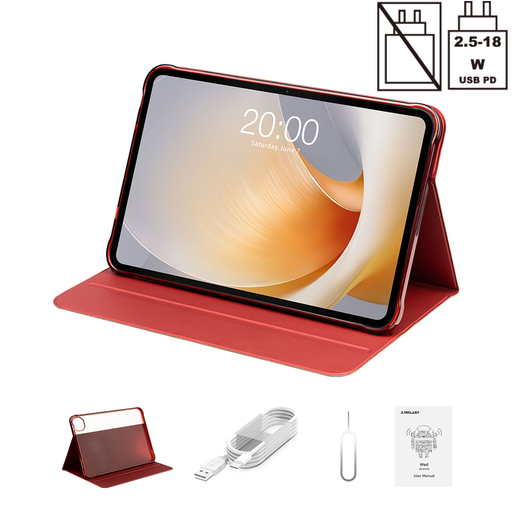
TECLAST T65 Plus tablet with 13.4-inch display, 120 Hz and Android 15

TECLAST T65 Plus, 13.4-inch, 120 Hz, Android 15

If you want to view storyboard panels on a larger screen, the product title lists a 13.4-inch display. Check first that your app and files will work on this Android device.

The title also lists 20 GB RAM (8 GB + 12 GB virtual), 128 GB storage and Dual SIM 4G.

View at Joybuy

Xiaomi Pad 7 with keyboard, Grey, 8 GB RAM and 128 GB storage

Xiaomi Pad 7 with keyboard, Grey, 8 GB RAM/128 GB storage

If you want to view panels on an Android tablet and use a keyboard, the product title identifies this offer as the keyboard version. Xiaomi confirms that the Pad 7 is compatible with the Focus Pen; check whether the stylus is included with this specific offer.

The product title lists a 3.2K display with a 144 Hz refresh rate.

View at Joybuy

TECLAST ArtPad Pro with 12.7-inch display, 2K screen and stylus

TECLAST ArtPad Pro, 12.7-inch, 2K, 256 GB, with T-Pen

If you want to annotate panels on your tablet with a stylus, the product title lists a T-Pen as included. Also check that your storyboard app’s drawing and file features are available on the device.

The title lists a 12.7-inch 2K display, 20 GB RAM (8 GB + 12 GB virtual), 256 GB storage and Android 15. It also lists a protective case and an English-language Bluetooth keyboard as accessories.

View at Joybuy
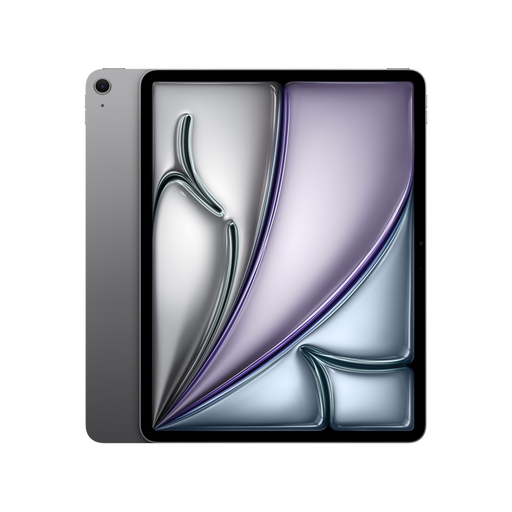
Apple iPad Air M4, 13-inch, Wi-Fi, 128 GB, Space Grey

Apple iPad Air (M4, 2026), 13-inch, Wi-Fi, 128 GB, Space Grey

If your storyboard workflow runs on iPadOS and you want a larger screen at the table, this 13-inch model is an option. Apple lists support for Apple Pencil Pro and Apple Pencil (USB-C); a Pencil isn’t listed as included.

The product title lists Wi-Fi and 128 GB storage. Check the requirements of your specific app, and if you need a compatible Pencil, remember to budget for one separately.

View at Joybuy

Frequently asked questions

Does my tablet need to support a particular storyboard app?

Yes, if you want to continue editing existing projects in that app. Check the device requirements, and make sure you can import and export your file formats. Adobe lists iPad, iPhone and Windows devices for Fresco; this doesn’t mean Fresco supports Android, and says nothing about other storyboard apps.

Does a tablet automatically come with a stylus?

No, it depends on the model and the offer. Samsung says the S Pen is included with the Galaxy Tab S10 FE series, while Lenovo lists one in the Tab Plus Pen bundle. Apple lists compatible Pencil models, but doesn’t list a Pencil as included with the iPad Air. Check the specific offer variant.

Will I need a separate stand or power adapter for a meeting at the table?

It depends on the model and what’s included. Lenovo lists a built-in kickstand for the Tab Plus, while Xiaomi notes that the Pad 7 doesn’t include a power adapter. Before buying, check which accessories come with the specific offer.

What are my rights in Germany if a tablet I bought online is faulty?

According to the Verbraucherzentrale (German consumer advice centre), consumers can make a claim against the seller under statutory rights for a new faulty product within two years of delivery. This is separate from a voluntary guarantee. For distance sales from a business, you generally also have a 14-day right to cancel from the date of delivery; statutory exceptions apply.

Which charging port is required for tablets newly sold in the EU?

The European Commission states that the EU rules on a common USB-C charging port have applied to tablets since 28 December 2024. This doesn’t mean a power adapter is included with a specific tablet, so check the listed contents.