Start with the storyboard file and the app your team actually uses. An iPadOS or Android tablet may suit supported viewing and annotation workflows, while a Windows 2-in-1 is worth considering if you need a compatible Windows application. Then test with a sample file to check that comments are preserved on export and everyone around the table can see the details. The display size, stylus and, where needed, keyboard all affect how much space and which accessories you’ll need.
Which tablet is right for you?
Storyboard teams around the meeting table
If you want to look at sequences and details together, screen space and a practical way to position the tablet are important considerations. Apple offers the iPad Air in 11- and 13-inch sizes; Lenovo describes the Tab P12 with Matte Display ZAD50005SE as having a 12.7-inch display.
Creatives who annotate with a stylus
For arrows, notes and corrections, check that the stylus works with the app you use and that files export reliably. Apple Support explains how to annotate PDFs in supported iPad apps; Samsung says the Galaxy Tab S10 FE comes with an S Pen and documents export formats for Samsung Notes.
Teams with an established desktop workflow
If your sign-off depends on a particular Windows application or file format, check that the specific application works on the device configuration you choose. Microsoft describes the Surface Pro 12-inch, 2nd Edition, as suitable for both tablet and laptop use.
What should you look for when buying?
First, test your actual file and comment workflow. Then compare the display and accessories with the conditions at your shared workspace.
| What matters |
What to check before buying |
Who will value it? |
| Reading storyboards together |
Open a typical page in your app and check the full-page view, zoom and positioning from the seats people will actually use. |
If we’re judging a sequence and small details together, the screen should be easy to see without having to keep passing the device around. Around 25 % of consumers put shared readability first. |
| Adding changes with a stylus |
Check the exact stylus and what’s included; test annotation, export and reopening the file. |
If you want to draw arrows and corrections directly on the storyboard and share the annotated version, the stylus and export options matter most. Around 25 % of consumers prioritise handwritten feedback. |
| Continuing to work on files as a team |
Test importing, commenting, exporting and reopening a representative file with your accounts and software. |
If we need to continue the sign-off in the team application we already use, a complete file workflow matters more than a single visible annotation. Around 20 % of consumers prioritise workflow compatibility. |
| Lighting and handling at the table |
Compare the same light and dark page in your usual room, and check how much space the tablet needs and whether it stands securely. |
If you view storyboards in changing light or want to pass the tablet around, weigh up reflections against size and ease of handling. Around 15 % of consumers put visibility in changing light first. |
| Total cost with accessories |
Allow for a compatible stylus and, if needed, a keyboard or stand for the workflow you have in mind. |
If we want the device ready to use with all the accessories we need, we should compare the complete setup rather than the tablet alone. Around 15 % of consumers prioritise predictable total costs. |
Common misconceptions
-
Stylus support doesn’t automatically mean one is included
The documented contents vary: Samsung says the Galaxy Tab S10 FE comes with an S Pen, while Apple lists compatible Pencil models for the iPad Air but doesn’t include a Pencil in its documented box contents. Microsoft says the Slim Pen for the Surface Pro 12-inch, 2nd Edition, is sold separately.
Before comparing devices, note the exact tablet and stylus versions and check that both work with your app.
Depending on the combination you choose, you may need to buy a compatible stylus separately. You may also need a keyboard for the Surface.
-
Being able to annotate a PDF doesn’t mean you have a complete team workflow
Adding an annotation in an app doesn’t confirm that comments and file structure will be preserved when you export to your project application. Samsung notes that handwriting is exported as an image when you export to PowerPoint from Samsung Notes.
Test the whole process: import a file, add comments, export it in the format you need, then reopen it using the next person’s account.
-
A matte or larger display doesn’t guarantee a better group view
Lenovo describes the Tab P12 with Matte Display ZAD50005SE as having a matte finish; this doesn’t automatically apply to other Tab P12 offers. Apple specifies an anti-reflective coating on the iPad Air. The result in your room will also depend on the lighting, viewing angle and how the tablet is positioned.
Compare the same storyboard page in your actual workspace, and factor in the space you have and how easy the tablet is to handle.
Key brands at a glance
Apple
iPad Air models for supported annotation workflows on iPadOS.
- Apple lists 11- and 13-inch models in the iPad Air range, with an anti-reflective coating and support for Apple Pencil Pro and Apple Pencil (USB-C). Apple Support explains how to annotate PDFs in supported apps.
- A Pencil isn’t listed in the documented iPad Air box contents. Also check that it’s compatible with your team app.
Samsung
Galaxy Tab S10 FE for supported Android annotation with a stylus.
- Samsung lists a 10.9-inch display and an S Pen included with the Galaxy Tab S10 FE. Samsung Notes supports documented export formats such as PDF, Word and PowerPoint.
- Export formats alone don’t guarantee that another storyboard app will preserve comments or layers. Check your file in the software you’ll use it with.
Lenovo
Tab P12 with Matte Display ZAD50005SE for a larger screen with a specifically stated matte finish.
- Lenovo describes this version as having a 12.7-inch matte display and lists a Pen in the documented configuration.
- The matte finish applies to the named version. Try it in your own space to see whether the surface makes a difference.
Microsoft
Surface Pro 12-inch, 2nd Edition: a Windows 2-in-1 for compatible applications and laptop use.
- Microsoft describes the Surface Pro as suitable for tablet, stylus and laptop use.
- The Slim Pen and keyboard are sold separately. Check that your specific application runs on the device configuration you choose.
Tablets for storyboard reviews at Joybuy
This selection includes tablets with larger displays for reviewing storyboards together, as well as models with a stylus or keyboard for compatible annotation and working workflows. For each device, check that it works with your team app and the files you need.
 No image available
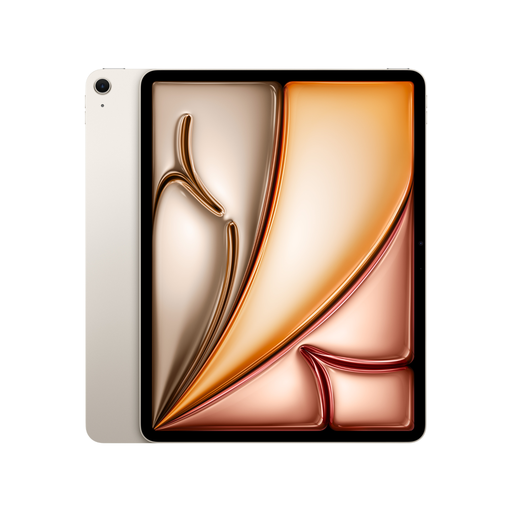
Apple 13-inch iPad Air (M4, 2026), Wi-Fi, 128GB, Starlight
The 13-inch version is worth considering if several people will be viewing storyboard pages together and you’ll be annotating in a supported iPad app.
13 inches; M4; Wi-Fi; 128GB; anti-reflective coating; supports compatible Apple Pencil models. An Apple Pencil isn’t included in the listed box contents.
View at Joybuy
 No image available
Apple 11-inch iPad Air (M4, 2026), Wi-Fi, 128GB, Starlight
The 11-inch version is a more compact option for reviews where a tablet that’s easier to handle at the table matters more than a larger display.
11 inches; M4; Wi-Fi; 128GB; anti-reflective coating; supports Apple Pencil Pro and Apple Pencil (USB-C). An Apple Pencil isn’t included in the listed box contents.
View at Joybuy
 No image available
TECLAST T65, 13.4 inches, 120Hz, Android 16
The stated display size could be useful for viewing storyboards together at the table. Check annotation works with your storyboard app and a sample file.
13.4 inches; 120Hz; Android 16; with folio case.
View at Joybuy
 No image available
Xiaomi Pad 7 with keyboard, grey, 8GB RAM, 128GB ROM
If you also need to type at the meeting table, the keyboard mentioned in the title is a useful feature. Check that the tablet supports the review workflow you want to use in your application.
3.2K display; 144Hz; 8GB RAM; 128GB ROM; keyboard included.
View at Joybuy
 No image available
Teclast ArtPad Pro 2025, 13.4 inches, 2K display, T-Pen
If you want to draw changes directly on the storyboard, check before buying that your app supports the stylus annotations you need and lets you export them afterwards on this Android tablet.
13.4 inches; 2K display; T-Pen with 4096 pressure sensitivity levels; Android 15.
View at Joybuy
Frequently asked questions
How can I check that comments will still be usable after the meeting?
Annotate a representative file in the app you plan to use, export it in the format you need, then reopen it with the next person’s account and software. Apple Support explains how to annotate PDFs in supported apps; Samsung Notes lists several export formats and notes that handwriting is exported as an image for PowerPoint.
Does a tablet that supports a stylus automatically come with one?
No, what’s included depends on the specific version. Samsung says the Galaxy Tab S10 FE comes with an S Pen; Apple lists compatible Pencil models for the iPad Air, but doesn’t include a Pencil in its documented box contents. The Slim Pen for the Surface Pro 12-inch, 2nd Edition, is sold separately. Check the details for the version you’ve selected.
How do I set up a shared device securely?
Before using it, decide who can access files and accounts, and set up the device in line with your team’s security requirements. The German Federal Office for Information Security recommends securing tablets in the same way as other internet-connected computers. This doesn’t mean there’s a blanket requirement to use a particular tablet model.
Does the GDPR apply to our storyboard?
The GDPR may apply if you process data about identifiable people. The European Commission distinguishes personal data from anonymous data. The team responsible should check the storyboard’s content and how it is processed to determine whether it contains personal data and what measures are needed.
What warranty rights apply when buying for a team?
The EU information on the minimum two-year legal guarantee applies to consumers and distinguishes this from an additional commercial guarantee. If a business is making the purchase, don’t assume that the same consumer rights apply. Check the buyer’s status, the seller and the contract terms before ordering.


