Detail-focused CAD users
If you need to control dimensions and geometry, choose a stylus alongside the snapping, dimensioning and constraint tools in your software. Shapr3D describes these as tools for controlling geometry.


First, choose a stylus that’s confirmed to work with your tablet, then check the drawing tools available in your app. For dimensionally accurate details, the software’s dimensions, snapping points and geometric constraints are key. For freehand hatching, pressure and tilt input may matter more, while charging, grip and replacement nibs can make a difference during longer sessions.
If you need to control dimensions and geometry, choose a stylus alongside the snapping, dimensioning and constraint tools in your software. Shapr3D describes these as tools for controlling geometry.
If you want to vary details freely or add hatching, first check that the exact stylus version works with your tablet. Compatibility depends on the model, as noted by Apple Support Germany, Samsung Germany and Microsoft Support, among others.
For longer drawing sessions, grip, charging interruptions and replacement nibs can all matter. STAEDTLER says the Noris digital jumbo has replaceable nibs and doesn’t need charging, but it requires a compatible EMR display.
First, check that the stylus works with your tablet. Then consider whether you mainly need to control CAD geometry or sketch freehand.
| Buying consideration | What to look for | Who it matters to |
|---|---|---|
| Device compatibility | Check the compatibility list for your exact tablet generation, stylus model and, where relevant, operating system version. | If I’m looking for a stylus for a tablet I already own, that exact device combination needs to be supported. For around 36% of consumers, compatibility with their own device comes first. |
| Dimensionally accurate CAD details | Check whether the specific app includes dimensions, snapping points and geometric constraints. Shapr3D lists these as tools for controlling geometry. | If I need defined dimensions and relationships, I don’t want to rely on freehand drawing alone. Around 29% of consumers prioritise dimensionally accurate CAD details. |
| Freehand lines and hatching | Check pressure and tilt input for the exact stylus model, and test whether the brushes you want to use work with it in your app. | If I want to vary lines and hatching while sketching, I look at how the stylus and drawing app work together. Around 21% of consumers prioritise freehand strokes. |
| Charging breaks and nibs | Check how the stylus charges, what accessories it needs, and which nibs come in the box or are available as replacements for the exact version. | If I spend long periods at my drawing desk, I want to plan for charging breaks and changing nibs. Around 14% of consumers mainly look for a smooth workflow with minimal interruptions. |
Styluses may have specific device or digitiser requirements. A similar connector or touchscreen alone doesn’t prove that the stylus features will work.
Check the exact tablet generation and stylus model, and see whether a particular system version is required.
Pressure input affects how you interact with the stylus, but it doesn’t automatically set dimensions or geometric relationships. Shapr3D describes tools such as dimensioning, snapping points and constraints for this purpose.
First, check which geometry and dimensioning tools your specific app offers on your device. Then compare the stylus’s drawing features.
Apple distinguishes between the Pencil (USB-C) attaching magnetically for storage and pairing and charging via a USB-C cable. How the Surface Slim Pen charges depends on the device and accessories.
Check how the exact stylus version charges separately from how it attaches to or is stored with your tablet.
Apple Pencil Pro and Pencil (USB-C) are options for the iPad models they support. Apple Support Germany lists compatibility by model.
The S Pen EJ-PX710 is worth considering as a replacement or extra stylus for certain Galaxy Tab ranges.
The Surface Slim Pen is an option for compatible Surface devices and a Windows-based workflow.
The Noris digital jumbo is an option for compatible EMR displays if you prefer a triangular stylus that doesn’t need charging.
The Crayon (USB-C) is an iPad option for sketching and annotation.
The Joybuy products below are mostly listed as styluses for iPads; one model is described as suitable for iOS and Android touchscreens. Before buying, check compatibility with your specific device and the features your drawing app needs.
 No image available
An option if you sketch on a compatible iPad and want to use tilt input.
The product title mentions USB-C fast charging. According to the product details, the stylus isn’t pressure-sensitive, so it’s not suitable if you want to vary your strokes based on pressure.
 No image available
An option for freehand sketching if your iPad is one of the models listed in the product title.
The title mentions tilt input, palm rejection and wireless charging. Compatible models listed include iPad Pro 11″ (1st/2nd/3rd/4th generation), Pro 12.9″ (3rd/4th/5th/6th generation), Air 4/5 and mini.
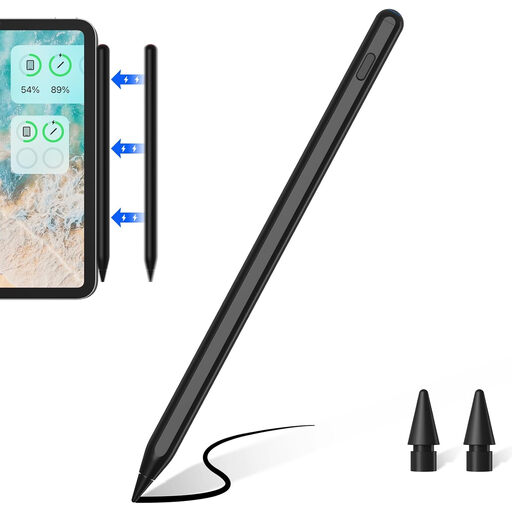 No image available
An option if you use one of the iPad models listed in the product title and want to rest your hand on the screen while drawing.
The product title mentions tilt recognition and palm rejection. Compatible models listed include iPad 8/9/10, mini 6, Air 4/5, Pro 11″ (1st/2nd/3rd generation) and Pro 12.9″ (3rd/4th/5th/6th generation). According to the product details, two replacement nibs are included.
 No image available
An option for sketching on a compatible iPad if you want to use tilt input.
The product title mentions USB-C fast charging. Check compatibility with your exact iPad model and whether your drawing app’s features work with this stylus.
 No image available
An option if you’re looking for a rechargeable stylus for drawing or writing on one of the listed iOS or Android touchscreens.
The product title mentions a Dual Touch function and a rechargeable design. Check which features are available on your device and in your drawing app.
No. For defined geometry, Shapr3D describes numerical dimensions, snapping options and geometric constraints. Check whether your specific app offers these features on your device.
Apple explains that you pair and charge it by connecting a USB-C cable to a compatible iPad. On this model, magnetic attachment is for storage, not charging.
Not just because you want to draw: Samsung says the Galaxy Tab S10 FE and FE+ come with an S Pen. Check what’s included in the specific offer and the model number before choosing a replacement stylus.
For a qualifying consumer purchase, the European Union specifies a minimum two-year legal guarantee from the date you receive the goods; if there’s a fault, contact the seller. This is separate from a voluntary manufacturer’s warranty. Whether an order for self-employed professional use counts as a consumer purchase depends on the specific contractual circumstances.