Artists with a tablet they already own
You want to buy a replacement stylus and need to identify the exact iPad, Galaxy, EMR or Windows model first. Apple, Samsung, STAEDTLER and Microsoft each publish compatibility information for their devices.


First, choose a stylus that’s specifically compatible with your tablet: iPad, Galaxy, EMR and Windows styluses aren’t interchangeable. If you want to vary your outlines and shading, check pressure and tilt input separately, and make sure your drawing app supports the features you need. The charging method, replacement nibs and accessories you already own can also influence your choice.
You want to buy a replacement stylus and need to identify the exact iPad, Galaxy, EMR or Windows model first. Apple, Samsung, STAEDTLER and Microsoft each publish compatibility information for their devices.
You create outlines and shading, and want to make deliberate use of pressure or tilt input. The stylus, tablet and drawing app must all support the input you want.
You want your stylus ready to use between drawing sessions and are weighing up a battery-free EMR stylus against rechargeable options. STAEDTLER describes the Noris digital classic as requiring no charging or pairing, but it does need an EMR display.
For cartoon expressions, it’s worth checking compatibility with your device first, then comparing line control, readiness to use and the accessories you’ll need.
| What matters | What to check before buying | Who should consider this? |
|---|---|---|
| Compatibility | Check the full tablet model, stylus version and, where relevant, protocol. Apple, Samsung, STAEDTLER and Microsoft each publish device-specific information. | If I’m looking for a stylus for a tablet I already own, I check the exact model number first; around 36% of consumers put device compatibility first. |
| Lines and shading | Check pressure and tilt input separately, and make sure your drawing app supports them. Logitech points out that the Crayon isn’t pressure-sensitive. | If I want to draw facial features with varying line thickness, I check which inputs my brushes actually use; around 29% of consumers prioritise line control. |
| Readiness to use | Consider charging, pairing and storage separately. Apple says the Pencil (USB-C) charges via cable, while the Pencil Pro pairs and charges magnetically with a compatible iPad. | If I plan to fit in repeated short drawing sessions at my desk, I consider how the stylus charges and where I can put it between sessions; around 21% of consumers prioritise readiness to use. |
| Accessories and ongoing costs | Check the stylus you already own, what’s included and whether you’ll need nibs, adapters or charging cables. For certain iPads, the 1st-generation Apple Pencil may need a USB-C to Apple Pencil Adapter for pairing and charging. | If I want to avoid buying things twice, I compare what I already have with the accessories included with the specific version; around 14% of consumers prioritise accessories and ongoing costs. |
Styluses may be designed for specific tablet generations or digitisers. STAEDTLER requires an EMR display for the Noris digital classic; Windows styluses also need to match the device in terms of protocol and version.
Before ordering, check the full tablet name against the compatibility list for that exact stylus version.
Logitech says the Crayon changes line thickness when tilted, but explicitly notes that it isn’t pressure-sensitive.
If you want your brushes to respond to varying pressure, check that this feature is supported by the stylus, tablet and drawing app.
Apple says the Pencil (USB-C) attaches magnetically to an iPad for storage, but pairs and charges via a USB-C cable. The Pencil Pro pairs and charges magnetically with compatible iPads.
Check the charging method and accessories required for the specific version separately.
Samsung describes the EJ-PT730 as a replacement for the original Galaxy Tab S7 FE stylus. For the Noris digital classic, STAEDTLER lists replaceable nibs and spare nibs included in the box.
First check which stylus and accessories you already have, and whether any replacement parts are compatible with the specific version.
This can help you avoid an unnecessary second purchase or ordering replacement parts that don’t fit.
Apple makes different Pencil versions for specific iPad models. The key is to choose the right stylus for the iPad you already own.
Samsung offers S Pen versions for specific Galaxy devices, as well as the S Pen Creator Edition.
The Noris digital classic is a pencil-shaped stylus for displays with an EMR digitiser.
The Bamboo Ink Plus is designed for compatible Windows devices that support a stylus and use Wacom AES or Microsoft Pen Protocol.
The Crayon is a stylus option for compatible iPad models; the documented Lightning version is compatible only with the devices specified for that version.
Microsoft offers Surface Pens for specific supported Surface models; other Windows devices are only an option if compatibility is confirmed.
The following products are mainly styluses for specific iPad models, along with an active stylus for iOS and Android touchscreens. Before buying, check that your device matches the listed compatibility and that the input features meet your drawing needs.
 No image available
An option if you want to sketch using tilt input on one of the listed iPads.
The product name lists the iPad Pro 11″ (4th/3rd/2nd/1st generation), iPad Pro 12.9″ (6th/5th/4th/3rd generation), iPad Air 4/5 and iPad mini. Features listed include tilt sensitivity, palm rejection and magnetic charging; according to the product information, magnetic charging is available for certain models.
 No image available
This version may suit you if your iPad is one of the models listed in the product name and you’re looking for a stylus with palm rejection.
The models listed are iPad 10/9/8, mini 6, Air 5/4, Pro 11″ 3/2/1 and Pro 12.9″ 6/5/4/3. The product name lists palm rejection and magnetic charging; according to the product information, magnetic charging isn’t available for all the compatible models listed.
 No image available
A potential option for drawing and writing on the iOS and Android touchscreens listed in the product name, if you’re looking for a rechargeable stylus.
The product name lists a dual-touch function and a rechargeable design. It doesn’t specify exact tablet models, so check compatibility with your device before buying.
 No image available
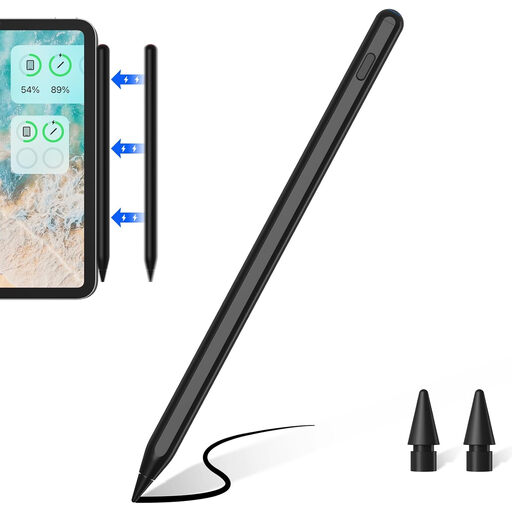
This version may suit you if you want to use tilt input for sketching and shading on a compatible iPad.
The product name lists tilt recognition, palm rejection, an LED battery indicator and compatibility with selected iPad models. According to the product information, the magnetic attachment is for storage; wireless charging isn’t supported.
It depends on the version: Apple says the Pencil (USB-C) pairs and charges via a USB-C cable, while the Pencil Pro pairs and charges magnetically with a compatible iPad. STAEDTLER describes the Noris digital classic as requiring no charging or pairing when used with a suitable EMR display.
Replace the nib if it’s damaged or worn, and use replacement parts that fit your specific stylus version. Logitech recommends replacing a damaged or worn Crayon nib; STAEDTLER lists replaceable nibs and spare nibs included with the Noris digital classic.
If a product is faulty, your statutory rights are against the seller and are separate from any voluntary guarantee. According to the Verbraucherzentrale, the relevant claims for defects on a standard purchase generally expire two years after delivery; your specific rights and any exceptions depend on the sales contract.
For a distance-selling contract, you generally have a statutory right to cancel, with a 14-day period. Statutory exceptions and the exact date the period starts should also be taken into account. You must notify the other party to the contract that you’re cancelling; simply sending the item back doesn’t count as notice.