Note-takers with limited charging access
If you take handwritten notes during long sessions, check whether your stylus needs charging or charges on a compatible tablet.


If you have limited access to sockets, a battery-free EMR stylus may be a good option, but only if your specific tablet has a compatible EMR digitiser. With supported iPads, the Apple Pencil Pro charges on the tablet, while the Apple Pencil (USB-C) needs a cable. Information from Samsung Germany and Samsung US Support conflicts on whether the S Pen EJ-PX510 for FE tablets needs charging.
If you take handwritten notes during long sessions, check whether your stylus needs charging or charges on a compatible tablet.
To find a compatible stylus or replacement, make sure the tablet model and stylus version match. EMR styluses also need a compatible EMR digitiser.
If you annotate documents, check that palm rejection and the eraser work in your chosen app, as well as making sure the stylus writes as expected.
First check that the stylus is compatible with your tablet, then look at how the specific model charges.
| What matters | What to check before buying | Who should pay particular attention? |
|---|---|---|
| Compatibility | Check the exact tablet model against the stylus version; for EMR styluses, check that the display supports it. | If you’re looking for a stylus for a tablet you already own, make sure it will actually write on it. Around 36% of consumers put compatibility first. |
| Additional charging | Check whether the stylus has no battery of its own, charges on the tablet or needs to be charged by cable; remember to factor in the tablet’s battery too. | If sockets are scarce, you’ll want to minimise the number of extra devices that need charging. Around 29% of consumers prioritise how much charging a stylus needs. |
| Editing notes | Check in your chosen app that writing, palm rejection and the eraser work as you need them to. | If you often edit notes or PDFs, what matters is how the features fit into your own workflow. Around 21% of consumers focus primarily on note-taking features. |
| Accessories and ongoing costs | Check what comes with the tablet and stylus, as well as replacement nibs and any charging cables you’ll need. | If you want to avoid unnecessary accessories, first check what’s already included with the tablet or stylus. Around 14% of consumers put accessories and ongoing costs first. |
Apple says the Apple Pencil (USB-C) attaches magnetically to the iPad for storage, but doesn’t charge there.
Check how the exact Pencil version charges rather than relying on magnetic attachment alone.
You’ll need to allow for charging by cable, which may require a separate USB-C charging cable.
An EMR stylus only works with a display that supports the right EMR digitiser.
Before buying, check the display technology and compatibility details for your exact tablet model.
Samsung says an S Pen is included with the Galaxy Tab S10 FE.
If you’re buying a new tablet, check what comes with the version you’ve chosen. If you need a replacement, make sure the exact stylus code matches.
The Noris digital jumbo is designed for compatible EMR displays and could suit you if you’re looking for a stylus that doesn’t need charging.
The AL-star EMR is another charging-free option for compatible EMR devices.
Apple offers different Pencil versions for supported iPads, each with its own charging method.
The S Pen EJ-PX510 is designed for certain Galaxy Tab FE ranges.
Lenovo says the Precision Pen 3 is compatible with the Tab P12 Pro and charges magnetically on the tablet.
This selection includes styluses for writing and taking notes on an iPad. Charging methods and model compatibility vary, so check both for your specific iPad before you buy.
 Image unavailable
The product description says this stylus is suitable for note-taking with your hand resting on the screen; check compatibility with your exact iPad model. The listed features include magnetic charging on compatible iPads, palm rejection, tilt sensitivity and a 1.0 mm nib.
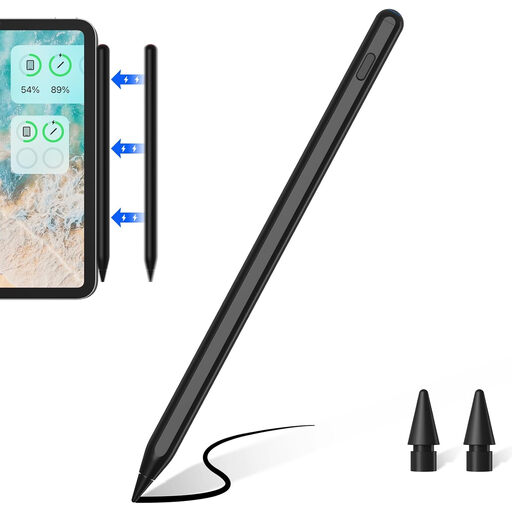 Image unavailable
If you take notes with your hand resting on the screen, the product description lists palm rejection; check that your iPad model is supported first. It specifies magnetic charging for certain iPads only, tilt sensitivity and a replaceable 1.0 mm nib.
 Image unavailable
For handwritten notes with your hand resting on the screen, the product description lists palm rejection; check compatibility with your exact iPad. The stylus charges via USB-C, and the description also lists tilt sensitivity and a 1.0 mm nib.
 Image unavailable
If you’re looking for a stylus for taking notes, the product description lists this as a suitable use and includes palm rejection; check your exact iPad model. According to the description, the stylus needs to be charged via USB-C and attaches magnetically, but doesn’t charge wirelessly.
 Image unavailable
For writing and drawing, the seller describes this rechargeable stylus as suitable for iOS and Android touchscreens; check that your specific device is supported. The product name mentions a dual-touch function, and the rechargeable design means it needs to be charged separately.
STAEDTLER says the Noris digital jumbo doesn’t need to be paired or charged. This only applies if your display supports the stylus; the tablet itself still needs power.
No. Apple describes the magnetic attachment as a way to store the stylus; pairing and charging are done with a USB-C charging cable. Apple says the Pencil Pro charges magnetically on a supported iPad.
No. STAEDTLER specifically says the eraser feature depends on the app. Check that it works in the note-taking or PDF app you plan to use.