Sketchers with a tablet they already own
You want to keep using your iPad, Galaxy tablet or stylus-enabled Windows device and need a compatible stylus. Apple Support, Samsung Germany and Wacom each set out device-specific compatibility requirements.


First, check the exact tablet model and which stylus version is compatible with it. A stylus described as “universal” doesn’t guarantee active pen input. For pressure-sensitive lines, look for explicit support for pressure input. For quick outlines, tilt support, easy power-on and convenient storage may matter more. Also consider your drawing app and how the stylus charges.
You want to keep using your iPad, Galaxy tablet or stylus-enabled Windows device and need a compatible stylus. Apple Support, Samsung Germany and Wacom each set out device-specific compatibility requirements.
You vary outlines and shading, and want to assess pressure and tilt input separately. Samsung Germany lists both features for the S Pen for the Tab S9 FE and S10 FE series; this doesn’t automatically apply to other versions.
You capture ideas between meetings and care about how quickly you can get your stylus ready, put it away and charge it. Apple Germany, Logitech Germany and LAMY Germany describe different charging and storage options for their respective models.
A good fit if: You want to use your existing iPad for quick sketches or pressure-sensitive lines.
The trade-off: Apple Pencil Pro is only compatible with certain iPads. COMPUTER BILD describes Apple Pencil (USB-C) and Logitech Crayon (USB-C) as lacking pressure sensitivity.
A good fit if: You already have a supported Galaxy tablet and want to use pressure and tilt input.
The trade-off: Samsung assigns S Pen models to specific devices. The LAMY AL-star EMR is only an option if your tablet supports the right EMR technology.
A good fit if: Your device supports the Surface Slim Pen or the input technology required by Bamboo Ink Plus.
The trade-off: Microsoft specifies a compatible Surface configuration for magnetic charging. Wacom says Bamboo Ink Plus requires AES or Microsoft Pen Protocol.
| Priority | What to check before buying | Who it matters most to |
|---|---|---|
| Tablet compatibility | Check the exact tablet model, stylus version and any operating system or digitiser requirements. Apple Support, Samsung Germany and Wacom list device-specific requirements. | I want to keep using my existing tablet and make sure active pen input will work before I buy. Around 36 % of consumers prioritise device compatibility. |
| Outlines and shading | Check pressure and tilt input separately for the specific stylus and tablet combination. Your drawing app must also support the controls you want. COMPUTER BILD distinguishes tilt from pressure sensitivity for Apple Pencil (USB-C) and Logitech Crayon (USB-C). | If I want to control line weight or shading with pressure, I need to check specifically that this feature is supported. Around 29 % of consumers prioritise variable line quality. |
| Quick use and storage | Check how the stylus switches on and pairs, along with its charging port and how it attaches to your device. Apple Germany distinguishes between magnetic storage and cable charging for Pencil (USB-C). | Between short sketching sessions, I want to find my stylus quickly and use it without a fiddly set-up. Around 21 % of consumers prioritise quick access and easy storage at a shared desk. |
| Replacement parts and charging | Check what’s included, which replacement tips are compatible and how that particular version charges. LAMY Germany describes replaceable tips for the AL-star EMR; these details don’t automatically apply to other styluses. | I want to know in advance whether I’ll need to budget for replacement tips or a charging cable. Around 14 % of consumers prioritise keeping ongoing upkeep to a minimum. |
Apple, Samsung and Wacom list different devices, stylus versions and input technologies. So a similar-sounding product name alone doesn’t tell you whether a stylus will work with your tablet.
First, identify your exact tablet model and check it against the details for the specific stylus version.
Tilt can change your lines, but it doesn’t replace pressure-sensitive line weight. COMPUTER BILD describes Apple Pencil (USB-C) and Logitech Crayon (USB-C) as lacking pressure sensitivity.
If you want your drawing app to control line width or opacity using pressure, check that the feature is supported by both the stylus and tablet.
Apple Germany says Apple Pencil (USB-C) attaches magnetically for storage, but charges via a USB-C cable.
Check how the specific version charges and what’s included before you order.
Apple Pencil Pro and Apple Pencil (USB-C) are designed for specific iPad models. Check that your devices are compatible.
S Pen versions are designed for specific supported Galaxy devices; features vary by model.
The AL-star EMR is an option for tablets confirmed to support compatible EMR technology.
Logitech Crayon (USB-C) is an option for sketching and annotating on compatible iPads if you don’t need pressure sensitivity.
The Surface Slim Pen is designed for compatible Surface devices, such as when you’re creating concept sketches on a stylus-enabled Windows tablet.
The Joybuy products below are listed as styluses for sketching on an iPad. Check each model’s details against your iPad and make sure the listed input features work with your drawing app.
 No image available
For sketching on an iPad, provided your exact model is included in the stated compatibility range.
The product title lists USB-C fast charging and iPad models from 2018 to 2026.
 No image available
For sketching on an iPad if you want the features listed in the title and your exact model is on the compatibility list.
The product title lists palm rejection, tilt sensitivity and magnetic charging. Compatible models include iPad Pro 11″ and 12.9″, Air 4/5 and mini.
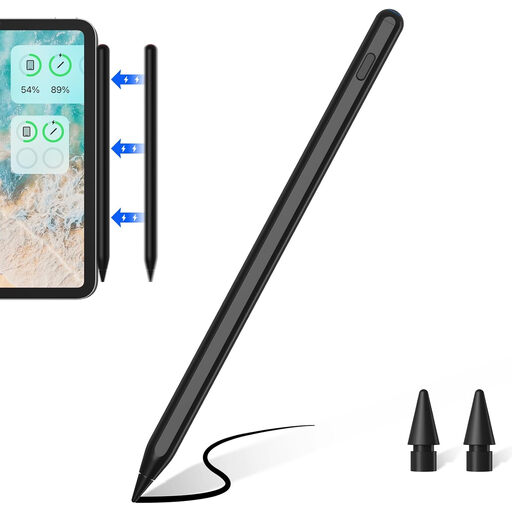 No image available
For sketching on one of the iPad models listed in the product title. Check your tablet’s generation carefully.
The product title lists palm rejection and wireless charging for selected compatible iPad models.
 No image available
For sketching on an iPad if your exact model is included in the range listed in the product title.
The product title lists USB-C fast charging.
 No image available
For sketching on an iPad if the input features listed in the product title are compatible with your device and drawing app.
The product title lists palm rejection and tilt.
No. Check the exact combination of tablet and stylus version. Apple Support and Samsung Germany list device-specific compatibility, while Wacom says Bamboo Ink Plus requires Wacom AES or Microsoft Pen Protocol on the Windows device, among other requirements.
No. Apple Germany describes Apple Pencil Pro as charging magnetically, while Apple Pencil (USB-C) attaches magnetically for storage and charges via a USB-C cable.
Check which replacement tips fit your exact stylus version. LAMY Germany lists replaceable tips and two spare tips included with the AL-star EMR described here; you can’t assume other models come with the same accessories.
For consumer purchases, the seller is generally responsible for the statutory warranty, not the manufacturer. The Verbraucherzentrale says this lasts for two years from purchase or delivery, and distinguishes these rights from a voluntary guarantee.
The German Federal Ministry for the Environment advises that used batteries must be returned to retailers or other battery collection points, free of charge. If the battery is built in, disposal of the whole device is a separate matter.