Students with a tablet already
If you’re buying a stylus separately, first check the full name of your tablet model against the exact name of the stylus. Apple, Samsung, Xiaomi and Lenovo each publish compatibility information for specific models.


For lecture slides, choose a stylus that’s explicitly compatible with your exact tablet model and has a charging method that suits your day-to-day routine. Lenovo says the Precision Pen 3 charges magnetically on the Tab P12 Pro, while Apple says the Pencil (USB-C) charges via a cable and attaches magnetically for storage. Also check that your note-taking app supports the PDF workflow you need: Samsung’s information on editing PDFs applies to Samsung Notes.
If you’re buying a stylus separately, first check the full name of your tablet model against the exact name of the stylus. Apple, Samsung, Xiaomi and Lenovo each publish compatibility information for specific models.
If you can’t count on finding a free socket, check how the compatible stylus charges and whether you need it charged to use any key extra features during your lecture. Apple, Samsung and Lenovo describe different charging methods and feature requirements for their stylus models.
If you want to annotate slides directly and use them afterwards, make sure your chosen app supports the whole process: importing, annotating, saving and exporting as a PDF. Samsung describes PDF editing in Samsung Notes.
First, check your exact tablet model. Then consider how the stylus charges, whether your app supports your PDF workflow and what’s actually included in the box.
| What matters when buying | What to check | Who it matters most to |
|---|---|---|
| Compatibility | Check the tablet generation and the full stylus model against the manufacturer’s compatibility information. | If I’m looking for a stylus for my existing iPad, Galaxy Tab, Xiaomi Pad or Lenovo Tab, that exact combination needs to be compatible. Around 33% of consumers would put device compatibility first when choosing. |
| Charging in lecture theatres | Check how the exact model charges, whether you need a cable and what’s required for any extra features. | If there are few free sockets in the lecture theatre, I want to know whether the stylus charges from the tablet or via a cable, and whether the features I need require it to be charged. About 27% of consumers would make power their top priority. |
| PDF workflow | Use one of your own files to test annotating, highlighting, saving, reopening and exporting as a PDF; Samsung describes PDF editing in Samsung Notes. | If I want to annotate slides and share them as a PDF later, the whole process needs to work in the app I plan to use. Around 20% of consumers would prioritise editing and reusing slides. |
| Complete writing set-up | Check what’s included with the tablet and stylus, along with any required cables and replacement tips. | If I want to avoid unnecessary extra purchases, I’ll first check whether a stylus is already included and what accessories my exact version needs. About 20% of consumers would put their overall accessory requirements first. |
Apple says the Apple Pencil (USB-C) attaches magnetically for storage and requires a USB-C cable for pairing and charging.
Check the charging method against the official information for the exact model, especially if retailer listings differ.
If the required charging cable isn’t available, you may not be able to charge the stylus as planned.
Manufacturers list specific compatible devices. Sharing a brand name doesn’t prove that a particular stylus will work with every tablet.
Before buying, check the exact tablet generation and full stylus name against the manufacturer’s information.
Samsung lists an S Pen as included with the Galaxy Tab S10 FE and FE+ configurations described. Logitech offers Crayon versions with different charging ports.
Check what’s included with the specific tablet offer, and check the exact model name and charging port when choosing a stylus.
The Apple Pencil (USB-C) is designed for iPads that are specifically listed as compatible.
Different S Pen models are designed for specific compatible Galaxy devices.
Crayon models are designed for writing and annotating on an iPad.
The Smart Pen (2nd generation) is designed for the Xiaomi Pad 5 models and Pad 6 specified by Xiaomi.
The Precision Pen 3 is designed for the Lenovo Tab P12 Pro specifically listed as compatible.
The Joybuy products listed here are styluses for taking notes and making handwritten annotations on iPad slides. For each version, check compatibility with your exact iPad and how it charges.
 No image available
Designed for handwritten notes on a compatible iPad.
The product title specifies USB-C fast charging. The product description says the magnetic attachment is for storage, not wireless charging.
 No image available
Designed for handwritten notes on one of the iPad models listed in the product offer.
The product title specifies magnetic charging, palm rejection and tilt sensitivity. Check that your exact iPad is among the models listed.
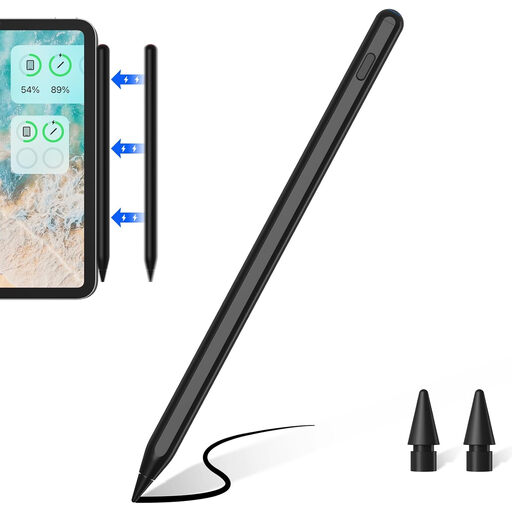 No image available
Designed for handwritten input on one of the iPad models listed in the title.
The title specifies magnetic charging and palm rejection. According to the description, magnetic charging is available only with the iPad models listed there.
 No image available
Designed for handwritten notes on one of the iPad models listed in the product offer.
The product title specifies USB-C fast charging; check the iPad model details against your device before buying.
 No image available
Designed for handwritten notes on slides using one of the iPad models listed in the title.
The product title specifies palm rejection and tilt support. According to the description, use only suitable 5-V USB adapters for charging; unplug the cable immediately if it is visibly damaged.
Samsung distinguishes basic writing from Bluetooth gestures and remote features. For the S Pen EJ-PX710, Samsung says the stylus must be charged for Air Command to work; check the features available with your specific stylus and tablet combination.
No. Apple describes the magnetic attachment on this model as being for storage, and specifies a USB-C charging cable for pairing and charging.
Test one of your own PDF files in the app you plan to use: write on it, highlight text, save the file and open it again. Samsung describes PDF editing in Samsung Notes; that doesn’t automatically mean every other app offers the same workflow.
Samsung lists an S Pen as included with the Galaxy Tab S10 FE and FE+ configurations it describes. Even so, check what’s included with the specific offer you’re considering.
According to Verbraucherzentrale, consumers generally have a right to cancel a distance purchase, usually within 14 days of receiving the goods; exceptions may apply. For faulty goods bought from professional sellers, the EU Consumer Portal describes a statutory guarantee of at least two years from receipt. This statutory guarantee is separate from a voluntary manufacturer’s warranty.