What should you look for when buying?
Start by matching your tablet and stylus, then check the writing experience, file sharing, charging and storage.
| Criteria |
What to check before buying |
Who will find this most important? |
| Tablet compatibility |
Check the exact tablet and stylus models, and, where relevant, the operating system or display technology. |
If I already own a tablet, I want to be sure the stylus is the right match before ordering. Around 36% of consumers put device compatibility first. |
| Writing with your hand resting on the screen |
Check palm rejection with your specific tablet and the app you plan to use. |
When I’m making lots of handwritten notes in the margins, I want to rest my hand on the screen without constantly adjusting how I write. Around 29% of consumers prioritise being able to write comfortably with their hand resting on the screen. |
| PDF workflow |
Import a typical slide, annotate it, save it in the format you need and open it again. |
If I need to submit or share annotated slides, a reliable process from import to finished file matters to me. Around 21% of consumers put their PDF workflow first. |
| Ready to use |
Check how it charges, how it’s stored, what charging accessories you’ll need and whether a stylus is already included. |
For short writing sessions, I don’t want to have to look for a cable or charger, or end up buying a second stylus unnecessarily. Around 14% of consumers prioritise being ready to use and keeping ongoing costs down. |
Joybuy products for iPad note-taking
The Joybuy products below are iPad styluses. Before buying, check that the stated model range includes your exact iPad model.
 No image available
Input Pen Stylus for iPad (2018–2026), USB-C fast charging
An option for handwritten notes if you want to rest your hand on the screen as you write.
Palm rejection and tilt sensitivity are listed; the stylus isn’t pressure-sensitive. Magnetic attachment doesn’t support wireless charging.
View at Joybuy
 No image available
ZSPEED Wireless Charging Stylus for iPad Pro, Air and mini
An option for iPad note-taking if you’re looking for palm rejection and tilt sensitivity.
The listing includes iPad Pro 11″ (4th, 3rd, 2nd and 1st generation), iPad Pro 12,9″ (6th, 5th, 4th and 3rd generation), iPad Air 4/5 and iPad mini. Check your exact model generation.
View at Joybuy
 No image available
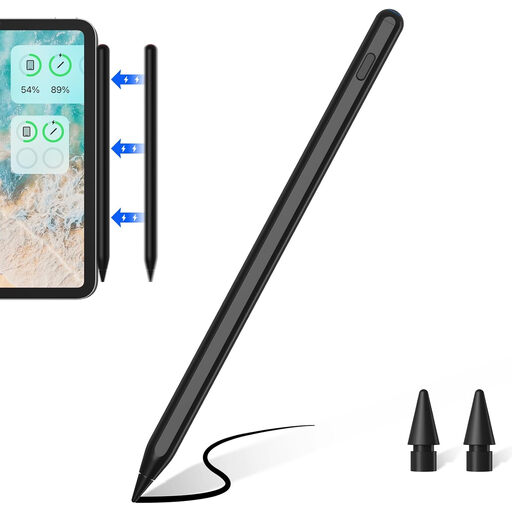
ZSPPED Wireless Charging Pencil, 2nd Generation
An option for handwritten notes on iPad, with palm rejection.
Tilt sensitivity and a replaceable 1,0-mm tip are listed. The model list includes iPad 10/9/8, mini 6, Air 5/4, Pro 11″ 3/2/1 and Pro 12,9″ 6/5/4/3. According to the product information, magnetic charging is available only for some of the listed models.
View at Joybuy
 No image available
Input Stylus Pen for iPad (2018–2025), USB-C fast charging
An option for iPad note-taking if you want to rest your hand on the screen as you write.
Palm rejection, tilt sensitivity, USB-C charging and magnetic attachment are listed. Check the exact iPad model name before buying.
View at Joybuy
 No image available
iPad Stylus with USB-C charging port and palm rejection
An option for handwritten notes on iPad if you want to rest your hand on the screen as you write.
The title lists tilt sensitivity and magnetic attachment, and a USB-C charging port is specified. Magnetic attachment is for storage, not wireless charging. Compatibility is limited to selected iPad models.
View at Joybuy
Frequently asked questions
Can I use any active tablet stylus to annotate my lecture slides?
No, the stylus needs to be compatible with your exact tablet model. Check Apple’s compatibility list, Samsung’s model guide or Microsoft’s Surface information. For the Noris digital, your specific display must support EMR, as STAEDTLER explains.
How can I check that my PDF workflow works before a full lecture?
Import a typical slide, annotate it with your hand resting on the screen, export the note in the format you need and open the file again. Samsung documents PDF editing and export from Samsung Notes, while Microsoft explains how to annotate inserted file printouts in certain versions of OneNote.
Do I need to be able to charge a Surface Slim Pen at my standing desk?
Make sure you have a compatible place to charge it. Microsoft lists built-in charging slots and a separately available Slim Pen charger, depending on the Surface model or accessory. Check which charging option works with your set-up.
Do I need to order an S Pen separately for the Galaxy Tab S10 FE?
Not just to have a stylus: Samsung says an S Pen is included with the Galaxy Tab S10 FE. Check what’s included with the specific offer and only order another if you need a spare.
What are my rights in Germany if a stylus I bought online isn’t compatible?
For eligible consumer purchases made online, you generally have a 14-day cancellation period starting from delivery. The European Consumer Centre Germany notes that you must explicitly notify the seller if you wish to cancel; exceptions and return postage costs may apply. Separately, if the goods are faulty, statutory consumer rights apply. According to information from the European Union, these rights cover a minimum of two years from receipt.


