Handwriting observers
If you want to record observations and sketches directly with a stylus, check in advance which stylus works with the specific device version.


For handwritten field notes on the train, a versatile tablet is a good choice if you need apps beyond writing and carefully choose a compatible stylus and the right bundle. A digital paper tablet is more suitable if writing and annotating PDFs are your priorities. Before you buy, check the space available at your seat, your offline workflow, the export formats you need and which accessories you’ll actually use.
If you want to record observations and sketches directly with a stylus, check in advance which stylus works with the specific device version.
If you write at your train seat, the device’s dimensions, weight and usable writing area all matter. Deutsche Bahn notes that many ICE seats have fixed or folding tables.
If you want to take notes without a connection and share them later, your workflow should work offline too. Deutsche Bahn says Wi-Fi is available throughout its ICE fleet, but only on some Intercity services and selected regional trains.
A good choice if: you want to use other tablet apps as well as take handwritten notes while you’re on the move. Apple lists two compatible Apple Pencil models for the iPad Air (M4), while Samsung describes taking notes with the S Pen on the Galaxy Tab S10 FE.
Things to consider: stylus support doesn’t automatically mean a stylus is included. Check the specific version.
A good choice if: handwritten notes and PDF annotations matter more to you than a general selection of tablet apps. For the Paper Pro, reMarkable lists features including PDF import and PDF, PNG and SVG export.
Things to consider: check that its focused workflow and cloud features meet your needs for apps and sharing files.
| Criterion | What to look for | Who it matters most to |
|---|---|---|
| Compatible stylus | Check compatibility and what’s included with the specific version. Apple lists Apple Pencil Pro and Apple Pencil (USB-C) for the iPad Air; Samsung describes taking notes with the S Pen on the Galaxy Tab S10 FE. | If I want to record observations by hand, the stylus and device need to work together. Around 40% of consumers put stylus note-taking at the top of their list when buying. |
| Size and weight | Compare the device’s dimensions and weight, including its case, with the space you have for writing. Deutsche Bahn says tables are available at many, but not all, ICE seats. | If you write at a train seat with little room to work, you’ll want to weigh up the device’s size and weight against the space available. Around 30% of consumers prioritise size and portability. |
| Working offline | Test whether you can write and open the documents you need without Wi-Fi using your chosen app. Deutsche Bahn says Wi-Fi is available throughout its ICE fleet, as well as on some Intercity services and selected regional trains. | If I need to take notes offline during my journey and continue working later, my workflow should work without a connection. Around 20% of consumers prioritise offline use. |
| Export and accessories | Check which file format you need and how to transfer it to your target device. reMarkable lists several export formats for the Paper Pro; Lenovo says the Idea Tab Pro Core Bundle includes the Tab Pen Plus and Folio. | If you need to share your notes later in a particular format, check the export process and any required accessories in advance. Around 10% of consumers prioritise how they’ll use their notes afterwards. |
A device may support certain styluses without including one in the box. Alongside the iPad Air, Apple lists a USB-C cable; Lenovo explicitly lists the Tab Pen Plus as part of the Idea Tab Pro Core Bundle.
Compare what’s included with the specific version you’re buying, and only budget for the accessories you need for your writing setup.
If you need to buy a compatible stylus separately, that’s one more thing to arrange.
A larger device needs more space at your seat. Deutsche Bahn says fixed or folding tables are available at many ICE seats, but not all of them.
Compare the device’s dimensions, including its case, with the space where you usually write.
reMarkable lists additional features for Connect. According to Deutsche Bahn, Wi-Fi availability on trains varies by service type.
First, test note-taking, file access and exporting later without a connection. Then decide whether you really need additional cloud features.
If your workflow depends on optional cloud features, check whether you’ll also need a subscription service.
The iPad Air (M4) is a versatile tablet option, available in 11- and 13-inch versions and compatible with two Apple Pencil models.
The Galaxy Tab S10 FE is an Android option for taking notes with the S Pen, with a 10.9-inch display.
The Idea Tab Pro Core Bundle pairs a 12.7-inch Android tablet with the Tab Pen Plus and Folio.
The Paper Pro is designed for handwriting and documents rather than general use as an app-based tablet.
This selection includes an E Ink note-taking tablet and versatile tablets with stylus input for taking handwritten notes on the go.
 Image unavailable
For handwritten notes on the go, if an E Ink note-taking device suits your workflow.
10.65-inch E Ink display. Voice transcription requires an internet connection.
 Image unavailable
For notes and other tablet tasks, if you’re looking for a large working area and an accessories bundle.
13.4-inch display; Android 16; bundle with keyboard, mouse and stylus.
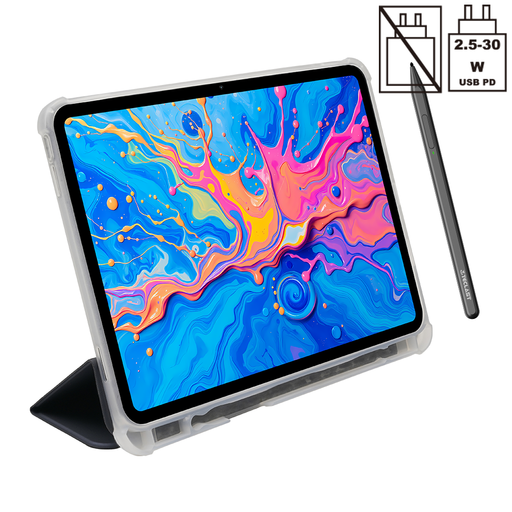 Image unavailable
For handwritten notes with stylus input, if you also want a tablet for other apps.
12.7-inch 2K display; T-Pen with 4096 pressure levels and protective case included; Android 15.
 Image unavailable
For handwritten notes and other tablet apps in a more compact size.
Apple lists the 11-inch Wi-Fi model at 464 g. It supports Apple Pencil Pro and Apple Pencil (USB-C); the stylus isn’t included in the listed box contents.
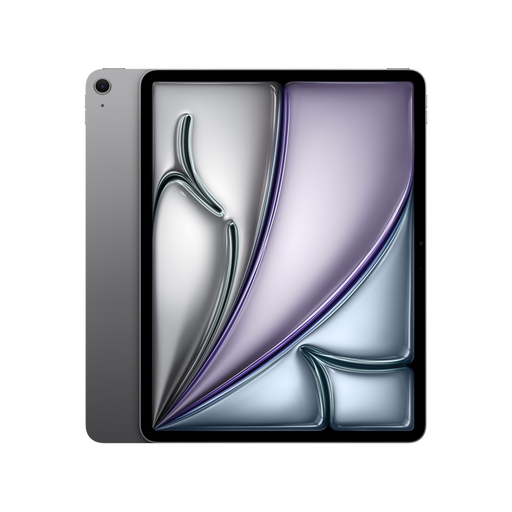 Image unavailable
For handwritten notes and other tablet apps, if a larger display matters more to you than a compact size.
Apple lists the 13-inch Wi-Fi model at 616 g. It supports Apple Pencil Pro and Apple Pencil (USB-C); the stylus isn’t included in the listed box contents.
No. Check the compatibility of the specific tablet. Apple lists Apple Pencil Pro and Apple Pencil (USB-C) for the iPad Air (M4); also check whether the stylus is included with the version you’ve chosen.
Save any documents you need locally beforehand and test a practice note with Wi-Fi switched off, including exporting it afterwards. Deutsche Bahn lists Wi-Fi across its entire ICE fleet, but only on some Intercity services and selected regional trains, so a connection isn’t guaranteed on every journey.
A digital paper tablet may be a good fit if handwritten notes and documents are your main focus and you don’t need a general selection of tablet apps. Check the export formats you need and whether your chosen cloud and offline workflow will work.
Create a practice note and check that you can open it in the format you need on your target device. reMarkable lists PDF, PNG and SVG export for the Paper Pro; make sure these work with your own workflow.
Online purchases generally come with a 14-day right to cancel, although exceptions may apply. If goods are faulty or don’t match the contract, you have a legal guarantee from the seller lasting at least two years from receipt. The European Union’s Your Europe website distinguishes these rights from a voluntary manufacturer’s warranty.