For longer pieces of writing, a tablet with a suitable keyboard is an obvious choice. For handwritten entries and sketches, you’ll need a compatible stylus and support from your app. Google Docs Editors Help explains how to edit files offline on Android tablets and iPads, provided you make them available offline in advance. Deutsche Bahn notes that Wi-Fi availability varies between trains and speeds can fluctuate.
Who is a tablet on the train suitable for?
Travellers who edit a lot of text
If you’re editing longer journal entries at your seat, your input method should suit both the amount you write and the space available. Deutsche Bahn describes fixed or fold-down tables at many ICE seats; Apple lists a keyboard option for the 11-inch iPad Air M4.
Travellers whose connection may come and go
If you want to open and edit entries without relying on a stable internet connection, check your app’s offline mode before you travel. Google Docs Editors Help explains offline editing on Android tablets and iPads; according to Deutsche Bahn, Wi-Fi isn’t available on every train service.
Travellers keeping a photo and sketch journal
If you add photos, handwritten notes or drawings to your writing, your app, storage and stylus should suit the way you work. Apple lists compatible Pencil models, while Samsung includes an S Pen with the Galaxy Tab S10 FE; check the specific version in each case.
What should you look for when choosing one?
Start by thinking about how you edit your entries, then check what accessories and offline access you’ll need.
| Priority |
What to check before buying |
Who is this important to? |
| Typing longer texts |
Check keyboard compatibility with the exact model, layout, footprint and what’s included. |
If I edit longer entries at my seat, I want to be able to use a suitable keyboard. Around 26% of consumers put typing longer texts first. |
| Carrying on offline |
Open a sample file offline before your journey, edit it and then check that it syncs later. |
If the connection drops while I’m travelling, I still want to be able to open and edit my journal. Around 21% of consumers prioritise working without a stable connection. |
| Ease of use at your seat |
Compare the dimensions and weight of the tablet and accessories with your luggage and the space available. |
If I take the device out of my bag on the train or hold it in my hand, size and weight matter to me. Around 21% of consumers prioritise ease of use at their seat and while travelling. |
| Adding photos and sketches |
Check stylus compatibility, app features, image import and the storage available on the specific version. |
If my journal includes photos, handwriting or drawings, the stylus and app need to suit the way I work. Around 16% of consumers prioritise photo and stylus input. |
| Getting the right accessories |
Check whether a keyboard, stylus and case are included with the version you want or need to be bought separately. |
If I’m putting together a complete writing or sketching set-up, I only want to budget for accessories I actually need. Around 16% of consumers pay particular attention to what their set needs to include. |
Avoid common buying mistakes
-
Assuming the tablet comes with everything you need to write
Keyboards and accessory bundles vary by model and configuration. Keyboard support doesn’t automatically mean a keyboard is included.
Before choosing, compare the exact version and check which of the accessories you need are actually included.
-
Assuming the train’s Wi-Fi will be available for everything
Wi-Fi availability varies by train type, and speeds can fluctuate too. Deutsche Bahn lists Wi-Fi on its ICE fleet, parts of its Intercity fleet and selected regional trains.
Make your journal files and any images you need available offline in your app before you travel. Test that you can open and edit them.
-
Assuming similarly named tablets are the same version
Model number, wireless connectivity and accessory bundle can all vary. A similar name alone doesn’t tell you which configuration is on offer.
Compare the full model number and the features that matter to you with the details for the specific version.
Relevant brands at a glance
Apple
The iPad Air M4 could suit you for typing and using a stylus, if the available iPad apps work with your journalling set-up.
- Apple lists a weight of 464 g for the 11-inch Wi-Fi model and support for Pencil Pro and Pencil (USB-C).
- The Magic Keyboard is listed as a compatible accessory; check whether it’s included with the specific version. This information comes from Apple and isn’t an independent assessment of suitability.
Samsung
The Galaxy Tab S10 FE is an option for travellers planning to make handwritten entries on an Android tablet.
- Samsung lists an S Pen as included with the 10.9-inch Galaxy Tab S10 FE.
- Check the wireless connectivity, storage and what’s included with the specific offer; the S Pen isn’t included as standard with every Samsung tablet.
Xiaomi
The Pad 7 is an Android option with a screen of around 11 inches and several storage configurations.
- Xiaomi lists an 11.2-inch screen, a weight of 500 g and 128 GB and 256 GB versions for the Pad 7.
- According to Xiaomi, usable storage is less than the stated capacity. Also check whether a stylus or keyboard is included with the version you choose.
Lenovo
The 12.7-inch Idea Tab Pro could suit you if you’d like a larger workspace and have enough room at your seat.
- Lenovo offers configurations with a Pen, as well as a separate bundle with a Pen, power adapter and Folio Case.
- A keyboard is listed as an option, so don’t assume it’s included with every configuration.
Joybuy tablets for journalling and note-taking
The devices below cover portable typing with a keyboard, handwritten notes and sketches, and larger workspaces. For each version, check that the accessories and app features suit your journal.
 No image available
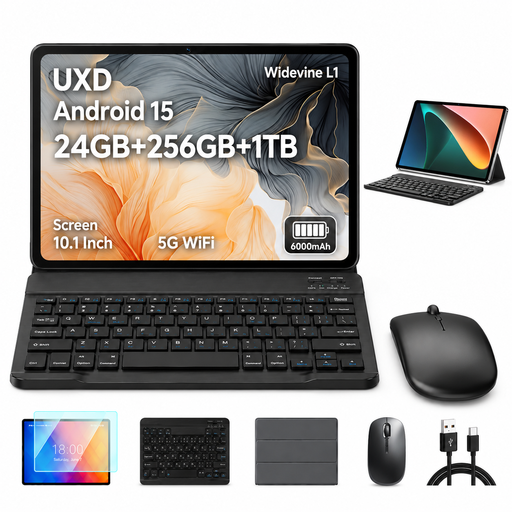
UXD A5, 10.1-inch Android 15 tablet with keyboard
The keyboard mentioned in the product title could make this a handy writing set-up for journalling at your seat.
256 GB ROM; 24 GB RAM, including 8 GB virtual; expandable by up to 1 TB according to the product title.
View at Joybuy
 No image available
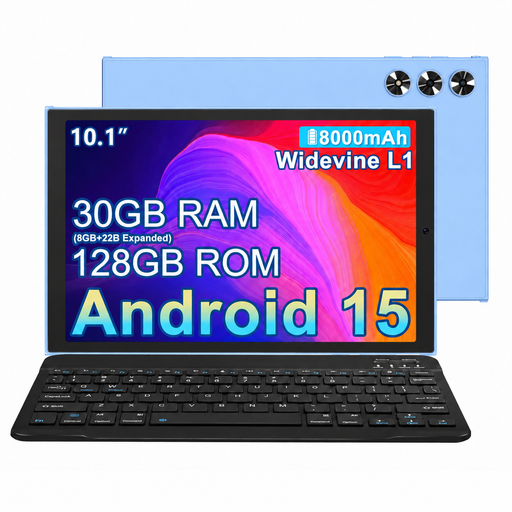
MEBERRY M8, 10.1-inch tablet with keyboard, mouse and case, Blue
The keyboard and case listed in the product title make up an accessory bundle for typing on the go.
128 GB ROM; 30 GB RAM, including 22 GB virtual; Android tablet according to the product title.
View at Joybuy
 No image available
Xiaomi Pad 7 with keyboard, 8 GB RAM and 128 GB ROM, Grey
The keyboard mentioned in the offer title could be useful for longer writing sessions; check that the configuration works with your app.
According to Xiaomi, the Pad 7 has an 11.2-inch screen and weighs 500 g without accessories. The offer lists 128 GB ROM.
View at Joybuy
 No image available
iFLYTEK AINOTE 2, 10.65-inch E Ink tablet
The product title mentions a stylus, handwritten note-taking and handwriting-to-text conversion.
The voice transcription mentioned there requires an internet connection.
View at Joybuy
 No image available
TECLAST ArtPad Pro, 12.7 inches, 2K, 256 GB, with stylus and English Bluetooth keyboard
The product title lists a stylus and Bluetooth keyboard for combining typing with sketching.
12.7-inch screen, 2K and 256 GB storage according to the product title. The larger size may take up more room on your seat’s table.
View at Joybuy
Frequently asked questions
Can I edit my journal on the train without an internet connection?
Yes, if your app and the files you’ve prepared support offline editing. Google Docs Editors Help explains how to make files available offline in advance on Android tablets and iPads; test that you can open and edit your specific file before travelling. Deutsche Bahn notes that train Wi-Fi availability and speeds vary.
What should I set up before my first train journey?
Make your current document available offline in the app you use, then test opening it, making changes and syncing it later. If you use Office on a mobile device, Microsoft Support explains how changes are saved regularly while you work offline.
Are statutory consumer rights and the manufacturer’s guarantee the same thing?
No. When you buy in Germany, your statutory consumer rights against the seller are separate from a voluntary manufacturer’s guarantee. Verbraucherzentrale explains the difference; any additional guarantee cover depends on the relevant terms and conditions.
What should I look out for regarding compliance and disposal?
The Bundesnetzagentur says that market surveillance includes checking CE marking and manufacturer details, among other things; check the information for the specific model. The Federal Ministry for the Environment explains that waste electrical equipment must be taken to an authorised collection point; check the applicable take-back conditions before handing it in.


