If you’ll mainly be writing training plans, first check that your writing app is compatible and that you can get a suitable keyboard. For handwritten notes, the stylus model and what’s included in the box are key. A larger display gives you more room for documents, but takes up more space. A Windows tablet is worth considering if the software and peripherals you need work with that specific device configuration.
Who is planning with a tablet?
People writing lesson plans
If you write and revise longer training plans at a library desk, the right app, a keyboard and enough workspace are important factors to consider. Apple lists support for certain Apple Pencil models for the iPad (A16); Microsoft describes a connectable keyboard for the Surface Pro, while Lenovo offers a larger Idea Tab Pro.
People annotating materials
If you mark up drafts or worksheets by hand, check which stylus works with the specific tablet and whether it’s included in the offer. Samsung says the S Pen is included with the Galaxy Tab S10 FE. Apple lists compatible Pencil models for the iPad (A16), but no Pencil in the stated box contents. Xiaomi’s listed package contents don’t include a stylus either.
People who need specific software
If you need a particular application or peripheral for your preparation, check compatibility with the operating system and the specific device configuration before buying. Microsoft says many Windows apps can run on Windows 11 ARM, but you should still check specialist software and drivers individually.
What should you look for when buying?
First decide whether you’ll mainly be typing, annotating by hand or viewing several documents at once. Then check app compatibility, accessories and offline access.
| What you need |
What to check when buying |
Who is this especially important for? |
| Writing longer training plans |
Check that the writing app you need is available, and confirm the keyboard model, German layout and box contents for the specific variant. |
If you revise longer plans at a library desk, typing comfort and a suitable app matter to you. Around 28% of consumers put typing first. |
| Annotating drafts by hand |
Check the compatible stylus model and what’s included. Also make sure the app you use saves annotations in the file format you want. |
If you mark up worksheets or drafts by hand, you’ll need a compatible stylus and should check whether it’s included. Around 22% of consumers prioritise handwritten notes. |
| Reviewing several documents |
Compare the dimensions, not just the screen size in inches, and check how your documents can be arranged on the display. |
If you want to view a draft alongside reference material, usable workspace matters. Also consider how much room the tablet will take up in your bag and at the library. Around 22% of consumers prioritise workspace. |
| Working without reliable Wi-Fi |
Before your visit, test the documents you need and your access permissions offline in the app you actually use. For public hotspots, the Federal Commissioner for Data Protection and Freedom of Information recommends taking protective measures into account. |
If you need to work on your plan without a stable connection, make sure the documents you need are available locally in advance. Around 17% of consumers put working independently of a network first. |
| Choosing a device and accessories |
Check what’s included with the specific variant: stylus, keyboard and any other accessories you need. |
If you want to assess the complete device setup first, you’ll need to know which tools you still need to buy. Around 11% of consumers prioritise the total cost of the tablet and accessories. |
Common pitfalls
-
Assuming stylus support means a stylus is included
Apple lists compatible Pencil models for the iPad (A16), but no Pencil in the stated box contents. Samsung says the S Pen is included with the Galaxy Tab S10 FE.
Before buying, compare the accessories listed for the exact model variant with the stylus supported by your note-taking or PDF app.
-
Assuming USB-C guarantees your setup will work
A port on its own doesn’t confirm that your preferred monitor, adapter, printer and application will all work together. With Windows on ARM, drivers can be especially important.
Check the specific device configuration with your application and peripherals before relying on it.
-
Assuming similar model names mean identical configurations
A Joybuy product page lists a Galaxy Tab S10 FE with 5G and gives a different display specification from Samsung’s details for the Wi-Fi version SM-X520 considered here, which has a 10,9-inch display.
Compare the model code, connectivity option and key specifications with Samsung’s details. A similar product name doesn’t prove that the configuration is identical.
Key brands at a glance
The manufacturers mentioned here differ in operating system, display and accessories. Check the details for the specific model and offer each time.
Apple
The iPad (A16) is an iPadOS option for training plans, research and optional handwritten annotations.
- Apple lists a weight of 477 g for the Wi-Fi model and 128 GB as one storage option.
- Apple doesn’t list a Pencil in the stated box contents. Also check whether the training app you need is available for iPadOS.
Samsung
The Galaxy Tab S10 FE is an Android option if handwritten annotations are important to you.
- Samsung lists a 10,9-inch display and an included S Pen for the Galaxy Tab S10 FE.
- Check the keyboard and the app you need separately. Details for the Wi-Fi version SM-X520 don’t automatically apply to a 5G variant.
Microsoft
The 1st Edition Surface Pro 12-inch combines tablet input with a Windows workflow, if that’s what you need.
- Microsoft lists a Snapdragon X Plus processor and a connectable keyboard. According to Microsoft, many Windows apps can run on Windows 11 ARM.
- Check the specific application and the peripherals you need individually, especially drivers and specialist software. Details for other Surface editions don’t necessarily apply.
Lenovo
The Idea Tab Pro ZAE40020SE is a larger Android option for working with longer documents.
- For this offer, Lenovo lists a 12,7-inch display, 8 GB of RAM and 256 GB of storage.
- The ‘+ Pen’ description doesn’t clearly confirm what’s included in the package. Check which stylus is actually included before ordering.
Xiaomi
The REDMI Pad Pro is a larger Android option for viewing documents.
- Xiaomi lists a 12,1-inch display, a weight of 571 g and USB-C. Available storage options may vary by region.
- Xiaomi’s stated package contents don’t list a stylus. If you want to work by hand, check which accessories are included.
Joybuy products for planning training sessions
The following Joybuy products suit different ways of working, from typing with a keyboard and taking handwritten notes to using a Windows workflow you rely on.
 No image available
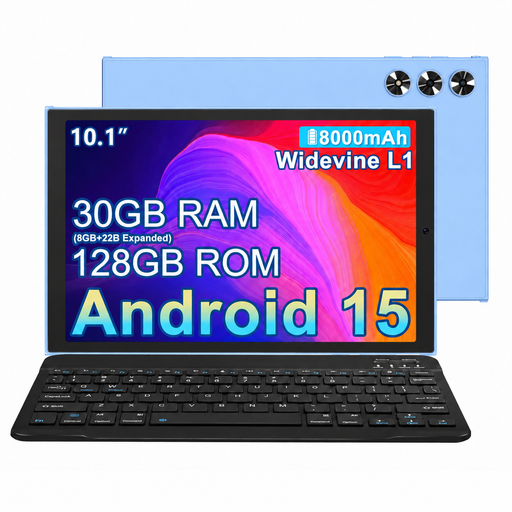
MEBERRY M8, 10.1-inch, 128 GB
If you type up longer plans at a library desk, the keyboard mentioned in the product name is a useful feature to consider.
The title lists 30 GB RAM (8 GB + 22 GB virtual), 128 GB ROM and an 8000-mAh battery. It also lists a keyboard, mouse and case.
View at Joybuy
 No image available
UXD 13.4-inch Android tablet, 128 GB
If you want to view longer documents and reference materials on a larger screen, display size is an important factor to consider.
The title lists Android 16, a resolution of 1920 × 1200 pixels and 128 GB of storage. It also lists a keyboard, mouse and stylus.
View at Joybuy
 No image available
iFLYTEK AINOTE 2, 10.65-inch, E Ink
If you want to plan training sessions by hand, an E Ink note-taking tablet could suit the way you work.
The product name lists a 10.65-inch E Ink display. The transcription feature described requires an internet connection; also check whether a stylus is included with the specific package.
View at Joybuy
 No image available
TECLAST ArtPad Pro, 12.7-inch, 256 GB
If you want to type longer texts and annotate materials by hand, the product title lists both a keyboard and a stylus.
The title also lists Android 15, 256 GB of storage and an English Bluetooth keyboard. Check whether its layout suits the way you type.
View at Joybuy
 No image available
Microsoft Surface Pro 12 Snapdragon Plus, 24 GB, 1 TB
If you need a specific Windows workflow to prepare training sessions, check that your applications and peripherals are compatible with the specific device configuration.
The product name lists 24 GB and 1 TB. A keyboard isn’t listed among the box contents, so check whether you’ll need to buy one separately.
View at Joybuy
Frequently asked questions
How can I prepare documents if I don’t know whether the library has Wi-Fi?
Before your visit, test the documents you need in the app you actually use, with the connection switched off. The Federal Commissioner for Data Protection and Freedom of Information highlights the risks of public Wi-Fi hotspots and recommends a VPN if you want to protect all information being transmitted. This doesn’t mean that a particular library offers Wi-Fi.
Can I use any Windows application and printer with a Surface Pro?
No, you can’t tell that from the product name alone. Microsoft says many Windows apps can run on Windows 11 ARM. Before buying, check that the application you need and the right drivers for your peripherals are supported.
Do I need to buy a stylus for handwritten annotations?
That depends on the specific model and offer. Samsung lists an included S Pen with the Galaxy Tab S10 FE. Apple lists compatible Pencil models for the iPad (A16), but no Pencil in the stated tablet box contents. For each variant, check which stylus is included and whether your app supports it.
Can I simply record participants or an online meeting?
No, having a recording feature isn’t enough on its own. For video conferences, the Data Protection Conference advises checking the legal basis, responsibilities and appropriate safeguards. What applies to a particular event depends on the data being processed and the circumstances.


