What should you look for when choosing one?
First check that your learning app works with saved lists. Then consider screen size, portability and the conditions you’ll be using it in on your trip.
| Consideration |
What to check before buying |
Who is it important to? |
| Access without Wi-Fi |
Open the app and full list in aeroplane mode; if you need to sync, check the Wi-Fi or mobile data version and your plan. |
If I study on the go without a stable Wi-Fi connection, I need to be able to open my saved list in the app. Around 31% of consumers have offline access as their main concern. |
| Portability |
Compare the size and weight of the exact model; try your own list with a comfortably readable font. |
If I only take my tablet out for a short time, I want it to be easy to carry and hold. Around 31% of consumers put portability first. |
| Reading full pages |
View one of your own PDF pages on the display and check readability in the lighting conditions you expect to use it in. |
If I use a fixed-format list, I want to see as much of it as possible at once. Around 23% of consumers say reading full pages is particularly important. |
| Battery and outdoor use |
Charge the device beforehand and test your usual routine at your preferred brightness; protect it from rain. |
If I can’t reliably charge during my trip or I’m studying outdoors, I need to think about power and the conditions I’ll be using it in. Around 15% of consumers have this as their main concern. |
Joybuy products for vocabulary lists on the go
These Joybuy options range from compact 8- to 8.8-inch tablets to larger 10.1- and 11-inch models. For each device, check that your learning app is available and that your lists work offline as you need them to.
 No image available
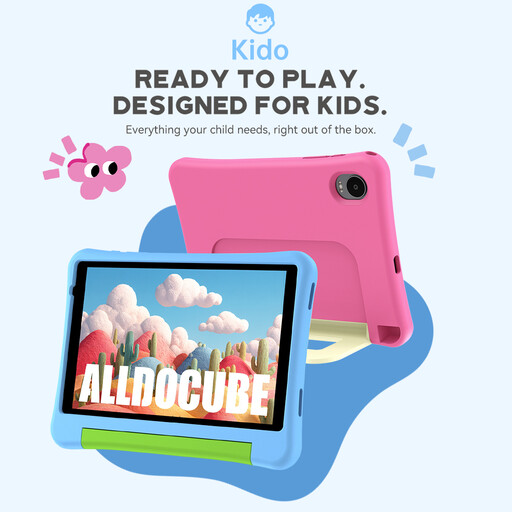
ALLDOCUBE Kido children’s tablet, 8 inches, Android 15, 3GB+32GB
The compact size could be a good fit for quick revision; before your trip, check that your learning app is available on the device.
8 inches, Android 15 and 3GB+32GB. A pink protective case is listed in the product title; according to the product information, a power adapter isn’t included.
View at Joybuy
 No image available
ALLDOCUBE iPlay 70 mini Ultra, 8.8 inches, Android 14, 12GB+256GB
The 8.8-inch size is a compact option if you often want to check your lists briefly while you’re out.
Android 14, 12GB+256GB and 7300mAh. According to the product information, a power adapter isn’t included.
View at Joybuy
 No image available
Samsung Galaxy Tab A11+ X230, 11 inches, Wi-Fi, 6GB RAM, 128GB
The larger display could be useful for full list or PDF pages; bear its size and weight in mind when carrying it.
11 inches, 1920 × 1200 pixels, 482 g, 6GB RAM and 128GB storage. This is a Wi-Fi model.
View at Joybuy
 No image available
MEBERRY M8, 10.1 inches, Android 15, 128GB
The 10.1-inch display gives you more screen space than a compact tablet; check that the size suits the way you’ll be carrying it.
Android 15, 128GB storage and 8GB RAM plus 22GB virtual RAM. A case, keyboard and mouse are listed in the product title.
View at Joybuy
 No image available
Android 16 Tablet PC, 10.1 inches, 36 GB RAM, 256 GB ROM, keyboard set
The 10.1-inch size gives you a larger display for vocabulary lists; consider whether you want to carry the extra screen space on your trip.
Android 16, 36 GB RAM and 256 GB ROM; “1 TB TF” is also listed in the title. A keyboard is included in the set.
View at Joybuy
Frequently asked questions
Do I need mobile data for vocabulary lists on a trip?
No, not if your specific app can open lists you’ve saved in advance without an internet connection. Try it in aeroplane mode. If you need to sync while you’re out, check the exact Wi-Fi or mobile data version, your plan and mobile reception.
What should I set up before my first trip?
Install the learning app you need, sign in, save a full list and try opening it offline. This lets you check in advance that the app and study materials will work with your planned routine.
How should I plan for charging and accessories?
Charge the tablet beforehand and test how long it lasts at your usual brightness. Lenovo’s stated battery life of up to 12.5 hours for the Tab One is based on YouTube streaming, not vocabulary practice. Also check whether any charging or protective accessories you need are included.
What are my rights when buying online in Germany?
For a consumer contract made at a distance, you generally have the right to cancel, usually within 14 days of receiving the goods. The Verbraucherzentrale distinguishes this right from the statutory warranty for faulty goods; for new goods, it generally gives a period of two years from delivery. A voluntary guarantee is separate.
Can I use the tablet freely on a school trip?
Check the rules set by your school and the teacher in charge before planning to take a tablet. The Ministry of Education of North Rhine-Westphalia describes school-level rules, but its guidance doesn’t automatically apply in every German state.


