What should you look for when buying?
Check app and offline content, portability, stylus input and display separately, so you can choose a device that suits the way you study.
Compact LCD tablet
A good fit if: you mainly read lists and tap through flashcards, and want to keep your library desk free of clutter. The Samsung Galaxy Tab A11 has an 8.7-inch display.
Consider: a smaller display may be less comfortable for long lists or viewing documents side by side.
Larger LCD tablet with stylus support
A good fit if: you want to add vocabulary by hand or annotate lists. Samsung lists S Pen support for the Galaxy Tab S10 Lite, while Apple lists support for certain Apple Pencil models for the iPad (A16).
Consider: stylus compatibility and whether one is included depend on the model and specific offer. Check both before buying.
E-paper device
A good fit if: you mainly read text and prefer a paper-like display. BOOX describes the Go 7 as a monochrome 7-inch e-paper device with access to Android apps.
Consider: check how your learning app works on the specific device. Manufacturer information doesn’t prove that it will display or respond as well as on an LCD tablet.
| Purchase priority |
What to check before buying |
Who it matters most to |
| App and prepared lists |
Check that the app works on the specific operating system, and download a test list and any required media in advance. |
If I rely on a particular flashcard app and ready-made lists, I want to test their features before going to the library. Around 36% of consumers say apps and lists are their top priority. |
| Portability at the library desk |
Compare the display size and weight of the exact version, and try out the list view you typically use. |
If I need to fit books and paper on the desk too, size and weight are especially important. Around 29% of consumers say portability matters most to them. |
| Handwritten notes |
Check which stylus is compatible, whether it’s included and which note-taking app is available with the exact version on offer. |
If you want to mark words directly on a list or add translations, you’ll need compatible stylus input. Around 21% of consumers prioritise handwritten notes. |
| Display for longer reading sessions |
Compare text size and how your actual lists work on LCD and e-paper. |
If I mainly read longer text lists, I want to judge the display using my own content. Around 14% of consumers say text display is their top priority. |
Tablets for vocabulary lists at Joybuy
This selection includes Android tablets for lists, an E Ink note-taking device and a tablet with a stylus. Check app compatibility and what’s included with each version.
 No image available
Samsung Galaxy Tab A11+ X230, 11-inch, Wi-Fi, 6 GB RAM, 128 GB, Grey
The 11-inch size could suit longer vocabulary lists. Check that the dimensions and weight work for your library desk.
11-inch TFT display; 6 GB RAM; 128 GB storage; 482 g.
View at Joybuy
 No image available
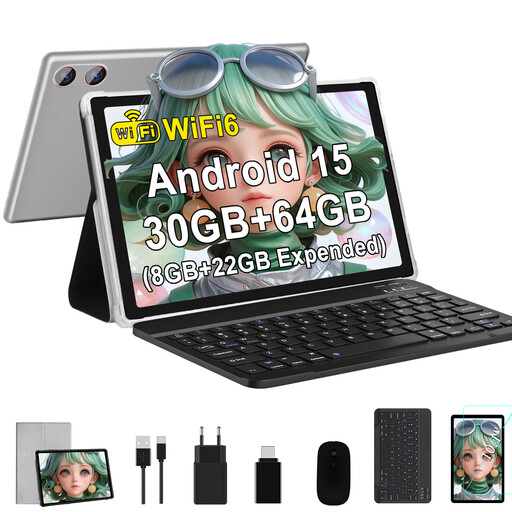
GOODTEL G9, 10.1-inch Android 15 tablet
The 10.1-inch size is an option if you want to browse vocabulary lists on an Android tablet.
IPS display; 1280 × 800 pixels; 64 GB storage.
View at Joybuy
 No image available
TECLAST P50T, 11-inch Android 16 tablet
This 11-inch tablet could work for lists if you’re looking for an Android device with a larger display.
90 Hz IPS display; 128 GB storage.
View at Joybuy
 No image available
iFLYTEK AINOTE 2, 10.65-inch E Ink tablet with protective case
The E Ink display and stated note-taking features could suit text-based reading and handwritten notes. Check how your learning app works on the specific device.
10.65-inch E Ink display; product description states that a stylus is included.
View at Joybuy
 No image available
TECLAST ArtPad Pro, 12.7-inch, 2K, with stylus, protective case and English Bluetooth keyboard
If you want to add vocabulary by hand, the product title says a stylus is included. Also check that the note-taking app you want is suitable.
12.7-inch 2K display; stylus support with 4096 pressure levels; Android 15.
View at Joybuy
Frequently asked questions
Is a tablet without mobile data enough for flashcards at the library?
It depends on your app and the content you’ve prepared. Download a test list and any images or audio files you need in advance, then check that they work offline. This is separate from syncing later. Anki and AnkiDroid describe separate mobile apps and features for syncing and downloading media.
What should I check for handwritten notes?
For the specific model, check which stylus is compatible and confirm what’s included. Then set up the note-taking app you want to use. The Lenovo Idea Tab version described is called ‘+ Pen’, but its product information also says the stylus is optional and sold separately.
What are my rights in Germany if a tablet bought online is faulty?
Your statutory rights against the seller are separate from any voluntary guarantee. If the product is faulty, the first step may be to ask the seller to repair or replace it. For distance purchases, you’ll generally also have a 14-day right to cancel. Verbraucherzentrale explains these rights; the conditions of your specific purchase apply.
Which markings are relevant for a tablet offered for sale in Germany?
The Bundesnetzagentur lists the CE marking, identifiable manufacturer details, German-language instructions and a declaration of conformity among the criteria it checks when monitoring the market. This doesn’t confirm that a specific offer complies with the rules.


