For wired Ethernet alone, a USB-C to RJ45 adapter is suitable, provided your tablet’s port and operating system are explicitly supported. If you want to charge your tablet while working for longer periods or connect other devices at the same time, choose a compatible adapter with charging passthrough or a hub. For a Lightning iPad, you’ll need a solution designed for that connection. A higher rated speed, such as 2.5 Gbit/s, is only relevant if your tablet and the rest of your network support it too; it won’t guarantee the same internet speed.
Who is a wired Ethernet adapter for?
Tablet users unsure about their Ethernet connection
If your tablet doesn’t have an RJ45 port, first check whether it uses USB-C or Lightning and whether its operating system is compatible with the specific adapter model. The different connector types require different solutions.
Tablet users who want to charge while they work
If your tablet needs power while connected by cable, look for charging passthrough or a suitable separate power supply. A simple Ethernet adapter may occupy the port you need.
Tablet users with several devices on their desk
If you want to connect USB devices or a screen as well as Ethernet, a hub may be a better fit than a single-purpose adapter. Even with a hub, check that your tablet supports the functions you need.
What should you look for when buying?
Start by checking the connection and operating system. Then decide whether you want to charge your tablet or connect other devices while using Ethernet. Only then compare the network speed you need.
| What to consider |
What to check before buying |
Who should pay particular attention? |
| Connection and operating system |
Check your tablet model, whether it has a USB-C or Lightning port, and which operating systems are explicitly listed as supported. |
If I want to connect my tablet by cable, the adapter needs to match its connector and operating system. Around 36% of consumers put compatibility first. |
| Charging at the same time |
Check whether the adapter supports charging passthrough, and what power supply and charging capacity your tablet requires. |
If I want to charge my tablet through the same port during longer work sessions, I need the right power supply as well as Ethernet. Around 29% of consumers prioritise charging at the same time. |
| Additional ports |
Choose only the hub ports you need, and check that your tablet supports the display or charging functions you want to use. |
If I want to connect other devices as well as a network cable at my desk, I need the right ports for them. Around 21% of consumers prioritise additional ports. |
| Network speed |
Make sure the rated speed of the adapter, router or switch, and cable meets your actual needs. |
If I want to benefit from a higher network speed, the other devices and connections need to support it too. Around 14% of consumers put speed first. |
Common buying mistakes
-
“It fits USB-C, so Ethernet will work”
A connector that fits doesn’t necessarily mean your tablet’s operating system is supported by the adapter. Supported systems vary from model to model.
Check the adapter’s model number against your tablet’s port and the list of supported operating systems. Don’t assume USB-C, USB-A and Lightning solutions are interchangeable.
-
Using your tablet’s only port for an Ethernet-only adapter
If you need to charge your tablet while it’s connected to the network, a simple adapter may occupy the port you need. Charging passthrough also requires a suitable power supply.
Before buying, decide whether Ethernet alone is enough or whether you’ll need charging and additional ports at the same time. Belkin says the power supply is not included with the USB-C adapter INC019.
You’ll therefore need to arrange a separate power supply for the INC019; Belkin recommends a suitable 65 W charger.
-
Assuming 2.5 Gbit/s on the adapter guarantees the same internet speed
The adapter’s rated speed alone doesn’t determine the speed of your entire connection. Your tablet, network equipment and cable all play a part too.
Before choosing a higher rated speed as a deciding factor, check that every part of your connection supports it and that it meets your actual needs.
A guide to relevant brands
TP-Link
The USB-C to RJ45 models UE310C and UE300C differ in the operating systems they explicitly list as supported.
- TP-Link specifies Gigabit RJ45 for the UE310C and lists iPadOS and Android among its supported systems.
- The German operating system list for the UE300C does not explicitly include iPadOS or Android. Before buying, check with TP-Link Deutschland that it supports your specific tablet.
Belkin
The Ethernet charging solutions mentioned are designed for different tablet connections.
- Belkin describes the USB-C adapter INC019 as offering Power Delivery and Ethernet. For the Lightning solution F8J227, Belkin specifies Ethernet data transfer of up to 180 Mbit/s and power delivery of up to 12 W.
- The INC019 and F8J227 are designed for different connections and are not interchangeable. Belkin recommends a 65 W charger for the INC019, but says it is not included.
Hama
The range includes a USB-C hub with Ethernet and a separate USB-C adapter with a rated speed of 2.5 Gbit/s.
- Hama lists RJ45, USB-A, HDMI and USB-C PD for the hub 00200144.
- Hama lists tablets as a use case for the adapter 00200360, but specifies Windows and macOS under system requirements. This does not confirm support for iPadOS or Android.
UGREEN
A USB-A model featured in the German adapter collection can help you distinguish between USB-A and USB-C solutions.
- UGREEN specifies a speed of up to 100 Mbit/s for this model.
- The USB-A connector won’t fit a USB-C tablet directly. UGREEN also highlights connector, system and network compatibility; this does not mean that all products from the brand have the same speed limit.
Joybuy products for tablets and workspaces
This selection includes USB-C Ethernet adapters and hubs for tablet workspaces. Check each model’s details for operating system, connection and the functions you need.
 No image available
HOCO UA37 Type-C Ethernet Adapter
This adapter may be suitable for wired Ethernet with an Android tablet that has USB-C, provided the device supports OTG.
RJ45; 10/100/1000 Mbit/s; cable 120 ± 5 mm.
View at Joybuy
 No image available
WOZINSKY USB-C Hub 14-in-1
This hub may be a good choice if you need additional workspace connections as well as Ethernet, and your tablet supports the functions you want to use.
Gigabit Ethernet; USB-A, USB-C, HDMI, 3.5 mm audio, SD and TF card reader; Power Delivery; 15 cm cable. Android and iPadOS are listed as compatible systems in the product details.
View at Joybuy
 No image available
D-Link DUB-E130 USB Type-C Network Adapter
This adapter may be suitable for a USB-C tablet only if its operating system and connection are supported; the product name specifies Windows and macOS.
USB 3.0; Ethernet 10/100/1000 Mbit/s.
View at Joybuy
 No image available
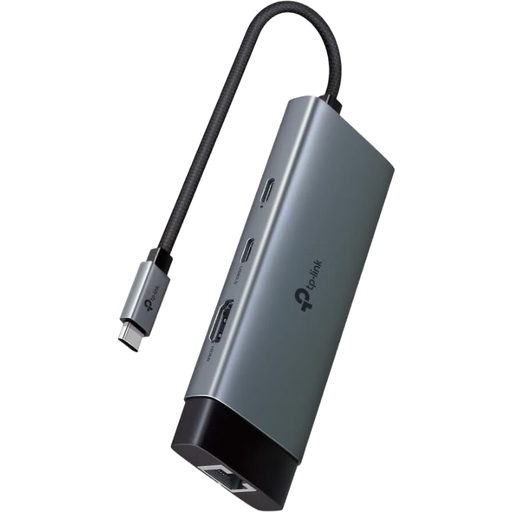
TP-Link UH6120C USB-C Hub, PD100W
For a tablet that needs to connect other devices as well as Ethernet, TP-Link lists iPadOS and Android as supported systems. Check that your specific device supports the hub functions you need too.
Gigabit Ethernet; HDMI 4K 60Hz; 1 USB-C 5Gbps; 2 USB-A 5Gbps; USB-C PD input, PD100W.
View at Joybuy
Frequently asked questions
Does a USB-C port on my tablet confirm compatibility?
No. Also check the operating system or model list for the specific adapter. TP-Link explicitly lists iPadOS and Android for the UE310C; the German operating system list for the UE300C does not explicitly include either.
How do I set up a wired Ethernet connection at my desk?
Connect an adapter that’s suitable for your tablet, then use a network cable to connect its RJ45 port to the relevant router, switch or wall socket. If you can’t establish a connection, first check adapter compatibility, the cable and the network port.
Can I charge my tablet while using wired Ethernet?
Yes, if you use a suitable model and power supply. Belkin describes the USB-C model INC019 as supporting Power Delivery passthrough; Belkin says the power supply is not included. The separate Lightning adapter F8J227 can also supply power to compatible devices.
What are my rights if a product is faulty?
If you buy a faulty product, your statutory rights are against the seller. A manufacturer’s guarantee is separate and voluntary, and comes with its own terms and conditions. The Verbraucherzentrale explains the difference between the two.
What do CE marking and disposal rules mean when buying in Germany?
The European Union explains that CE marking is required only for products covered by relevant harmonised rules. It is not an independent performance test. According to the Umweltbundesamt, discarded electrical equipment must not go in household rubbish; take it to an appropriate collection point instead.


