
Lieferung heute & morgen

Qualitätsgarantie

Willkommens-Angebote freischalten: KOSTENLOSE Lieferung | Bis zu 80 % RABATT | Kostenlose 30-Tage-JoyPlus-Testphase
App herunterladen
The search for a flexible device for university, the home office, or personal use leads many users to a central question: should it be a laptop, or is a tablet with a keyboard enough? For tasks like writing texts, researching online, or streaming media, these tablets offer a lightweight and often more cost-effective alternative. The challenge is finding a model that is not only powerful but also comes as a complete package with the necessary accessories to avoid additional costs.
This article presents a selection of tablets that come with a keyboard as standard. The focus is on the technical specifications and intended use cases to provide you with an informed basis for your decision.
Before you decide on a model, there are several technical features to consider that significantly impact user experience and performance.
The screen size determines how comfortably you can work and consume media. A 10-inch tablet is compact and easy to transport, ideal for taking notes in lectures or for use on the go. A 12-inch tablet or larger, on the other hand, offers more screen real estate, which facilitates multitasking and makes it a more practical tablet as a laptop replacement. Also, pay attention to connectivity: while Wi-Fi is sufficient for home use, a tablet with a SIM card (4G/LTE) offers the freedom to be online even without an available Wi-Fi network—a key advantage for commuters and students.
Memory (RAM) is crucial for smooth performance, especially when multiple applications are open simultaneously. For simple tasks like browsing and emails, 4 GB to 6 GB of RAM is sufficient. If you plan to use your tablet for work or for more demanding apps at university, 8 GB of RAM or more is recommended. Some Android tablet models also offer virtual RAM, which uses a portion of the internal storage as additional memory when needed. An eight-core (octa-core) processor has become the standard for ensuring smooth performance.
Excellent value for money is often reflected in the included accessories. Models that include a tablet with a stylus and a protective case in addition to the keyboard offer more value from the start and save you from purchasing accessories separately. Such a bundle is particularly attractive for budget-conscious buyers looking for an affordable tablet that is ready to use out of the box.
Here is a selection of devices that are well-suited for different user profiles based on their features and technical specifications.
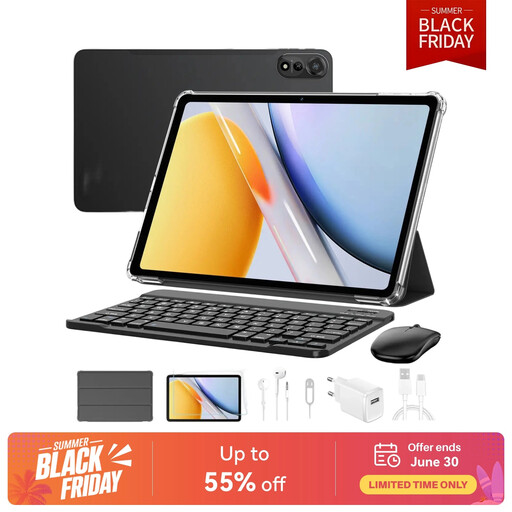
What makes it stand out: The Blackview Mega2 is designed for productivity and entertainment. It combines a large 12-inch display with 2K resolution, ensuring crisp visuals for text and videos. Its standout feature is the generous memory and large battery, all packaged in a complete set.
Pros:
Who is it for? This model is aimed at users looking for a powerful tablet as a laptop replacement. It is ideal for the home office, university studies, or for users who value a large display and long battery life.
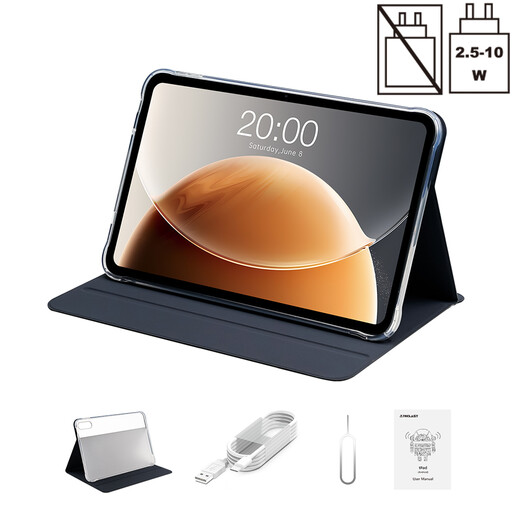
What makes it stand out: The Teclast T65 stands out with its exceptionally large 13.4-inch display featuring a 120 Hz refresh rate. This combination ensures extremely smooth motion rendering, which is particularly noticeable in videos and when scrolling.
Pros:
Who is it for? Users who primarily consume media, browse the internet, or need a device with a very large display for presentations or reading documents will find this to be a suitable model.
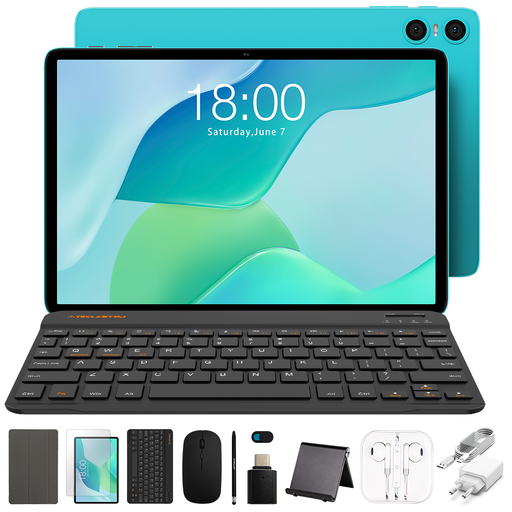
What makes it stand out: The TECLAST P33 is a prime example of an affordable tablet with excellent value for money. It offers a complete starter package in a compact 10.1-inch size, making it a very accessible device for beginners.
Pros:
Who is it for? This set is ideal for school pupils, university students, or casual users looking for an inexpensive and straightforward device for basic tasks. It is a great choice as a first tablet for university or for simple activities around the house.
If none of these models meet your specific needs, you can find a wider selection of devices with different specifications and price points in our Tablet with Stylus and Keyboard category.
For many everyday tasks such as writing emails, creating documents, browsing the internet, and media consumption, a powerful tablet with a keyboard can replace a laptop. It is lighter, more portable, and often more energy-efficient. However, for very computationally intensive applications like professional video editing, complex CAD programs, or high-end gaming, tablets hit their limits. In these cases, a laptop generally remains the more powerful choice.
With a budget tablet, the overall package is crucial. Look for good value for money. Check if the RAM (at least 4 GB recommended) and internal storage are sufficient for your needs. A key advantage is included accessories like a keyboard, stylus, and case, as these keep the initial cost down and make the device ready to use right away.
A tablet with a SIM card (LTE/4G) is a good idea if you are frequently on the go and don't want to depend on public Wi-Fi networks. For students commuting between lecture halls and the library, or for professionals traveling for work, it offers maximum flexibility. Keep in mind that this requires a separate mobile data plan.