
Lieferung heute & morgen

Qualitätsgarantie

Willkommens-Angebote freischalten: KOSTENLOSE Lieferung | Bis zu 80 % RABATT | Kostenlose 30-Tage-JoyPlus-Testphase
App herunterladen
The search for a device that bridges the gap between the portability of a tablet and the functionality of a laptop leads many to a practical solution: a tablet with a keyboard. Whether for university, the mobile office, or simply for comfortable browsing at home, this combination offers remarkable versatility. However, the market is vast, and the options can be overwhelming.
This guide is designed to bring you clarity. We will introduce you to various models and explain the most important criteria, so you can make an informed decision that suits your needs and budget.
Before you choose a model, it's helpful to understand a few key features. These three points are crucial for most users.
Screen size affects both the work experience and portability. A 10-inch tablet with a keyboard or a slightly larger 11-inch model offers a great compromise: it's large enough for editing documents and viewing websites, yet still compact enough to carry in a bag. Besides size, also pay attention to the resolution (Full HD or higher is recommended) and the refresh rate (90 Hz or more ensures a smoother display).
A tablet for work needs enough power to run multiple applications simultaneously. Memory (RAM) is a key indicator here. 6 GB of RAM or more provides a solid foundation for smooth multitasking. The processor determines the device's overall speed. For everyday tasks like email, word processing, and research, modern octa-core processors are typically more than sufficient. Anyone considering a device as a potential laptop replacement should look for more powerful chipsets.
Most versatile and budget-friendly options run on Android. An Android tablet with a keyboard offers access to millions of apps on the Google Play Store and high compatibility with various services. A key advantage is often the included accessories. A bundle that already includes a tablet with a keyboard and stylus provides full functionality for notes, drawings, and precise input right out of the box, with no additional purchases necessary.
Here is a selection of devices that cover different needs—from the all-rounder for daily use to the affordable all-in-one package for beginners.
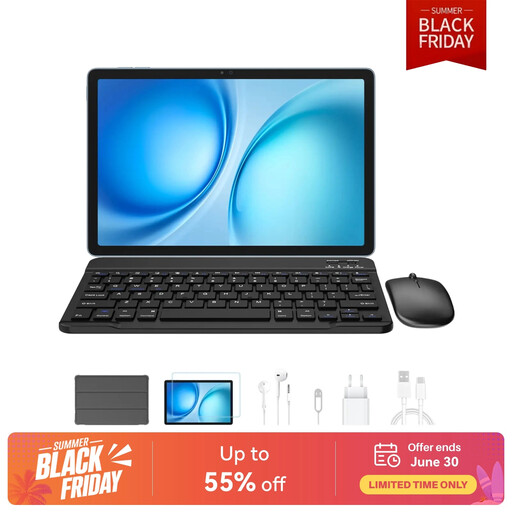
What makes it stand out: The Blackview Zeno 10 is positioned as a versatile all-in-one package. With an 11-inch 2K display and a 90 Hz refresh rate, it delivers sharp and smooth visuals. A standout feature is its connectivity: in addition to Wi-Fi, it also supports Dual SIM 4G and 5G, making it a truly independent on-the-go companion. The integrated PC Mode transforms the user interface into a desktop-like view, further boosting productivity with the docked keyboard.
Pros:
Who is it for? For users looking for a flexible tablet for work who don't want to sacrifice an internet connection on the go. The all-in-one package makes it ideal for professionals and students who prefer a single, comprehensive solution.
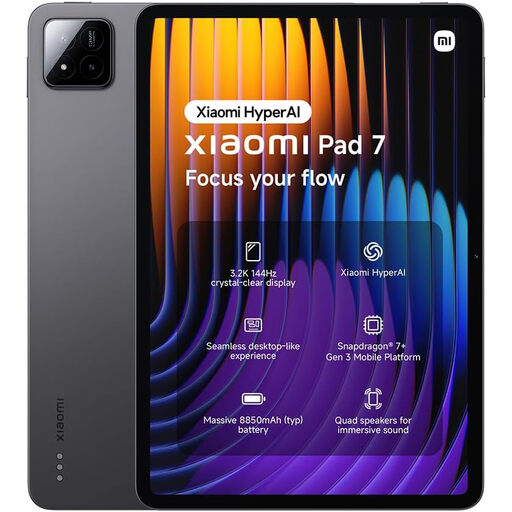
What makes it stand out: The Xiaomi Pad 7 is aimed at users who value high performance and a premium display. Its screen, with a 3.2K resolution and a 144 Hz refresh rate, sets a new standard in this device category and is ideal for media playback and smooth gaming. Powered by the Snapdragon 7+ Gen 3 processor, it offers plenty of performance headroom for demanding applications and can serve as a powerful laptop replacement tablet. The seamless desktop integration and quad-speaker system complete the high-end package.
Pros:
Who is it for? For demanding users who use a tablet not just for work, but also for high-resolution entertainment, gaming, and creative tasks. It's an excellent choice for anyone seeking maximum display quality and performance.
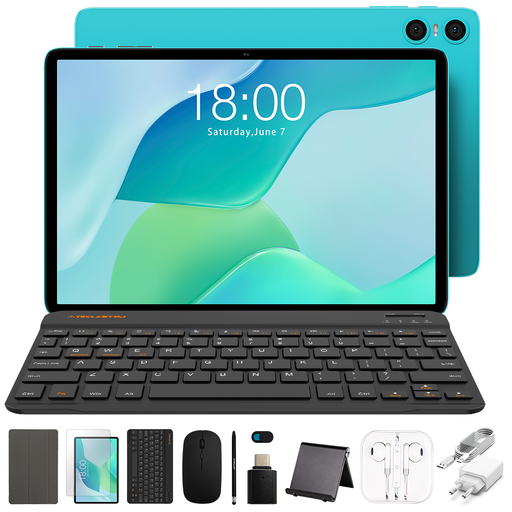
What makes it stand out: The TECLAST P33 is a prime example of a budget-friendly tablet with a keyboard that doesn't compromise on the essentials. It comes as a complete set that includes the tablet, a Bluetooth keyboard, a mouse, and a stylus. With its 10.1-inch display, it is compact and easy to handle. Its performance is tailored for basic productivity and entertainment tasks, making it a very accessible option for beginners.
Pros:
Who is it for? Ideal for school, university students, or casual users on a limited budget. Anyone looking for a simple device for taking notes in class, writing emails, or watching videos will find unbeatable value for money here.
Haven't found the right model for your specific needs yet? The market offers a wide variety of other configurations, display sizes, and brands. To explore the full range and compare different models directly, it's worth taking a look at the complete collection.
Browse our entire selection of tablets with keyboards
For many everyday tasks like word processing, internet research, email communication, and media consumption, a tablet with a keyboard can effectively replace a laptop. It's often lighter, more portable, and offers longer battery life. However, for very computationally intensive applications such as professional video editing, complex spreadsheets, or the use of specialised software, tablets reach their limits. In these cases, a laptop often remains the more powerful choice.
Yes, this combination is especially practical for students. A tablet for university with a stylus allows you to take handwritten notes directly on lecture slides, draw diagrams, and annotate PDF documents. The keyboard makes it easier to write papers and longer texts. It thus combines the advantages of a digital notebook with those of a compact laptop.
An Android tablet with a keyboard is distinguished by its flexibility and open ecosystem. The Google Play Store offers a huge selection of apps for almost any purpose. Additionally, there is a wide range of devices in various price brackets, making it easier to find a budget-friendly tablet with a keyboard that meets your specific needs. The seamless integration with Google services like Drive, Docs, and Gmail is another advantage for many users.