
Lieferung heute & morgen

Qualitätsgarantie

Willkommens-Angebote freischalten: KOSTENLOSE Lieferung | Bis zu 80 % RABATT | Kostenlose 30-Tage-JoyPlus-Testphase
App herunterladen
A tablet with a stylus promises to bridge the gap between digital efficiency and analog creativity. Whether for taking notes at university, sketching in a café, or recording minutes in a meeting—the use cases are diverse. But the market is saturated with options that often promise more than they deliver. Before you make a decision, it's crucial to understand the most common pitfalls that can lead to disappointment and unnecessary expense.
As a Joybuy Product Recommendation Officer, I analyze product data to provide you with objective and practical guidance. This guide will help you separate marketing hype from genuine performance features.
tablet for drawing or for handwritten notes, this effect is distracting and significantly impairs precision.To avoid a bad purchase, you should focus on verifiable technical specifications rather than marketing promises.
The most important rule is: The stylus and the tablet must be considered a single system.
iPad stylus alternative, for example, must be approved for specific iPad generations to function smoothly.E-Ink tablet and offer a very direct writing feel.For an authentic writing and drawing experience, two display properties are crucial:
Define your primary use case. Do you need a versatile tablet for university and leisure that also allows for handwritten notes? Or are you looking for a dedicated digital notepad for meetings that offers weeks of battery life and an eye-friendly display? An E-Ink tablet is optimized for the latter, while a classic LCD or OLED tablet is better suited for media consumption and color drawing.
Here are some product recommendations tailored to specific user profiles and the criteria mentioned above.
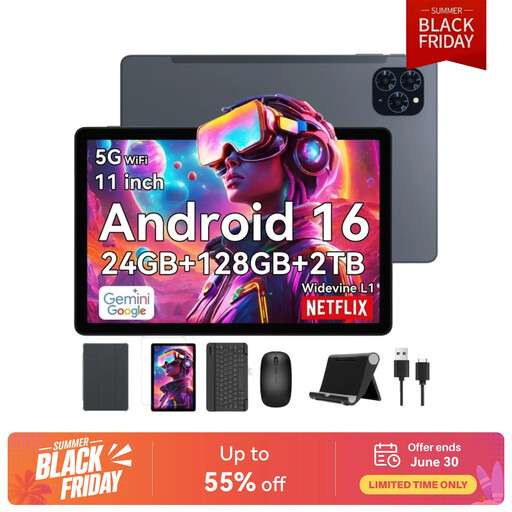
Why This Fits Their Persona: This bundle is a pragmatic solution for anyone seeking a versatile device for university or basic productivity tasks. It combines an Android tablet with the necessary accessories (stylus, keyboard, mouse), eliminating compatibility issues and hidden costs.
It bypasses the "false all-in-one" trap because the included stylus and keyboard are matched to the tablet, providing a ready-to-use solution without requiring additional purchases.
Comprehensive accessory bundle included; Widevine L1 support for HD streaming; large 11-inch display for productive work.

Why This Fits Their Persona: This tablet is aimed at users who need a large, high-resolution display for drawing. It offers technical features typically found in higher price brackets, making it an attractive option for ambitious creatives on a defined budget.
It directly addresses the display trap by combining a 2K display with support for 4096 levels of pressure. The included T-Pen is calibrated for these specifications, enabling precise input.
Supports 4096 levels of pressure for detailed drawing; large 12.7-inch display with 2K resolution; stylus is included in the box.
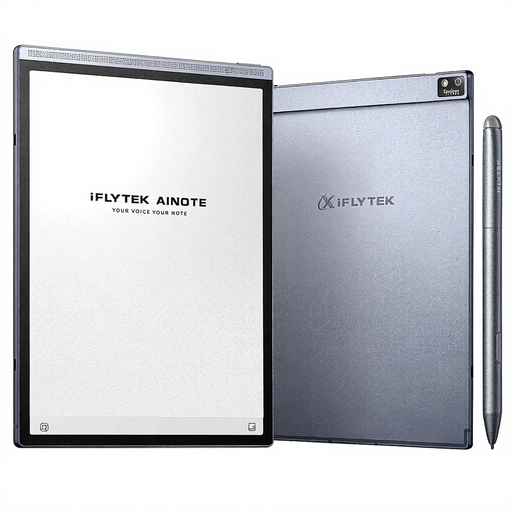
Why This Fits Their Persona: This device is not an all-round tablet but a highly specialized digital notepad. It is designed for users whose priority is capturing, transcribing, and organizing notes in meetings or lectures. The E-Ink display is easy on the eyes and ideal for long reading and writing sessions.
It is a closed ecosystem where hardware and software are perfectly matched. The compatibility trap does not exist here. The paper-like writing feel, thanks to the E-Ink display and special stylus, is the core product feature.
Eye-friendly E-Ink display; long battery life; voice transcription and translation features; paper-like writing feel with 4096 levels of pressure.
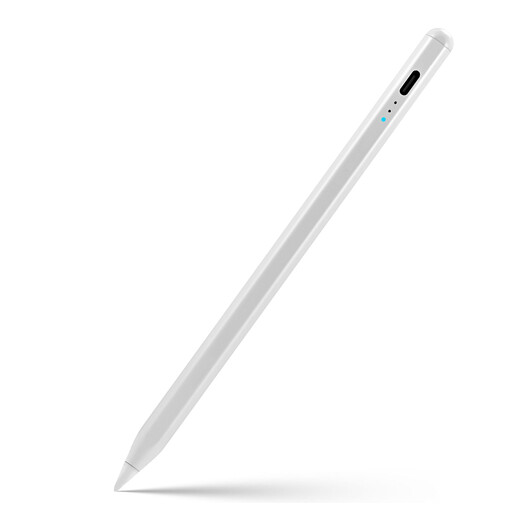
Why This Fits Their Persona: This stylus is designed for iPad owners (2018 models and later) who are looking for a cost-effective alternative to the original product without sacrificing core features like tilt and palm rejection. It offers a pragmatic solution for students and creatives within the Apple ecosystem.
It avoids the compatibility trap by clearly specializing in specific iPad models. The product description lists the supported devices precisely, allowing users to ensure compatibility before purchasing.
Supports Palm Rejection and Tilt Sensitivity; attaches magnetically to the side of the iPad; LED indicator for battery level; no Bluetooth pairing required.
We have compiled a complete, real-time updated list of products that fully meet these strict selection criteria and German safety regulations.
1. Does every universal stylus work with every tablet? No. Simple, passive "universal styluses" only simulate a finger press and work on all capacitive touchscreens, but they offer no precision or special features. Active styluses that enable features like pressure sensitivity or palm rejection are almost always model-specific. Always check the manufacturer's compatibility list before buying.
2. What's the difference between an E-Ink tablet and a regular tablet for writing? An E-Ink tablet (like the iFLYTEK) uses a display that resembles real paper. It is extremely power-efficient, highly readable in sunlight, and easy on the eyes. It is optimized for reading and writing. A regular tablet (with an LCD/OLED screen) has a color, backlit display that is better for videos, games, and color drawings, but it consumes more power and can cause more eye strain during prolonged use.
3. Do I need a tablet with a keyboard for university? A tablet with a keyboard can be very useful for students, as it combines the functionality of a laptop with the portability of a tablet. For taking notes in lectures, writing papers, and conducting research, a physical keyboard is often more efficient than the on-screen keyboard. A bundle that includes both can be a cost-effective initial setup.