For word puzzles on car journeys, a compact tablet of around 8 to 9 inches is the obvious choice if you’ll usually be holding it yourself. For playing together, a model of around 11 inches gives you more screen space, but takes up more room too. Check that the games you want are available in the relevant app store, and try them out offline before you set off. This advice is for passengers: under Section 23(1a) of the German Road Traffic Regulations (StVO), the driver must not play puzzles on a tablet while driving.
Which tablet is right for you?
Passengers playing on their own
If you’ll be holding the tablet yourself for longer stretches and want to store it away easily, consider a compact 8.7-inch model. Lenovo lists the Tab One at around 320 g. Also check that the letters in your puzzle app are large enough to read on the smaller screen.
Passengers playing together
If you’ll be looking at words and clues together, an 11-inch screen gives you more space than an 8.7-inch model, but takes up more room in the car. Samsung and Xiaomi list 11-inch models in their technical specifications.
Passengers without a reliable connection
If you want to keep playing while you’re offline, it depends on the specific game and the content it needs—not just the tablet’s hardware. Install your game in advance and test it in aeroplane mode.
What should you look for when buying?
First, decide whether you’ll usually hold the tablet yourself or whether several passengers will want to look at the same puzzle. Then check that the app you want is available on the specific device and find out whether it works offline.
| What matters to you |
What to check before buying |
Who should consider this? |
| Playing offline |
Check that the game is available in the relevant app store and that the specific game works offline; download any required content in advance. |
If you don’t want to rely on a connection on longer journeys, test the game offline beforehand. Around 31% of consumers put offline use first. |
| Portability |
Compare the screen size and weight of the exact model variant, and check the text size in the app. |
If you’ll usually be holding the tablet yourself and want to store it at your seat, a handy size matters. Around 25% of consumers prioritise this. |
| Readability |
Check the puzzle view and adjustable text size in the specific app; screen size alone doesn’t guarantee that the letters will be easy to read. |
If several passengers will be looking at clues together or you prefer larger text, the available screen space is important. Around 25% of consumers prioritise readability. |
| Choice of apps |
Search for your favourite word games in the device’s app store and check they’re compatible with the exact model variant. |
If you already have particular puzzles in mind, check they’re available before choosing a device. Around 19% of consumers put app choice first. |
Avoid these common selection mistakes
-
Assuming mobile connectivity means a pre-installed game will work offline
Whether a word puzzle works without a connection depends on the specific game and the content it needs. Having connectivity on your tablet doesn’t prove that it will.
Install the games you want and any puzzle packs you need before you set off, then try them in aeroplane mode.
-
Assuming battery figures tell you how long you can play puzzles
Manufacturers’ battery capacity and battery life figures are based on different conditions. Lenovo, for example, quotes battery life for YouTube streaming, not word puzzles.
Charge the tablet before you set off and plan how you’ll recharge it. Only compare battery life figures when the usage and test conditions match.
-
Leaving a tablet unsecured in the car
Loose objects can injure passengers in an accident. The ADAC Foundation recommends securing items safely in the car.
Put the tablet away securely when it’s not in use. If you use a holder, check that it’s suitable for your specific vehicle and tablet.
-
Planning for the driver to use the tablet
Section 23(1a) of the StVO also covers entertainment devices, touchscreens and portable computers. The exceptions in the regulation don’t allow you to play a word puzzle while driving.
Plan to use the tablet as a passenger. The driver should not operate it while the vehicle is moving.
Notable brands and product ranges
Lenovo
The Tab One ZAF00255SE is a compact Android option for passengers who want to hold the tablet themselves.
- Lenovo lists an 8.7-inch screen, a weight of around 320 g and 64 GB of storage for this model.
- The advertised battery life of up to 12.5 hours is for YouTube streaming, not word puzzles. The smaller screen gives you less room to read together.
Samsung
The Galaxy Tab A11 range offers a choice of 8.7-inch and 11-inch screens across the models listed.
- Samsung lists an 8.7-inch screen for the Galaxy Tab A11 and an 11-inch screen for the Galaxy Tab A11+.
- These specifications relate to different models. The 7,040 mAh battery capacity listed for the A11+ is not a measured figure for puzzle-app play time.
Xiaomi
The REDMI Pad 2 is an 11-inch Android option for a larger view of your puzzles.
- Xiaomi lists a resolution of 2,560 × 1,600 pixels and a 9,000 mAh battery for the REDMI Pad 2.
- According to Xiaomi, the device weighs 510 g. Consider its size and weight if you’ll be holding it yourself for a while. Battery capacity figures aren’t directly comparable with battery life tests on other tablets.
Apple
The iPad (A16) is an 11-inch option if the games you want are available for iPadOS, or if you’d also like to use the device beyond car journeys.
- Apple lists 128 to 512 GB of storage for the iPad (A16). According to Apple, the Wi-Fi version weighs 477 g.
- Check that your specific games are available for iPadOS. These technical specifications don’t confirm whether they work offline or how long the battery lasts when playing word puzzles.
Joybuy tablets for word puzzles on the go
This selection mainly includes Android tablets with 11-inch screens, as well as a more compact 8.8-inch model. They’re for passengers who want to look at a puzzle together or hold the device themselves. Check that your games are available and work offline on the model you choose.
 No image available
Samsung Galaxy Tab A11+ X230, 11 inches, 6 GB RAM, 128 GB
The 11-inch screen gives you a larger view when several passengers want to look at the same word puzzle.
The listed version is a Wi-Fi model with 6 GB RAM and 128 GB of storage.
Joybuy
 No image available
GOODTEL G11, Android 15, 11 inches
The 11-inch screen is a larger option if you want to look at a puzzle together.
The product title lists a resolution of 2176 × 1600 pixels, 16 GB RAM (8 GB + 8 GB virtual) and 256 GB ROM.
Joybuy
 No image available
Teclast P50, 11 inches, Android 15, 8 GB RAM, 128 GB
The 11-inch screen gives passengers more room to look at clues together.
The product title lists Android 15, 8 GB RAM, 128 GB of storage and a 7,000 mAh battery. Battery capacity doesn’t tell you exactly how long you can play.
Joybuy
 No image available
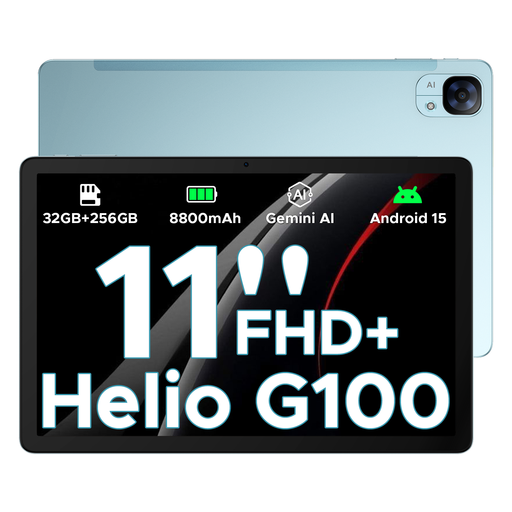
DOOGEE Tab E3, Android 15, 11-inch FHD+, 90 Hz
The 11-inch screen gives several passengers more room to look at the same puzzle.
The product title lists Android 15, an FHD+ screen with 90 Hz and an 8,800 mAh battery. Battery capacity can’t be converted directly into puzzle-playing time.
Joybuy
 No image available
ALLDOCUBE iPlay 70 mini Ultra, 8.8 inches, Android 14
The 8.8-inch screen is a more compact option if you want to hold the tablet yourself while playing.
The product title lists Android 14, 12 GB RAM, 256 GB of storage and a 7,300 mAh battery. According to the title, a power adapter is not included.
Joybuy
Frequently asked questions
Do I need a tablet with mobile connectivity for word games on a car journey?
Not necessarily. What matters is whether the specific game and the content it needs work without a connection. Install it before you set off and try a game in aeroplane mode.
Is an 11-inch tablet better than a compact model for word puzzles in the car?
An 11-inch screen gives you more room if several passengers want to read together; a more compact model is easier to handle if you’ll usually be holding it yourself. Readability also depends on the text size and display settings in the specific app.
How should I plan for battery life and charging on a long journey?
Charge the device before you set off and check the connection type and what’s included with the exact model variant. You can’t convert a mAh figure directly into the battery life of your puzzle app; manufacturers’ battery life figures apply to the usage conditions they specify.
Can the driver play word puzzles on a tablet while driving in Germany?
No. Section 23(1a) of the StVO also covers entertainment devices, touchscreens and portable computers, so playing a word puzzle while driving is not allowed. The regulation includes an exception for a stationary motor vehicle with its engine completely switched off. A stop-start system does not count.
What should I consider if children are playing puzzles in the back seat?
A suitable child seat and seat belt come first; the tablet and holder must not compromise safe travel. The ADAC Foundation recommends securing items safely in the car. If you use a holder, check that it’s suitable for your specific vehicle and tablet.


