What should you look for when buying?
First, compare a typical guide on the screen. Then check how the tablet sits on the table, and make sure it meets your app, file and charging requirements.
| What you need |
What to check when buying |
Who is this important for? |
| Reading text and viewing images |
Open a typical page in the app you plan to use and check the text size, how much you need to zoom, viewing angles and reflections in similar lighting. |
I want to read labels and see illustrations from where I usually sit or stand. Around 31% of consumers put readability first. |
| Working with a stable setup |
Check whether a stand or case is included, fits the exact model and holds it securely in the position you want. |
When I need both hands to work, I want the tablet to stay on the table without having to hold it. Around 25% of consumers prioritise hands-free viewing. |
| Opening your guides |
Check that the required app works on the device’s operating system and open a sample file. If needed, test access without Wi-Fi. |
I need to use a specific workshop app or a file stored on the device. Access to the app and guide comes first for around 19% of consumers. |
| Working without stopping to charge |
Compare battery life claims, including the test conditions, and consider the length of your workshop, screen brightness, charging port and what’s included. |
If there’s no socket available during my workshop, I want to use the guide without an unexpected charging break. Around 13% of consumers prioritise uninterrupted use on the go. |
| Protection from splashes |
Set the device up away from your work area. Check the protection rating for the exact model and take note of the relevant test conditions. |
If liquids or mess are likely to be right next to the device, protection for the specific model matters to me. Around 12% of consumers prioritise splash protection. |
Joybuy products for viewing at the table
This selection includes tablets with a listed screen size suited to viewing workshop guides at the table. Check readability and positioning using your own guide and the specific product offer.
 No image available
Samsung Galaxy Tab A11+ X230, 11-inch, Wi-Fi, 6 GB RAM, 128 GB, Grey
The 11-inch screen gives you space to view guides at the table. Check how readable your actual file is.
The product title lists 6 GB RAM and 128 GB storage. The product description gives an IP52 rating; take note of its splash warning and keep the device away from liquids.
View at Joybuy
 No image available
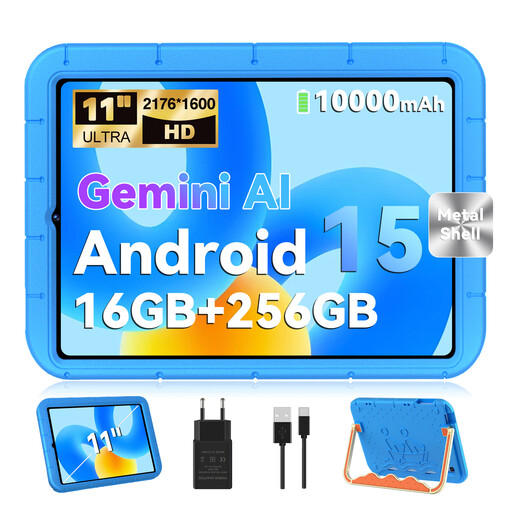
GOODTEL G11, Android 15, 11-inch, with EVA case
The 11-inch screen is one possible size for viewing at the table. Try your guide using your preferred text size.
The title lists 16 GB RAM (8 GB + 8 GB virtual) and 256 GB storage. The product description mentions an EVA case but does not confirm that it functions as a stand.
View at Joybuy
 No image available
UXD 13.4-inch tablet, Android 16, with keyboard, mouse and stylus
The 13.4-inch screen listed in the title gives you plenty of viewing space. Check that the device and its accessories will fit on your table.
The title lists a resolution of 1,920 × 1,200 pixels and 20 GB RAM (8 GB + 12 GB virtual). For storage, it lists 128 GB or 256 GB ROM; check the specific version before buying.
View at Joybuy
 No image available
TECLAST P50T, 11-inch, Android 16, 90 Hz IPS screen
The 11-inch format is worth considering for viewing guides at the table; actual readability depends on your file and viewing settings.
The title lists a 90 Hz IPS screen and 128 GB storage. It does not specify a built-in stand.
View at Joybuy
 No image available
Xiaomi Pad 7, 8 GB RAM, 128 GB, with keyboard, Grey
The product title lists a 3.2K-resolution screen. Check how your workshop guide looks at the viewing size you plan to use.
The product details list 8 GB RAM, 128 GB storage and 144 Hz. They also advise keeping the device away from moisture.
View at Joybuy
Frequently asked questions
Is 8.7 inches enough for my workshop guide?
It may be enough for short steps. If the labels are small or a page contains several images, check the file at your preferred viewing size. Samsung lists an 8.7-inch screen for the Tab A11, while Apple lists an 11-inch screen for the iPad (A16).
Do I need a stand to use a tablet at the kitchen table?
If you want to keep both hands free while you work, a stable setup is important. Check whether a stand or compatible case is included with the specific version you’re buying; Lenovo offers a folio case as a bundle option for the Tab M11.
Can I use workshop guides without Wi-Fi?
That depends on whether the app or file you need allows local access and whether the content is already available on the device. Try opening your actual guide while offline; storage capacity alone doesn’t confirm that this will work.
Does an IP68-rated tablet protect against all liquids during a workshop?
No. Samsung’s IP68 rating for the Galaxy Tab Active5 5G applies to the manufacturer’s stated test conditions using fresh water. It doesn’t automatically apply to other models or other liquids.
What should I know about the power adapter and statutory guarantee?
Check what’s included: Xiaomi notes that the Redmi Pad 2 does not come with a power adapter. Goods bought from a trader in the EU come with a minimum two-year legal guarantee from the date you receive them; this is separate from any additional manufacturer’s warranty.
Can I return a tablet bought online?
For distance purchases from a trader, you generally have a 14-day right to cancel from the date of delivery. There are exceptions, and this right does not apply to private sales. Before buying, also check the details of any return postage costs.


